> ## Documentation Index
> Fetch the complete documentation index at: https://docs.z.ai/llms.txt
> Use this file to discover all available pages before exploring further.
# GLM-Image
## Overview
GLM-Image is Z.AI's new flagship image generation model, which adopts an original hybrid architecture of "autoregressive + diffusion decoder", taking into account both global instruction understanding and local detail portrayal, overcoming the challenges in generating knowledge-intensive scenarios such as posters, PPTs, and science popularization diagrams. It represents an important exploration of the new generation of "cognitive generative" technology paradigm represented by Nano Banana Pro.
\$0.015 / image
Text
Image
Supports 1:1, 3:4, 4:3, 16:9, etc.
**Recommended common resolutions:** 1280×1280, 1568×1056, 1056×1568, 1472×1088, 1088×1472, 1728×960, 960×1728.
**Custom parameters:** Both width and height must be within the range of 512px–2048px, and each must be a multiple of 32.
Please note that the output of the GLM-Image model is an image URL. You need to download the image via the provided URL.
## Usage
It can generate festival posters and commercial promotional images with complete composition, clear visual hierarchy, and prominent overall design sense, support the precise embedding and stable presentation of text content, and is suitable for various commercial scenarios such as brand communication and market promotion.
More adept at creating popular science illustrations and schematic diagrams of principles that include complex logical relationships, process descriptions, and text annotations, capable of clearly and accurately conveying the knowledge structure and core information while ensuring the aesthetic appeal of the visuals.
When generating multi-panel images such as e-commerce display images and story comics, GLM-Image can effectively maintain the consistency of the overall content style and the main subject's image, while significantly improving the accuracy of text generation in multiple locations to ensure content coherence and unified expression.
Suitable for creating social media graphic content with relatively complex cover design and layout structure, it supports flexible typesetting and diverse expression, making the creative process more efficient and the presentation more rich and diverse.
## Resources
* [API Documentation](/api-reference/image/generate-image): Learn how to call the API.
## Introducting GLM-Image
GLM-image is an important exploration of ours in the technological paradigm of "cognitive generative" technology, and it is the first open-source industrial-grade discrete autoregressive image generation model.
GLM-Image introduces a hybrid architecture of "autoregressive + diffusion decoder", integrating a 9B autoregressive model with a 7B DiT diffusion decoder. The former leverages the advantages of its language model base, focusing on enhancing semantic understanding of instructions and global composition of images; the latter, in conjunction with the text encoder of Glyph Encoder, focuses on restoring high-frequency details of images and text strokes, thereby improving the model's "forgetting characters while writing" phenomenon.
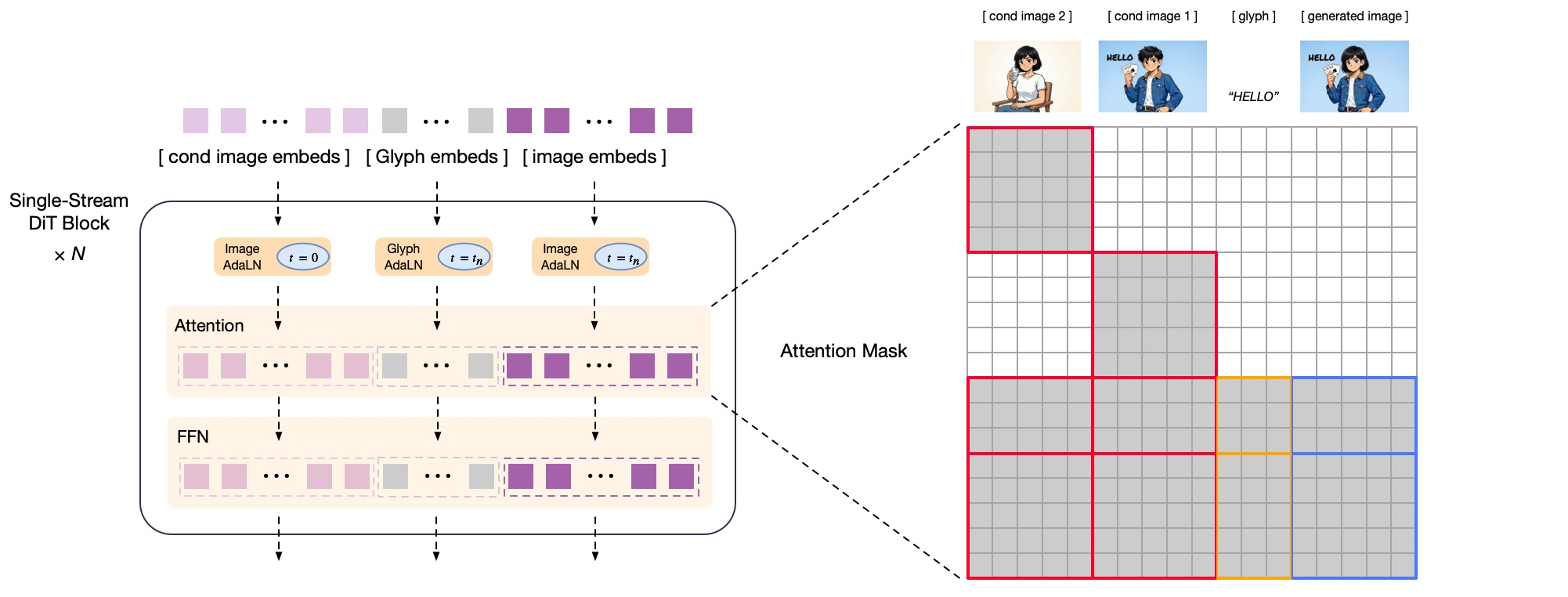
*decoder formulation*
Based on the above architectural innovation, GLM-Image has reached the open-source SOTA level in the authoritative leaderboard for text rendering.
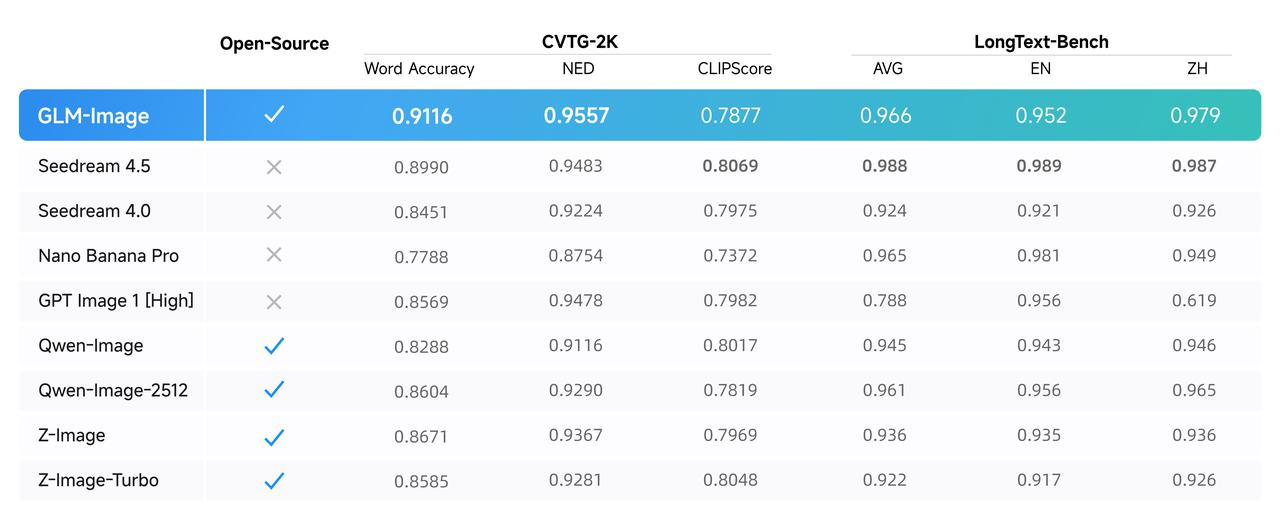
The CVTG-2K (Complex Visual Text Generation) leaderboard primarily evaluates the accuracy of models in simultaneously generating multiple text instances within an image. In terms of multi-region text generation accuracy, GLM-Image ranks first among open-source models, with a Word Accuracy score of 0.9116. On the NED (Normalized Edit Distance) metric, GLM-Image also leads with a score of 0.9557, indicating that the text it generates is highly consistent with the target text, with fewer typos and omissions.
The LongText-Bench (Long Text Rendering) leaderboard evaluates the accuracy of models in rendering long texts and multi-line texts, covering 8 text-intensive scenarios such as signboards, posters, PPTs, dialog boxes, etc., and separately conducts bilingual tests in Chinese and English. GLM-Image ranked first among open-source models with scores of 0.9524 in English and 0.9788 in Chinese.
## Examples
}
>
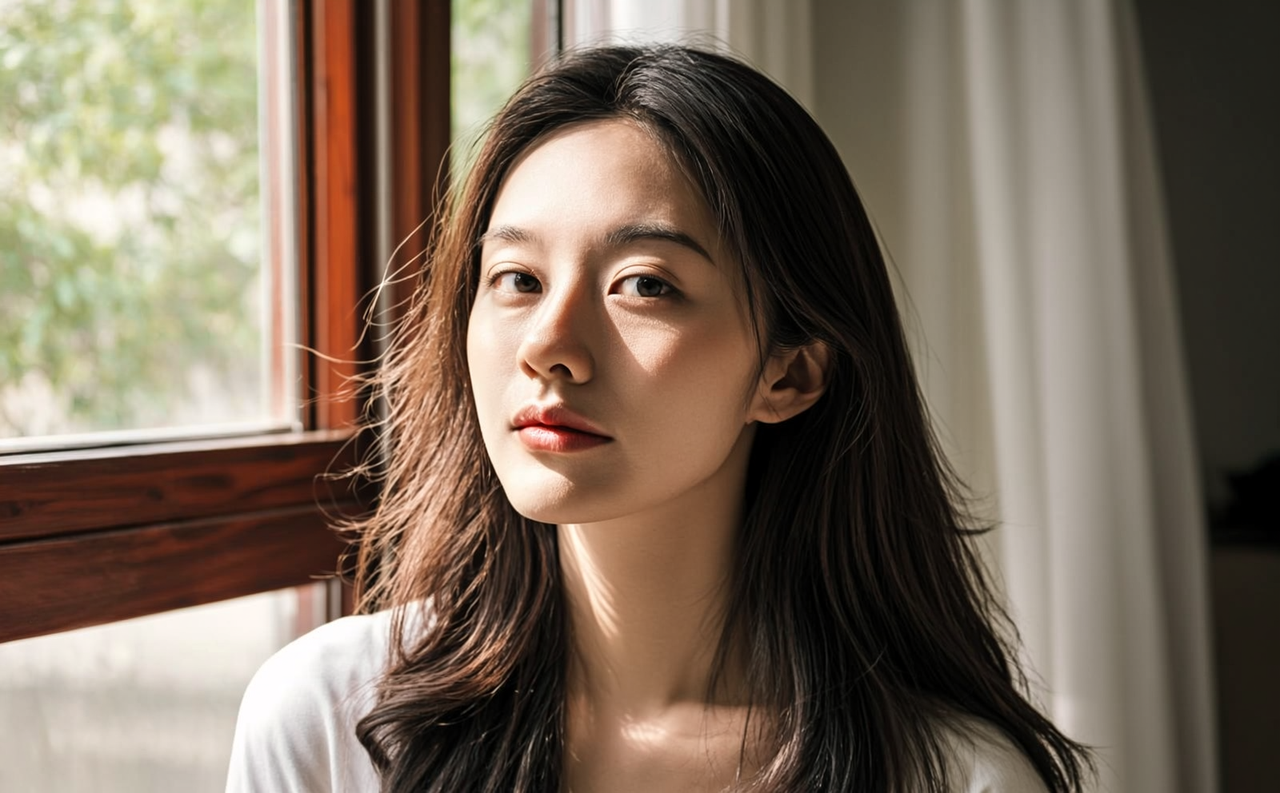
A Hasselblad film–style portrait set in soft indoor lighting. A long-haired
woman stands within gentle shadows, while branches outside the window
sway in the breeze, casting dappled light across her face and shoulders.
Sheer fabric drapes softly in the background, creating a hazy, romantic
atmosphere. Rim lighting outlines her relaxed, natural posture, and her
slightly tousled hair lifts gently in the air, each strand catching
subtle highlights from the sunlight. A close-up composition captures
the moment she gazes deeply into the camera. Her skin appears clear and
finely textured under high exposure and strong light–shadow contrast.
The background is softly blurred, with bloom and diffusion blending into
a dreamy glow. Film-like grain and delicate reflections add richness and
realism, freezing a poetic instant of afternoon light and breeze.
}
>
}
>
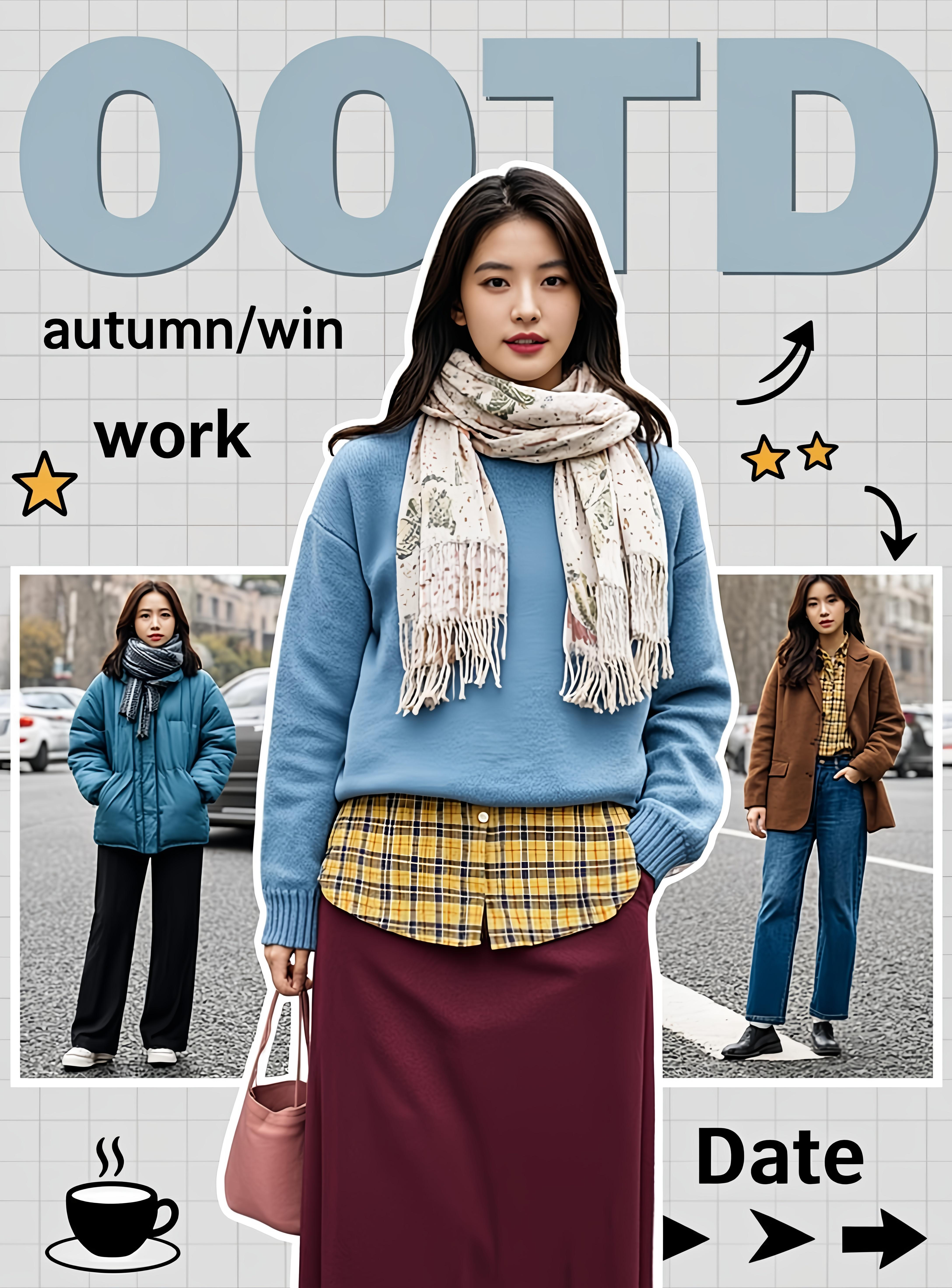
Winter OOTD outfit cover in a retro collage style. The main subject is a
female outfit (light blue loose sweater + yellow plaid inner shirt +
burgundy skirt + pink-and-white patterned scarf + pink-toned handbag),
surrounded by 2–3 smaller images of winter looks from the same series
(such as a blue down jacket with black wide-leg pants, or a brown coat
with navy trousers). The background blends a light gray grid wall with
partial outdoor street scenery. Add large light-blue decorative text
reading “OOTD,” handwritten-style annotations (such as “autumn/win” and
“work/date”), and small embellishments like stars, hand-drawn arrows, a
coffee cup icon, and a play button. The overall color palette is soft and
warm, with layered elements arranged dynamically to create a lively,
winter outfit inspiration vibe.
}
>
}
>
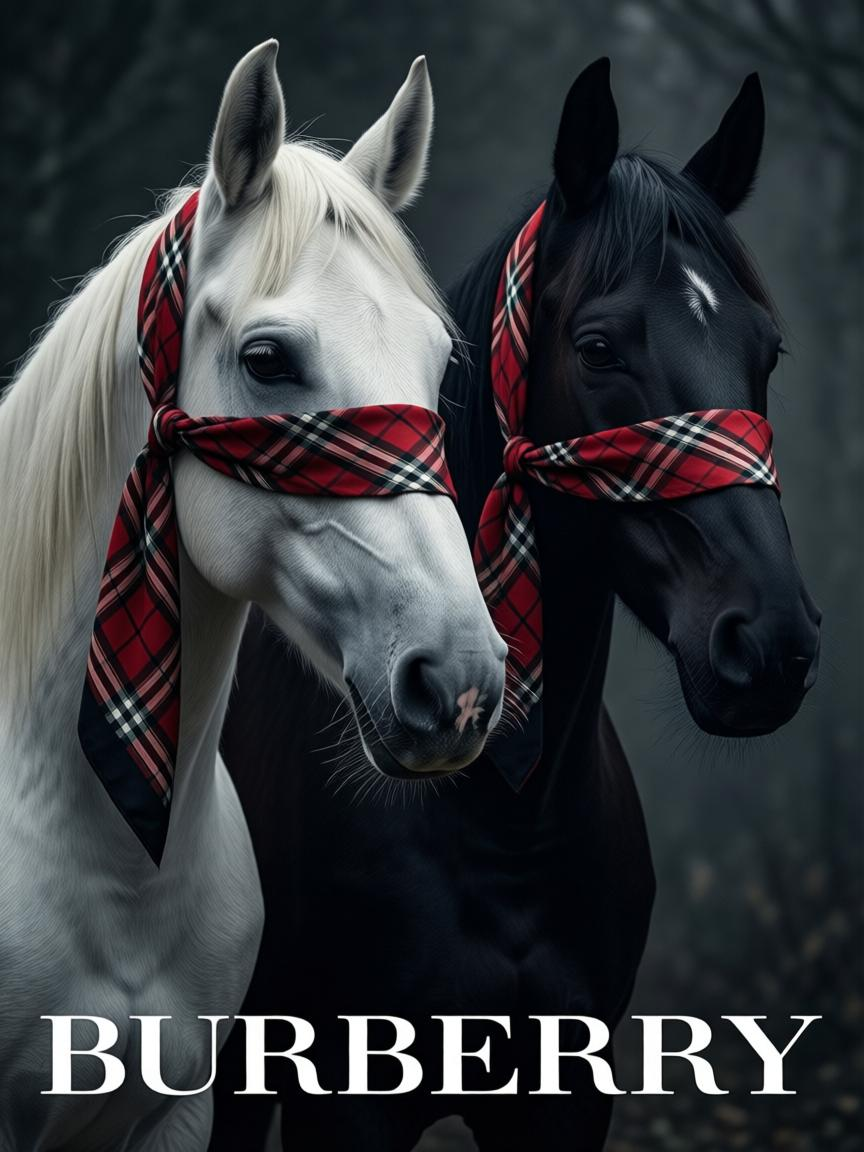
A dark, artistic Burberry brand campaign poster. The overall composition
uses a low-saturation dark gray background, with a color palette centered
on black and white (two horses) and Burberry’s iconic red-and-black plaid
pattern (with white and light brown lines). All text and logos are white.
The main subjects are two highly realistic horses, one pure white on the
left and one pure black on the right, both with their eyes covered by
Burberry’s classic red-and-black plaid silk scarves, rendered with
naturally draping fabric textures. A white Burberry equestrian logo is
placed in the top-right corner, while the bottom features the brand name
“BURBERRY” in large white sans-serif type. Lighting is soft and restrained,
highlighting the fine details of the horses’ coats and the plaid scarf
textures. The overall style conveys a high-end, artistic fashion aesthetic
with a mysterious atmosphere that aligns with the brand’s iconic identity.
}
>
## Quick Start
```bash theme={null}
curl --request POST \
--url https://api.z.ai/api/paas/v4/images/generations \
--header 'Authorization: Bearer ' \
--header 'Content-Type: application/json' \
--data '{
"model": "glm-image",
"prompt": "A cute little kitten sitting on a sunny windowsill, with the background of blue sky and white clouds.",
"size": "1280x1280"
}'
```
**Install SDK**
```bash theme={null}
# Install latest version
pip install zai-sdk
# Or specify version
pip install zai-sdk==0.2.3
```
**Verify Installation**
```python theme={null}
import zai
print(zai.__version__)
```
**Call Example**
```python theme={null}
from zai import ZaiClient
client = ZaiClient(api_key="your-api-key")
response = client.images.generations(
model="glm-image",
prompt="A cute little kitten sitting on a sunny windowsill, with the background of blue sky and white clouds.",
)
print(response.data[0].url)
```
**Install SDK**
**Maven**
```xml theme={null}
ai.z.openapi
zai-sdk
0.3.5
```
**Gradle (Groovy)**
```groovy theme={null}
implementation 'ai.z.openapi:zai-sdk:0.3.5'
```
**Call Example**
```java theme={null}
import ai.z.openapi.ZaiClient;
import ai.z.openapi.core.Constants;
import ai.z.openapi.service.image.CreateImageRequest;
import ai.z.openapi.service.image.ImageResponse;
public class GlmImageExample {
public static void main(String[] args) {
ZaiClient client = ZaiClient.builder().ofZAI().apiKey("YOUR_API_KEY").build();
// Create image generation request
CreateImageRequest request = CreateImageRequest.builder()
.model("glm-image")
.prompt("A cute little kitten sitting on a sunny windowsill, with the background of blue sky and white clouds.")
.size("1280x1280")
.build();
ImageResponse response = client.images().createImage(request);
System.out.println(response.getData());
}
}
```
Please note that the output of the CogView-4 model is an image URL. You will need to download the image using this URL.