> ## Documentation Index
> Fetch the complete documentation index at: https://docs.z.ai/llms.txt
> Use this file to discover all available pages before exploring further.

# GLM-4.5

## <Icon icon="rectangle-list" iconType="solid" color="#ffffff" size={36} />   Overview

GLM-4.5 and GLM-4.5-Air are Z.AI's models, purpose-built as foundational models for agent-oriented applications. Both leverage a Mixture-of-Experts (MoE) architecture. GLM-4.5 has a total parameter count of 355B with 32B active parameters per forward pass, while GLM-4.5-Air adopts a more streamlined design with 106B total parameters and 12B active parameters.

Both models share a similar training pipeline: an initial pretraining phase on 15 trillion tokens of general-domain data, followed by targeted fine-tuning on datasets covering code, reasoning, and agent-specific tasks. The context length has been extended to 128k tokens, and reinforcement learning was applied to further enhance reasoning, coding, and agent performance.

GLM-4.5 and GLM-4.5-Air are optimized for tool invocation, web browsing, software engineering, and front-end development. They can be integrated into code-centric agents such as Claude Code and Roo Code, and also support arbitrary agent applications through tool invocation APIs.

Both models support hybrid reasoning modes, offering two execution modes: Thinking Mode for complex reasoning and tool usage, and Non-Thinking Mode for instant responses. These modes can be toggled via the `thinking.type`parameter (with `enabled` and `disabled` settings), and dynamic thinking is enabled by default.

<CardGroup cols={2}>
  <Card title="Input Modalities" icon="arrow-down-right">
    Text
  </Card>

  <Card title="Output Modalitie" icon="arrow-down-left">
    Text
  </Card>

  <Card title="Context Length" icon="arrow-down-arrow-up" iconType="regular">
    128K
  </Card>

  <Card title="Maximum Output Tokens" icon="maximize" iconType="regular">
    96K
  </Card>
</CardGroup>

## <Icon icon="list-ol" iconType="solid" color="#ffffff" size={36} />   GLM-4.5 Serials

<CardGroup cols={2}>
  <Card>
    <div style={{display: 'flex', gap: '12px', alignItems: 'flex-start'}}>
      <div style={{width: '48px', height: '48px', borderRadius: '12px', background: 'linear-gradient(135deg, #667eea 0%, #764ba2 100%)', display: 'flex', alignItems: 'center', justifyContent: 'center', color: 'white', fontWeight: 'bold', fontSize: '12px', flexShrink: 0}}>GLM</div>

      <div style={{flex: 1}}>
        <h3 style={{margin: '0 0 8px 0', fontSize: '18px', fontWeight: '600', color: 'white'}}>GLM-4.5</h3>
        <p style={{color: '#909090', fontSize: '14px', margin: 0, lineHeight: '1.4'}}>Our most powerful reasoning model, with 355 billion parameters</p>
      </div>
    </div>
  </Card>

  <Card>
    <div style={{display: 'flex', gap: '12px', alignItems: 'flex-start'}}>
      <div style={{width: '48px', height: '48px', borderRadius: '12px', background: 'linear-gradient(135deg, #f093fb 0%, #f5576c 100%)', display: 'flex', alignItems: 'center', justifyContent: 'center', color: 'white', fontWeight: 'bold', fontSize: '11px', flexShrink: 0}}>AIR</div>

      <div style={{flex: 1}}>
        <h3 style={{margin: '0 0 8px 0', fontSize: '18px', fontWeight: '600', color: 'white'}}>GLM-4.5-Air</h3>
        <p style={{color: '#909090', fontSize: '14px', margin: 0, lineHeight: '1.4'}}>Cost-Effective  Lightweight  Strong Performance</p>
      </div>
    </div>
  </Card>

  <Card>
    <div style={{display: 'flex', gap: '12px', alignItems: 'flex-start'}}>
      <div style={{width: '48px', height: '48px', borderRadius: '12px', background: 'linear-gradient(135deg, #4facfe 0%, #00f2fe 100%)', display: 'flex', alignItems: 'center', justifyContent: 'center', color: 'white', fontWeight: 'bold', fontSize: '11px', flexShrink: 0}}>X</div>

      <div style={{flex: 1}}>
        <h3 style={{margin: '0 0 8px 0', fontSize: '18px', fontWeight: '600', color: 'white'}}>GLM-4.5-X</h3>
        <p style={{color: '#909090', fontSize: '14px', margin: 0, lineHeight: '1.4'}}>High Performance  Strong Reasoning  Ultra-Fast Response</p>
      </div>
    </div>
  </Card>

  <Card>
    <div style={{display: 'flex', gap: '12px', alignItems: 'flex-start'}}>
      <div style={{width: '48px', height: '48px', borderRadius: '12px', background: 'linear-gradient(135deg, #fa709a 0%, #fee140 100%)', display: 'flex', alignItems: 'center', justifyContent: 'center', color: 'white', fontWeight: 'bold', fontSize: '10px', flexShrink: 0}}>AirX</div>

      <div style={{flex: 1}}>
        <h3 style={{margin: '0 0 8px 0', fontSize: '18px', fontWeight: '600', color: 'white'}}>GLM-4.5-AirX</h3>
        <p style={{color: '#909090', fontSize: '14px', margin: 0, lineHeight: '1.4'}}>Lightweight  Strong Performance  Ultra-Fast Response</p>
      </div>
    </div>
  </Card>

  <Card>
    <div style={{display: 'flex', gap: '12px', alignItems: 'flex-start'}}>
      <div style={{width: '48px', height: '48px', borderRadius: '12px', background: 'linear-gradient(135deg, #ffecd2 0%, #fcb69f 100%)', display: 'flex', alignItems: 'center', justifyContent: 'center', color: 'white', fontWeight: 'bold', fontSize: '9px', flexShrink: 0}}>FLASH</div>

      <div style={{flex: 1}}>
        <h3 style={{margin: '0 0 8px 0', fontSize: '18px', fontWeight: '600', color: 'white'}}>GLM-4.5-Flash</h3>
        <p style={{color: '#909090', fontSize: '14px', margin: 0, lineHeight: '1.4'}}>Free  Strong Performance  Excellent for Reasoning  Coding & Agents</p>
      </div>
    </div>
  </Card>
</CardGroup>

## <Icon icon="table-cells" iconType="solid" color="#ffffff" size={36} />   Capability

<CardGroup cols={3}>
  <Card title="Deep Thinking" icon="brain" iconType="solid">
    Enable deep thinking mode for more advanced reasoning and analysis
  </Card>

  <Card title="Streaming Output" icon="maximize" iconType="regular">
    Support real-time streaming responses to enhance user interaction experience
  </Card>

  <Card title="Function Call" icon="function" iconType="regular">
    Powerful tool invocation capabilities, enabling integration with various external toolsets
  </Card>

  <Card title="Context Caching" icon="database" iconType="regular">
    Intelligent caching mechanism to optimize performance in long conversations
  </Card>

  <Card title="Structured Output" icon="code" iconType="regular">
    Support for structured output formats like JSON, facilitating system integration
  </Card>
</CardGroup>

## <Icon icon="arrow-down-from-line" iconType="solid" color="#ffffff" size={36} />   Introducing GLM-4.5

### Overview

The first-principle measure of AGI lies in integrating more general intelligence capabilities without compromising existing functions. GLM-4.5 represents our first complete realization of this concept. It combines advanced reasoning, coding, and agent capabilities within a single model, achieving a significant technological breakthrough by natively fusing reasoning, coding, and agent abilities to meet the complex demands of agent-based applications.

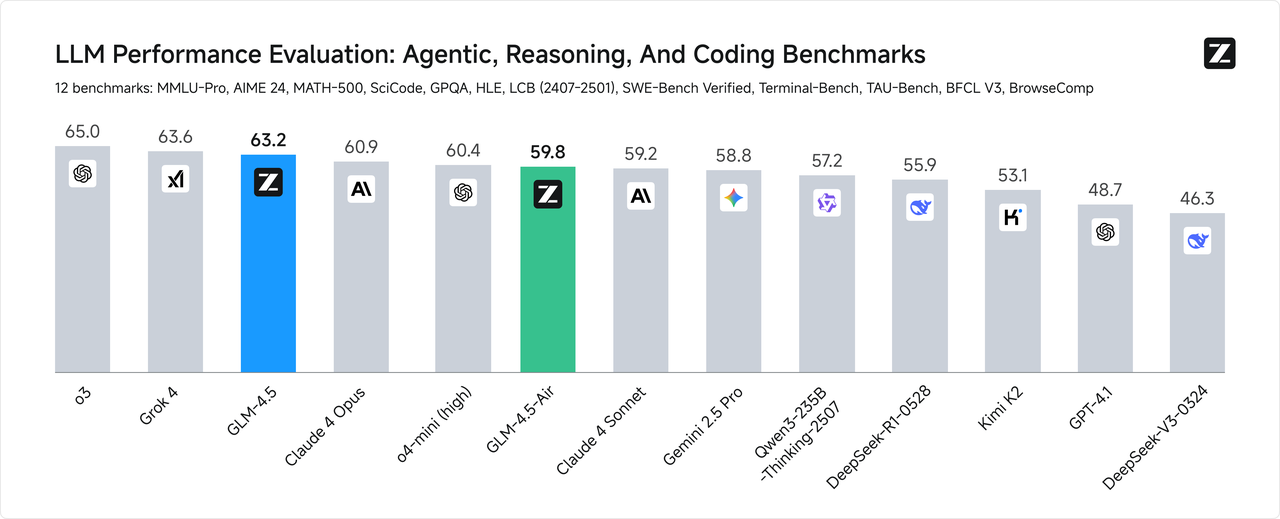
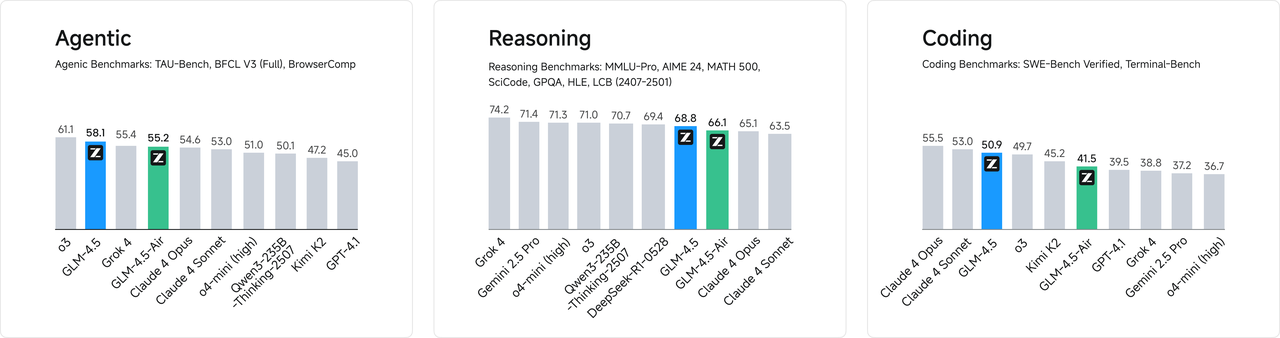
To comprehensively evaluate the model’s general intelligence, we selected 12 of the most representative benchmark suites, including MMLU Pro, AIME24, MATH 500, SciCode, GPQA, HLE, LiveCodeBench, SWE-Bench, Terminal-bench, TAU-Bench, BFCL v3, and BrowseComp. Based on the aggregated average scores, GLM-4.5 ranks second globally among all models, first among domestic models, and first among open-source models.

<img src="https://mintcdn.com/zhipu-32152247/fQm1SxNtD2jBDQ3i/resource/benchmark-0.png?fit=max&auto=format&n=fQm1SxNtD2jBDQ3i&q=85&s=d565bc82527cd77841a018a7e9fe2df0" alt="Description" width="1280" height="519" data-path="resource/benchmark-0.png" />

<img src="https://mintcdn.com/zhipu-32152247/fQm1SxNtD2jBDQ3i/resource/benchmark-1.png?fit=max&auto=format&n=fQm1SxNtD2jBDQ3i&q=85&s=a296f62a9517735d7af5b0580094065b" alt="Description" width="1280" height="338" data-path="resource/benchmark-1.png" />

### **Higher Parameter Efficiency**

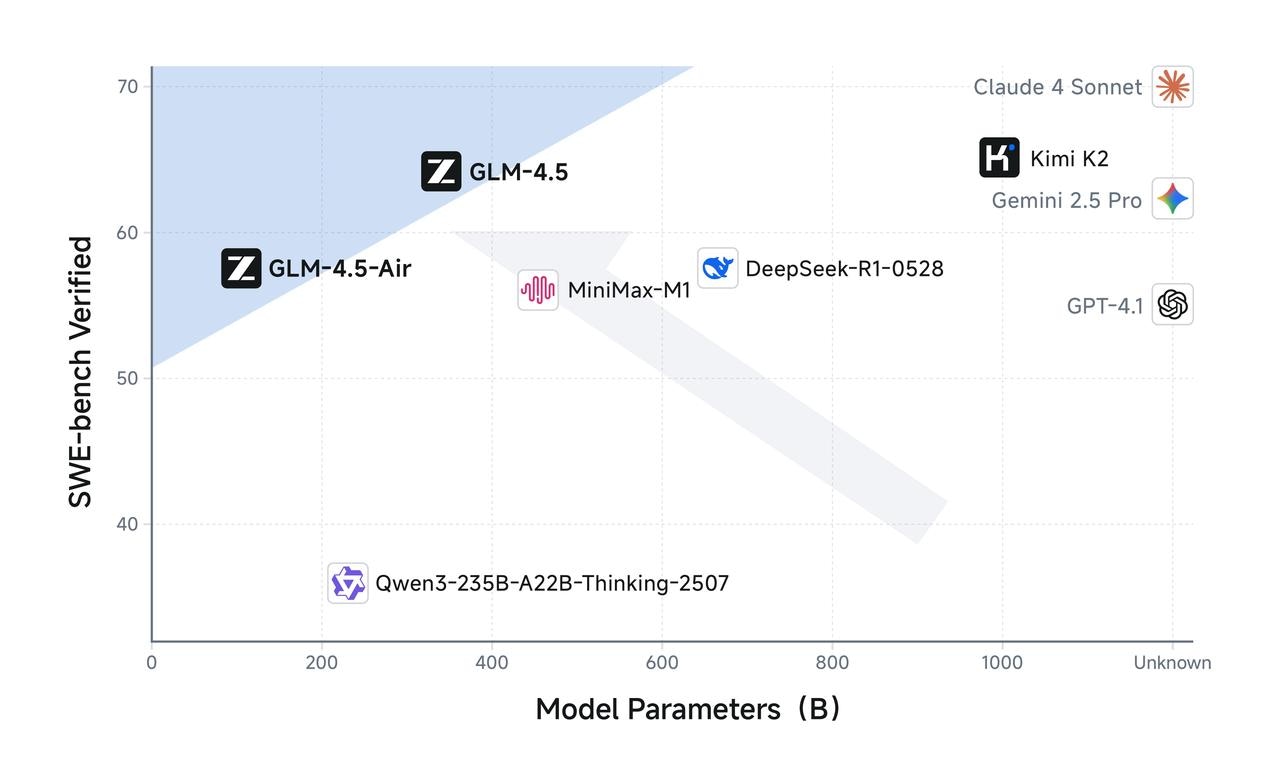
GLM-4.5 has half the number of parameters of DeepSeek-R1 and one-third that of Kimi-K2, yet it outperforms them on multiple standard benchmark tests. This is attributed to the higher parameter efficiency of GLM architecture. Notably, GLM-4.5-Air, with 106 billion total parameters and 12 billion active parameters, achieves a significant breakthrough—surpassing models such as Gemini 2.5 Flash, Qwen3-235B, and Claude 4 Opus on reasoning benchmarks like Artificial Analysis, ranking among the top three domestic models in performance.

On charts such as SWE-Bench Verified, the GLM-4.5 series lies on the Pareto frontier for performance-to-parameter ratio, demonstrating that at the same scale, the GLM-4.5 series delivers optimal performance.
<img src="https://mintcdn.com/zhipu-32152247/fQm1SxNtD2jBDQ3i/resource/benchmark-2.png?fit=max&auto=format&n=fQm1SxNtD2jBDQ3i&q=85&s=0ab97aeb6f7d4cef4e2b33fcb76231b4" alt="Description" width="1280" height="777" data-path="resource/benchmark-2.png" />

### **Low Cost, High Speed**

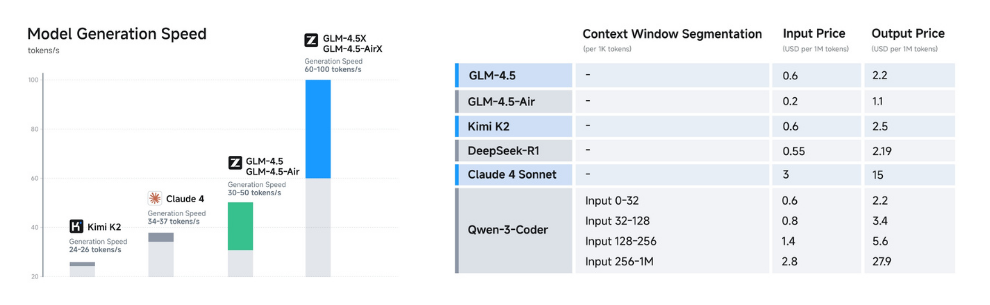
Beyond performance optimization, the GLM-4.5 series also achieves breakthroughs in cost and efficiency, resulting in pricing far lower than mainstream models: API call costs are as low as \$0.2 per million input tokens and \$1.1 per million output tokens.

At the same time, the high-speed version demonstrates a generation speed exceeding 100 tokens per second in real-world tests, supporting low-latency and high-concurrency deployment scenarios—balancing cost-effectiveness with user interaction experience.
<img src="https://mintcdn.com/zhipu-32152247/fQm1SxNtD2jBDQ3i/resource/benchmark2.png?fit=max&auto=format&n=fQm1SxNtD2jBDQ3i&q=85&s=d39c7575956dbe42a1c437e3cf14279f" alt="Description" width="990" height="305" data-path="resource/benchmark2.png" />

### **Real-World Evaluation**

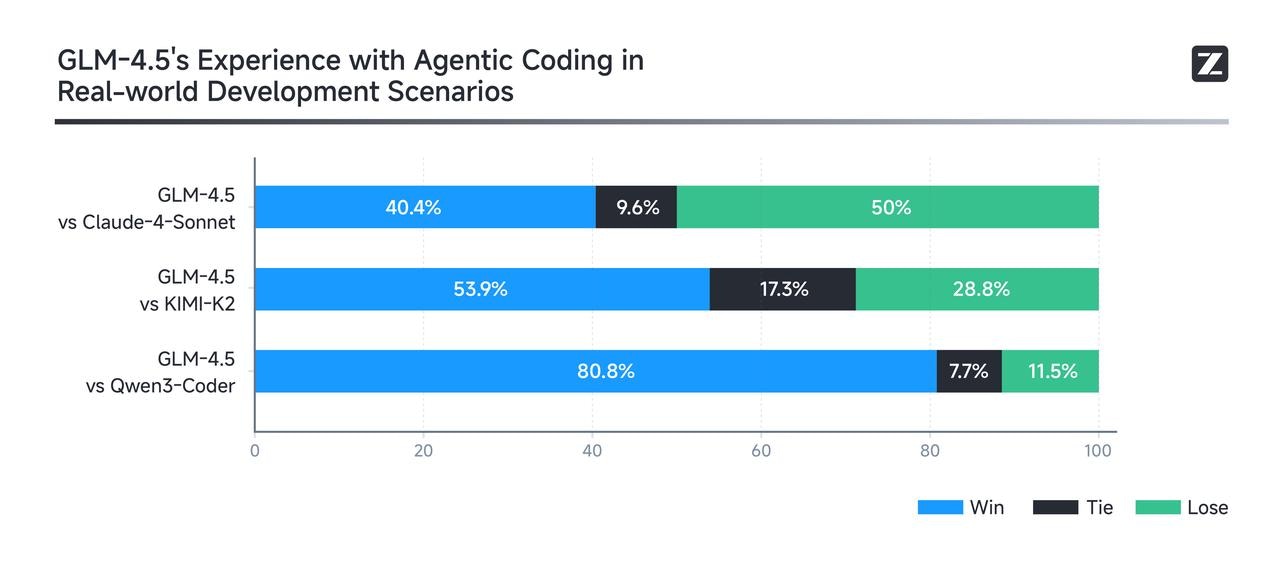
Real-world performance matters more than leaderboard rankings. To evaluate GLM-4.5’s effectiveness in practical Agent Coding scenarios, we integrated it into Claude Code and benchmarked it against Claude 4 Sonnet, Kimi-K2, and Qwen3-Coder.

The evaluation consisted of 52 programming and development tasks spanning six major domains, executed in isolated container environments with multi-turn interaction tests.

As shown in the results (below), GLM-4.5 demonstrates a strong competitive advantage over other open-source models, particularly in tool invocation reliability and task completion rate. While there remains room for improvement compared to Claude 4 Sonnet, GLM-4.5 delivers a largely comparable experience in most scenarios.

To ensure transparency, we have released all [52 test problems along with full agent trajectories](https://huggingface.co/datasets/zai-org/CC-Bench-trajectories) for industry validation and reproducibility.
<img src="https://mintcdn.com/zhipu-32152247/fQm1SxNtD2jBDQ3i/resource/expr1.jpeg?fit=max&auto=format&n=fQm1SxNtD2jBDQ3i&q=85&s=f8b051792b065926cf99bed4648197e0" alt="Description" width="1280" height="564" data-path="resource/expr1.jpeg" />

## <Icon icon="list" iconType="solid" color="#ffffff" size={36} />   Usage

<Tabs>
  <Tab title="Web Development">
    **Core Capability:** <u>Coding Skills</u> → Intelligent code generation | Real-time code completion | Automated bug fixing

    * Supports major languages including Python, JavaScript, and Java.
    * Generates well-structured, scalable, high-quality code based on natural language instructions.
    * Focuses on real-world development needs, avoiding templated or generic outputs.

    **Use Case:** Complete refactoring-level tasks within 1 hour; generate full product prototypes in 5 minutes.

    <video src="https://cdn.bigmodel.cn/agent-demos/lark/113123.mov" controls />
  </Tab>

  <Tab title="AI Assistant">
    **Core Capabilities:** <u>Agent Abilities</u> → Autonomous task planning | Multi-tool orchestration | Dynamic environment interaction

    * Automatically decomposes complex tasks into clear, executable step-by-step plans.
    * Flexibly invokes development tools to complete coding, debugging, and validation in a one-stop workflow.
    * Dynamically adjusts strategies based on real-time feedback, quickly adapting to task changes and continuously optimizing execution paths.

    **Use Case:** In multi-module collaborative development projects, delivery cycles were shortened by 40%, and manpower investment was reduced by approximately 30%.

    <video src="https://cdn.bigmodel.cn/agent-demos/lark/113115.mov" controls />
  </Tab>

  <Tab title="Smart Office">
    **Core Capability:** <u>PPT Creation</u> → Clear logic | Complete content | Effective visual presentation

    * **Content Expansion by Theme:** Generates multi-slide PPT content from a single title or central concept.
    * **Logical Structure Organization:** Automatically segments content into introduction, body, and conclusion modules with well-organized semantic flow.
    * **Slide Layout Suggestions:** Works with template systems to recommend optimal presentation styles for the generated content.

    **Use Case:** Suitable for office automation platforms, AI presentation tools, and other productivity-focused products.
  </Tab>

  <Tab title="Intelligent Question Answering">
    **Core Capability:** <u>Model reasoning power</u> → Precise instruction parsing | Multi-turn logical reasoning | Domain knowledge integration

    * **Deep Natural Language Understanding** – Accurately interprets natural language instructions, extracts key intents, and converts them into executable tasks.
    * **Complex Multi-Turn Reasoning** – Supports multi-step logical reasoning chains, efficiently handling composite problems involving cross-step dependencies and multiple variables.
    * **Domain Knowledge Fusion** – Integrates domain-specific expertise with contextual information to enhance reasoning accuracy and output stability.

    **Use Case:** In complex business workflows, accuracy improves by *60%*, and reasoning efficiency improves by *70%*.
  </Tab>

  <Tab title="Complex Text Translation">
    **Core Capabilities:** <u>Translation Proficiency</u> → Strong contextual consistency | Accurate style preservation | Excellent handling of long passages

    * **Long, Complex Sentence Translation:** Maintains semantic coherence and structural accuracy, ideal for policy and academic materials.
    * **Style Retention and Adaptation:** Preserves the original tone or adapts to the target language’s commonly used expression style during translation.
    * **Support for Low-Resource Languages and Informal Contexts:** Preliminary coverage of 26 languages, with capabilities to translate social and informal texts.

    **Use Cases:** Suitable for publishing house translations, content localization for overseas markets, cross-border customer service, and social media platforms.
  </Tab>

  <Tab title="Content Creation">
    **Core Capability:** <u>Creative Writing</u> → Natural expression | Rich emotion | Complete structure

    * Generates coherent literary texts with clear narrative flow based on given themes, characters, or worldviews.
    * Produces emotionally engaging copy tailored to audience profiles and product characteristics.
    * Supports short videos and new media scripts aligned with platforms like Douyin and Xiaohongshu, integrating emotion control and narrative pacing.

    **Use Case:** Ideal for deployment in content creation platforms, marketing toolchains, or AI writing assistants to enhance content production efficiency and personalization.
  </Tab>

  <Tab title="Virtual Characters">
    **Core Capability:** <u>Humanized Expression</u> → Natural tone | Accurate emotional conveyance | Consistent character behavior

    * **Role-Playing Dialogue System:** Maintains consistent tone and behavior of the designated character across multi-turn conversations.
    * **Emotionally Rich Copywriting:** Delivers warm, relatable expressions suitable for building “humanized” brands or companion-style user products.
    * **Virtual Persona Content Creation:** Supports generation of content aligned with virtual streamers or character IPs, including social posts and fan interactions.

    **Use Case:** Ideal for virtual humans, social AI, and brand personification operations.
  </Tab>
</Tabs>

## <Icon icon="bars-sort" iconType="solid" color="#ffffff" size={36} />   Resources

* [API Documentation](/api-reference/llm/chat-completion): Learn how to call the API.

## <Icon icon="rectangle-code" iconType="solid" color="#ffffff" size={36} />    Quick Start

### Thinking Mode

GLM-4.5 offers a “Deep Thinking Mode” that users can enable or disable by setting the `thinking.type` parameter. This parameter supports two values: `enabled` (enabled) and `disabled` (disabled). By default, dynamic thinking is enabled.

* **Simple Tasks (No Thinking Required):** For straightforward requests that do not require complex reasoning (e.g., fact retrieval or classification), thinking is unnecessary. Examples include:
  * When was Z.AI founded?
  * Translate the sentence “I love you” into Chinese.
* **Moderate Tasks (Default/Some Thinking Required):** Many common requests require stepwise processing or deeper understanding. The GLM-4.5 series can flexibly apply thinking capabilities to handle tasks such as:
  * Why does Jupiter have more moons than Saturn, despite Saturn being larger?
  * Compare the advantages and disadvantages of flying versus taking the high-speed train from Beijing to Shanghai.

**Difficult Tasks (Maximum Thinking Capacity):** For truly complex challenges—such as solving advanced math problems, network-related questions, or coding issues—these tasks require the model to fully engage its reasoning and planning abilities, often involving many internal steps before arriving at an answer. Examples include:

* Explain in detail how different experts in a Mixture-of-Experts (MoE) model collaborate.
* Based on the recent week’s fluctuations of the Shanghai Composite Index and current political information, should I invest in a stock index ETF? Why?

### Samples Code

<Tabs>
  <Tab title="cURL">
    **Basic Call**

    ```bash theme={null}
    curl -X POST "https://api.z.ai/api/paas/v4/chat/completions" \
      -H "Content-Type: application/json" \
      -H "Authorization: Bearer your-api-key" \
      -d '{
        "model": "glm-4.5",
        "messages": [
          {
            "role": "user",
            "content": "As a marketing expert, please create an attractive slogan for my product."
          },
          {
            "role": "assistant",
            "content": "Sure, to craft a compelling slogan, please tell me more about your product."
          },
          {
            "role": "user",
            "content": "Z.AI Open Platform"
          }
        ],
        "thinking": {
          "type": "enabled"
        },
        "max_tokens": 4096,
        "temperature": 0.6
      }'
    ```

    **Streaming Call**

    ```bash theme={null}
    curl -X POST "https://api.z.ai/api/paas/v4/chat/completions" \
      -H "Content-Type: application/json" \
      -H "Authorization: Bearer your-api-key" \
      -d '{
        "model": "glm-4.5",
        "messages": [
          {
            "role": "user",
            "content": "As a marketing expert, please create an attractive slogan for my product."
          },
          {
            "role": "assistant",
            "content": "Sure, to craft a compelling slogan, please tell me more about your product."
          },
          {
            "role": "user",
            "content": "Z.AI Open Platform"
          }
        ],
        "thinking": {
          "type": "enabled"
        },
        "stream": true,
        "max_tokens": 4096,
        "temperature": 0.6
      }'
    ```
  </Tab>

  <Tab title="Official Python SDK">
    **Install SDK**

    ```bash theme={null}
    # Install latest version
    pip install zai-sdk

    # Or specify version
    pip install zai-sdk==0.2.2
    ```

    **Verify Installation**

    ```python theme={null}
    import zai
    print(zai.__version__)
    ```

    **Basic Call**

    ```python theme={null}
    from zai import ZaiClient

    client = ZaiClient(api_key="your-api-key")  # Your API Key

    response = client.chat.completions.create(
        model="glm-4.5",
        messages=[
            {"role": "user", "content": "As a marketing expert, please create an attractive slogan for my product."},
            {"role": "assistant", "content": "Sure, to craft a compelling slogan, please tell me more about your product."},
            {"role": "user", "content": "Z.AI Open Platform"}
        ],
        thinking={
            "type": "enabled",
        },
        max_tokens=4096,
        temperature=0.6
    )

    # Get complete response
    print(response.choices[0].message)
    ```

    **Streaming Call**

    ```python theme={null}
    from zai import ZaiClient

    client = ZaiClient(api_key="your-api-key")  # Your API Key

    response = client.chat.completions.create(
        model="glm-4.5",
        messages=[
            {"role": "user", "content": "As a marketing expert, please create an attractive slogan for my product."},
            {"role": "assistant", "content": "Sure, to craft a compelling slogan, please tell me more about your product."},
            {"role": "user", "content": "Z.AI Open Platform"}
        ],
        thinking={
            "type": "enabled",    # Optional: "disabled" or "enabled", default is "enabled"
        },
        stream=True,
        max_tokens=4096,
        temperature=0.6
    )

    # Stream response
    for chunk in response:
        if chunk.choices[0].delta.reasoning_content:
            print(chunk.choices[0].delta.reasoning_content, end='', flush=True)

        if chunk.choices[0].delta.content:
            print(chunk.choices[0].delta.content, end='', flush=True)
    ```
  </Tab>

  <Tab title="Official Java SDK">
    **Install SDK**

    **Maven**

    ```xml theme={null}
    <dependency>
        <groupId>ai.z.openapi</groupId>
        <artifactId>zai-sdk</artifactId>
        <version>0.3.3</version>
    </dependency>
    ```

    **Gradle (Groovy)**

    ```groovy theme={null}
    implementation 'ai.z.openapi:zai-sdk:0.3.3'
    ```

    **Basic Call**

    ```java theme={null}
    import ai.z.openapi.ZaiClient;
    import ai.z.openapi.service.model.ChatCompletionCreateParams;
    import ai.z.openapi.service.model.ChatCompletionResponse;
    import ai.z.openapi.service.model.ChatMessage;
    import ai.z.openapi.service.model.ChatMessageRole;
    import ai.z.openapi.service.model.ChatThinking;
    import java.util.Arrays;

    public class BasicChat {
        public static void main(String[] args) {
            // Initialize client
            ZaiClient client = ZaiClient.builder().ofZAI()
                .apiKey("your-api-key")
                .build();

            // Create chat completion request
            ChatCompletionCreateParams request = ChatCompletionCreateParams.builder()
                .model("glm-4.5")
                .messages(Arrays.asList(
                    ChatMessage.builder()
                        .role(ChatMessageRole.USER.value())
                        .content("As a marketing expert, please create an attractive slogan for my product.")
                        .build(),
                    ChatMessage.builder()
                        .role(ChatMessageRole.ASSISTANT.value())
                        .content("Sure, to craft a compelling slogan, please tell me more about your product.")
                        .build(),
                    ChatMessage.builder()
                        .role(ChatMessageRole.USER.value())
                        .content("Z.AI Open Platform")
                        .build()
                ))
                .thinking(ChatThinking.builder().type("enabled").build())
                .maxTokens(4096)
                .temperature(0.6f)
                .build();

            // Send request
            ChatCompletionResponse response = client.chat().createChatCompletion(request);

            // Get response
            if (response.isSuccess()) {
                Object reply = response.getData().getChoices().get(0).getMessage();
                System.out.println("AI Response: " + reply);
            } else {
                System.err.println("Error: " + response.getMsg());
            }
        }
    }
    ```

    **Streaming Call**

    ```java theme={null}
    import ai.z.openapi.ZaiClient;
    import ai.z.openapi.service.model.ChatCompletionCreateParams;
    import ai.z.openapi.service.model.ChatCompletionResponse;
    import ai.z.openapi.service.model.ChatMessage;
    import ai.z.openapi.service.model.ChatMessageRole;
    import ai.z.openapi.service.model.ChatThinking;
    import ai.z.openapi.service.model.Delta;
    import java.util.Arrays;

    public class StreamingChat {
        public static void main(String[] args) {
            // Initialize client
            ZaiClient client = ZaiClient.builder().ofZAI()
                .apiKey("your-api-key")
                .build();

            // Create streaming chat completion request
            ChatCompletionCreateParams request = ChatCompletionCreateParams.builder()
                .model("glm-4.5")
                .messages(Arrays.asList(
                    ChatMessage.builder()
                        .role(ChatMessageRole.USER.value())
                        .content("As a marketing expert, please create an attractive slogan for my product.")
                        .build(),
                    ChatMessage.builder()
                        .role(ChatMessageRole.ASSISTANT.value())
                        .content("Sure, to craft a compelling slogan, please tell me more about your product.")
                        .build(),
                    ChatMessage.builder()
                        .role(ChatMessageRole.USER.value())
                        .content("Z.AI Open Platform")
                        .build()
                ))
                .thinking(ChatThinking.builder().type("enabled").build())
                .stream(true)  // Enable streaming output
                .maxTokens(4096)
                .temperature(0.6f)
                .build();

            ChatCompletionResponse response = client.chat().createChatCompletion(request);

            if (response.isSuccess()) {
                response.getFlowable().subscribe(
                    // Process streaming message data
                    data -> {
                        if (data.getChoices() != null && !data.getChoices().isEmpty()) {
                            Delta delta = data.getChoices().get(0).getDelta();
                            System.out.print(delta + "\n");
                        }},
                    // Process streaming response error
                    error -> System.err.println("\nStream error: " + error.getMessage()),
                    // Process streaming response completion event
                    () -> System.out.println("\nStreaming response completed")
                );
            } else {
                System.err.println("Error: " + response.getMsg());
            }
        }
    }
    ```
  </Tab>

  <Tab title="OpenAI Python SDK">
    **Install SDK**

    ```bash theme={null}
    # Install or upgrade to latest version
    pip install --upgrade 'openai>=1.0'
    ```

    **Verify Installation**

    ```python theme={null}
    python -c "import openai; print(openai.__version__)"
    ```

    **Usage Example**

    ```python theme={null}
    from openai import OpenAI

    client = OpenAI(
        api_key="your-Z.AI-api-key",
        base_url="https://api.z.ai/api/paas/v4/"
    )

    completion = client.chat.completions.create(
        model="glm-4.5",
        messages=[
            {"role": "system", "content": "You are a smart and creative novelist"},
            {"role": "user", "content": "Please write a short fairy tale story as a fairy tale master"}
        ]
    )

    print(completion.choices[0].message.content)
    ```
  </Tab>
</Tabs>