> ## Documentation Index
> Fetch the complete documentation index at: https://docs.z.ai/llms.txt
> Use this file to discover all available pages before exploring further.
# GLM-4.6
## Overview
GLM-4.6 achieves comprehensive enhancements across multiple domains, including real-world coding, long-context processing, reasoning, searching, writing, and agentic applications. Details are as follows:
* **Longer context window**: The context window has been expanded from 128K to 200K tokens, enabling the model to handle more complex agentic tasks.
* **Superior coding performance**: The model achieves higher scores on code benchmarks and demonstrates better real-world performance in applications such as Claude Code、Cline、Roo Code and Kilo Code, including improvements in generating visually polished front-end pages.
* **Advanced reasoning**: GLM-4.6 shows a clear improvement in reasoning performance and supports tool use during inference, leading to stronger overall capability.
* **More capable agents**: GLM-4.6 exhibits stronger performance in tool use and search-based agents, and integrates more effectively within agent frameworks.
* **Refined writing**: Better aligns with human preferences in style and readability, and performs more naturally in role-playing scenarios.
Text
Text
200K
128K
## Introducing GLM-4.6
### 1. Comprehensive Evaluation
In evaluations across 8 authoritative benchmarks for general model capabilities—including AIME 25, GPQA, LCB v6, HLE, and SWE-Bench Verified—GLM-4.6 achieves performance on par with Claude Sonnet 4/Claude Sonnet 4.6 on several leaderboards, solidifying its position as the top model developed in China. 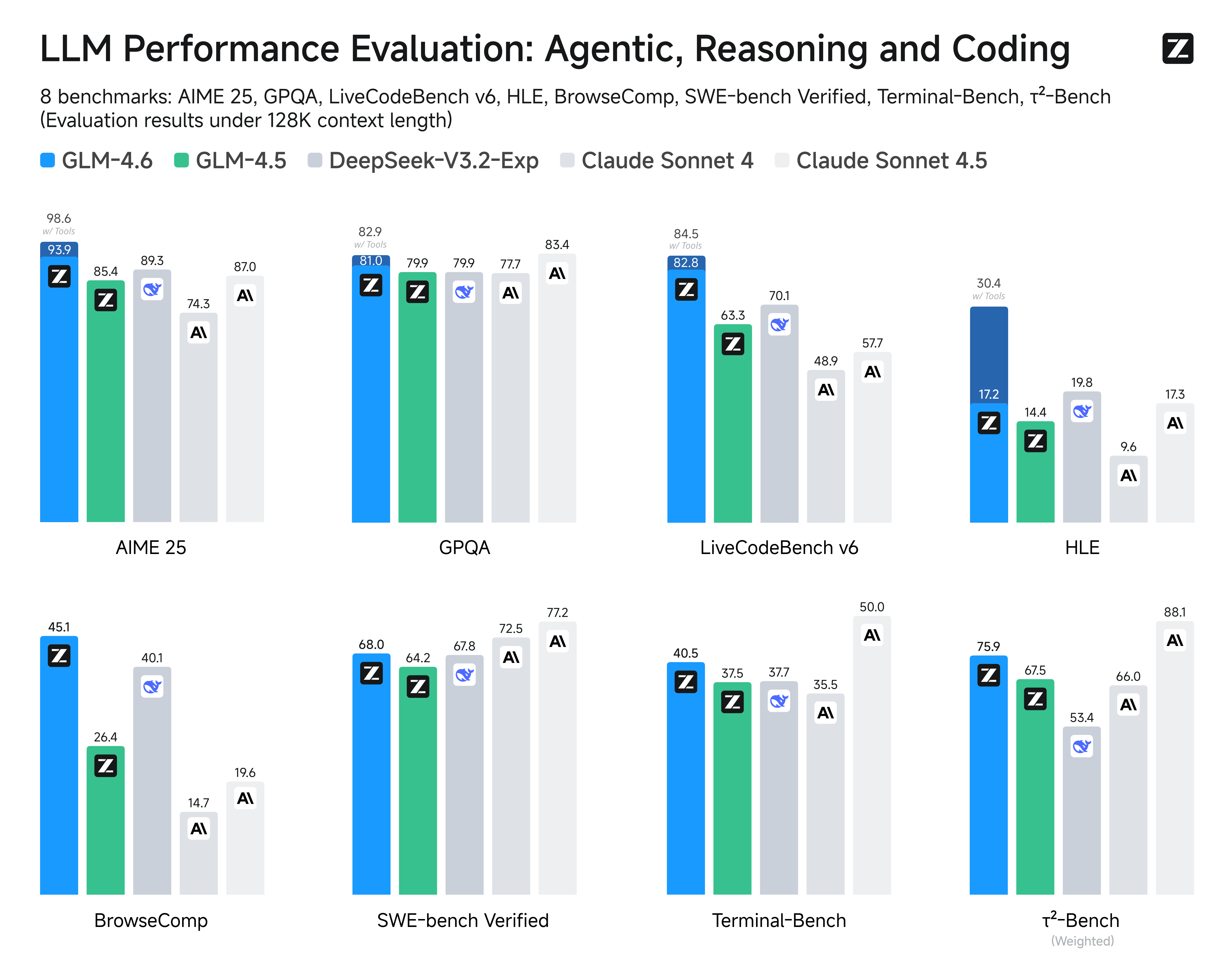 ### 2. Real-World Coding Evaluation
To better test the model's capabilities in practical coding tasks, we conducted 74 real-world coding tests within the Claude Code environment. The results show that GLM-4.6 surpasses Claude Sonnet 4 and other domestic models in these real-world tests.
### 2. Real-World Coding Evaluation
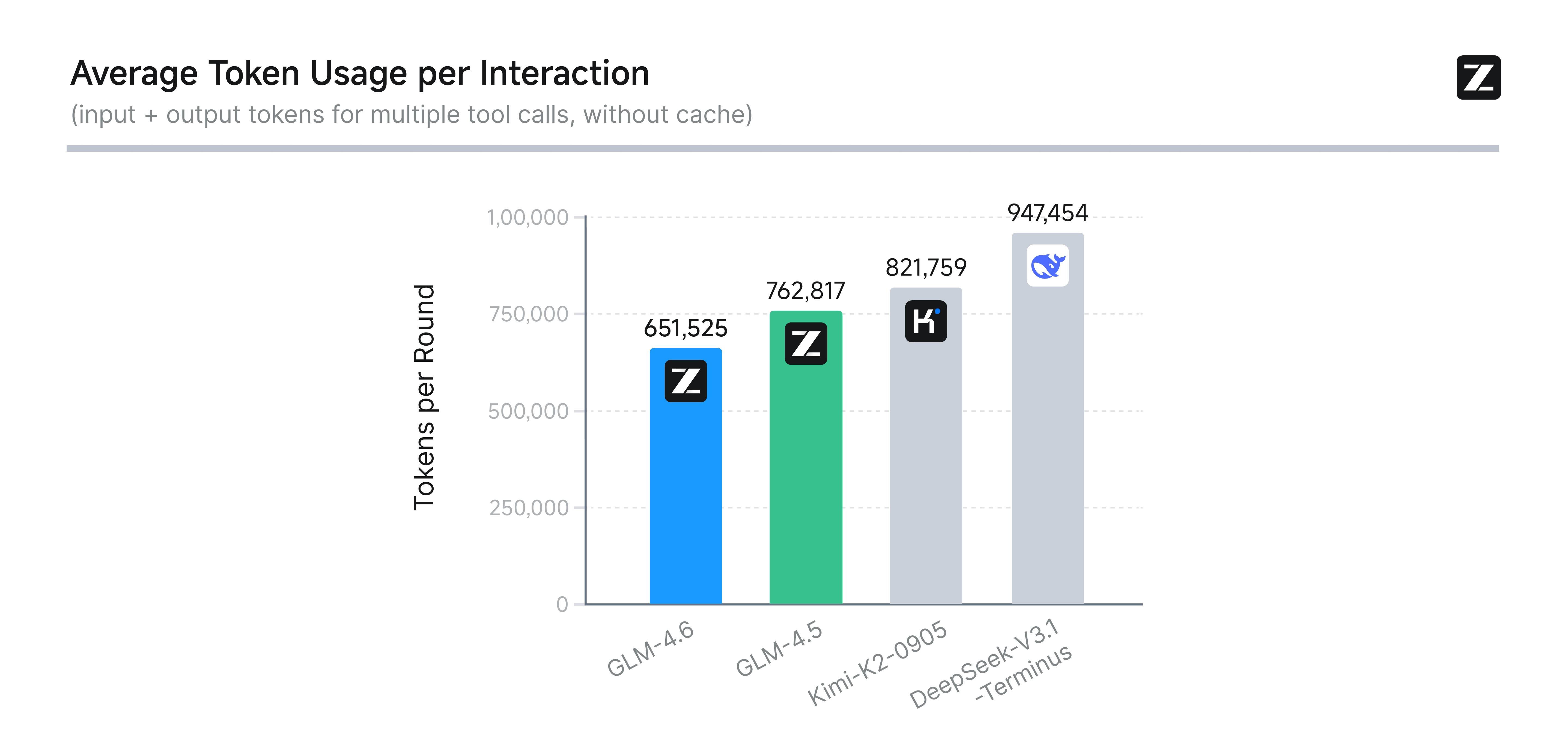
To better test the model's capabilities in practical coding tasks, we conducted 74 real-world coding tests within the Claude Code environment. The results show that GLM-4.6 surpasses Claude Sonnet 4 and other domestic models in these real-world tests. 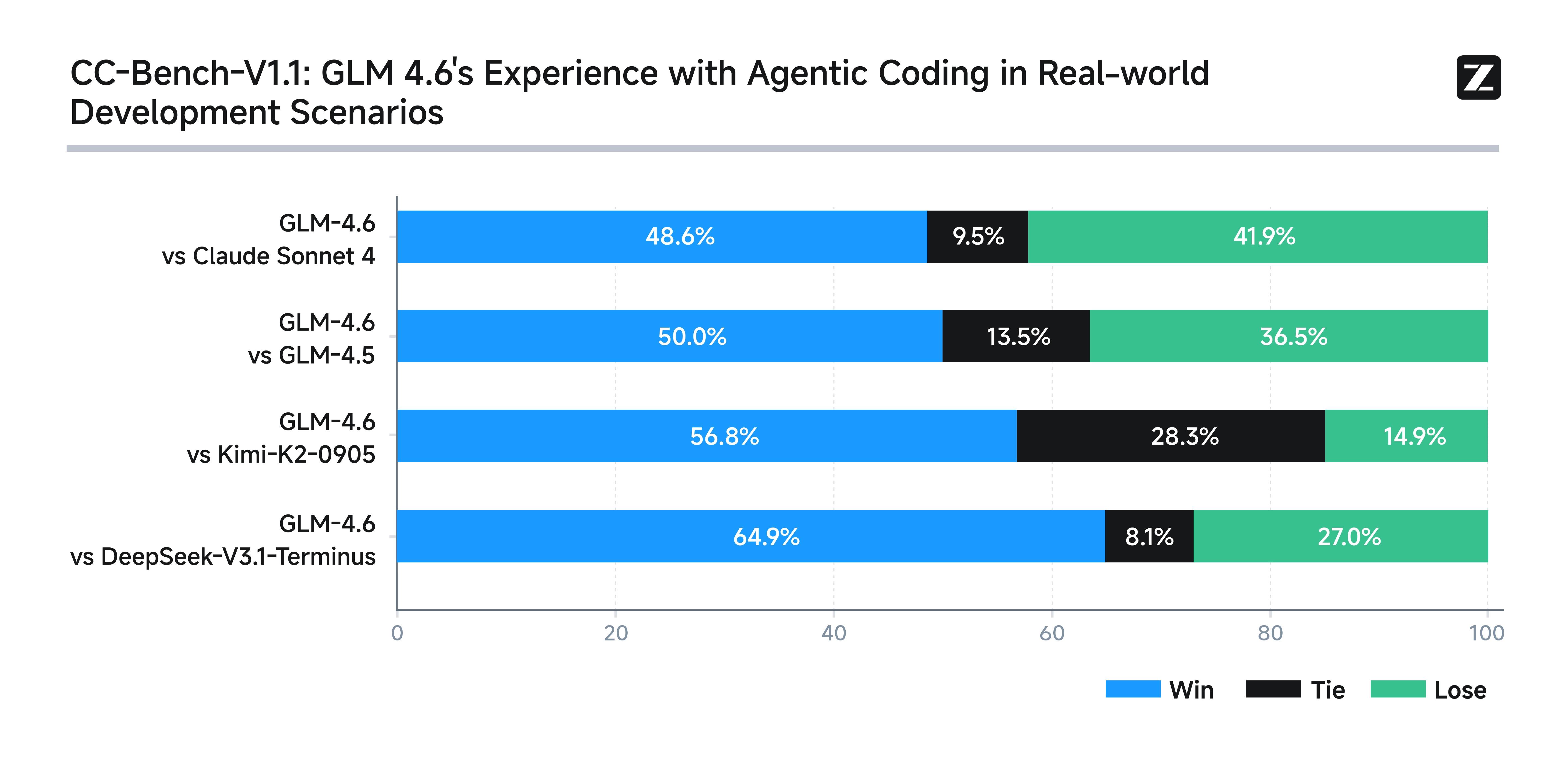 In terms of average token consumption, GLM-4.6 is over 30% more efficient than GLM-4.5, achieving the lowest consumption rate among comparable models.
  To ensure transparency and credibility, Z.ai has publicly released all test questions and agent trajectories for verification and reproduction. (Link: [https://huggingface.co/datasets/zai-org/CC-Bench-trajectories](https://huggingface.co/datasets/zai-org/CC-Bench-trajectories)).
## Usage
Supports mainstream languages including Python, JavaScript, and Java, delivering superior aesthetics and logical layout in frontend code. Natively handles diverse agent tasks with enhanced autonomous planning and tool invocation capabilities. Excels in task decomposition, cross-tool collaboration, and dynamic adjustments, enabling flexible adaptation to complex development or office workflows.
Significantly enhances presentation quality in PowerPoint creation and office automation scenarios. Generates aesthetically advanced layouts with clear logical structures while preserving content integrity and expression accuracy, making it ideal for office automation systems and AI presentation tools.
Translation quality for minor languages (French, Russian, Japanese, Korean) and informal contexts has been further optimized, making it particularly suitable for social media, e-commerce content, and short drama translations. It maintains semantic coherence and stylistic consistency in lengthy passages while achieving superior style adaptation and localized expression, meeting the diverse needs of global enterprises and cross-border services.
Supports diverse content production including novels, scripts, and copywriting, achieving more natural expression through contextual expansion and emotional regulation.
Maintains consistent tone and behavior across multi-turn conversations, ideal for virtual humans, social AI, and brand personification operations, making interactions warmer and more authentic.
Enhances user intent understanding, tool retrieval, and result integration. Not only does it return more precise search results, but it also deeply synthesizes outcomes to support Deep Research scenarios, delivering more insightful answers to users.
## Resources
* [API Documentation](/api-reference/llm/chat-completion): Learn how to call the API.
## Quick Start
The following is a full sample code to help you onboard GLM-4.6 with ease.
**Basic Call**
```bash theme={null}
curl -X POST "https://api.z.ai/api/paas/v4/chat/completions" \
-H "Content-Type: application/json" \
-H "Authorization: Bearer your-api-key" \
-d '{
"model": "glm-4.6",
"messages": [
{
"role": "user",
"content": "As a marketing expert, please create an attractive slogan for my product."
},
{
"role": "assistant",
"content": "Sure, to craft a compelling slogan, please tell me more about your product."
},
{
"role": "user",
"content": "Z.AI Open Platform"
}
],
"thinking": {
"type": "enabled"
},
"max_tokens": 4096,
"temperature": 1.0
}'
```
**Streaming Call**
```bash theme={null}
curl -X POST "https://api.z.ai/api/paas/v4/chat/completions" \
-H "Content-Type: application/json" \
-H "Authorization: Bearer your-api-key" \
-d '{
"model": "glm-4.6",
"messages": [
{
"role": "user",
"content": "As a marketing expert, please create an attractive slogan for my product."
},
{
"role": "assistant",
"content": "Sure, to craft a compelling slogan, please tell me more about your product."
},
{
"role": "user",
"content": "Z.AI Open Platform"
}
],
"thinking": {
"type": "enabled"
},
"stream": true,
"max_tokens": 4096,
"temperature": 1.0
}'
```
**Install SDK**
```bash theme={null}
# Install latest version
pip install zai-sdk
# Or specify version
pip install zai-sdk==0.2.3
```
**Verify Installation**
```python theme={null}
import zai
print(zai.__version__)
```
**Basic Call**
```python theme={null}
from zai import ZaiClient
client = ZaiClient(api_key="your-api-key") # Your API Key
response = client.chat.completions.create(
model="glm-4.6",
messages=[
{"role": "user", "content": "As a marketing expert, please create an attractive slogan for my product."},
{"role": "assistant", "content": "Sure, to craft a compelling slogan, please tell me more about your product."},
{"role": "user", "content": "Z.AI Open Platform"}
],
thinking={
"type": "enabled",
},
max_tokens=4096,
temperature=1.0
)
# Get complete response
print(response.choices[0].message)
```
**Streaming Call**
```python theme={null}
from zai import ZaiClient
client = ZaiClient(api_key="your-api-key") # Your API Key
response = client.chat.completions.create(
model="glm-4.6",
messages=[
{"role": "user", "content": "As a marketing expert, please create an attractive slogan for my product."},
{"role": "assistant", "content": "Sure, to craft a compelling slogan, please tell me more about your product."},
{"role": "user", "content": "Z.AI Open Platform"}
],
thinking={
"type": "enabled", # Optional: "disabled" or "enabled", default is "enabled"
},
stream=True,
max_tokens=4096,
temperature=0.6
)
# Stream response
for chunk in response:
if chunk.choices[0].delta.reasoning_content:
print(chunk.choices[0].delta.reasoning_content, end='', flush=True)
if chunk.choices[0].delta.content:
print(chunk.choices[0].delta.content, end='', flush=True)
```
**Install SDK**
**Maven**
```xml theme={null}
ai.z.openapi
zai-sdk
0.3.5
```
**Gradle (Groovy)**
```groovy theme={null}
implementation 'ai.z.openapi:zai-sdk:0.3.5'
```
**Basic Call**
```java theme={null}
import ai.z.openapi.ZaiClient;
import ai.z.openapi.service.model.ChatCompletionCreateParams;
import ai.z.openapi.service.model.ChatCompletionResponse;
import ai.z.openapi.service.model.ChatMessage;
import ai.z.openapi.service.model.ChatMessageRole;
import ai.z.openapi.service.model.ChatThinking;
import java.util.Arrays;
public class BasicChat {
public static void main(String[] args) {
// Initialize client
ZaiClient client = ZaiClient.builder().ofZAI()
.apiKey("your-api-key")
.build();
// Create chat completion request
ChatCompletionCreateParams request = ChatCompletionCreateParams.builder()
.model("glm-4.6")
.messages(Arrays.asList(
ChatMessage.builder()
.role(ChatMessageRole.USER.value())
.content("As a marketing expert, please create an attractive slogan for my product.")
.build(),
ChatMessage.builder()
.role(ChatMessageRole.ASSISTANT.value())
.content("Sure, to craft a compelling slogan, please tell me more about your product.")
.build(),
ChatMessage.builder()
.role(ChatMessageRole.USER.value())
.content("Z.AI Open Platform")
.build()
))
.thinking(ChatThinking.builder().type("enabled").build())
.maxTokens(4096)
.temperature(1.0f)
.build();
// Send request
ChatCompletionResponse response = client.chat().createChatCompletion(request);
// Get response
if (response.isSuccess()) {
Object reply = response.getData().getChoices().get(0).getMessage();
System.out.println("AI Response: " + reply);
} else {
System.err.println("Error: " + response.getMsg());
}
}
}
```
**Streaming Call**
```java theme={null}
import ai.z.openapi.ZaiClient;
import ai.z.openapi.service.model.ChatCompletionCreateParams;
import ai.z.openapi.service.model.ChatCompletionResponse;
import ai.z.openapi.service.model.ChatMessage;
import ai.z.openapi.service.model.ChatMessageRole;
import ai.z.openapi.service.model.ChatThinking;
import ai.z.openapi.service.model.Delta;
import java.util.Arrays;
public class StreamingChat {
public static void main(String[] args) {
// Initialize client
ZaiClient client = ZaiClient.builder().ofZAI()
.apiKey("your-api-key")
.build();
// Create streaming chat completion request
ChatCompletionCreateParams request = ChatCompletionCreateParams.builder()
.model("glm-4.6")
.messages(Arrays.asList(
ChatMessage.builder()
.role(ChatMessageRole.USER.value())
.content("As a marketing expert, please create an attractive slogan for my product.")
.build(),
ChatMessage.builder()
.role(ChatMessageRole.ASSISTANT.value())
.content("Sure, to craft a compelling slogan, please tell me more about your product.")
.build(),
ChatMessage.builder()
.role(ChatMessageRole.USER.value())
.content("Z.AI Open Platform")
.build()
))
.thinking(ChatThinking.builder().type("enabled").build())
.stream(true) // Enable streaming output
.maxTokens(4096)
.temperature(1.0f)
.build();
ChatCompletionResponse response = client.chat().createChatCompletion(request);
if (response.isSuccess()) {
response.getFlowable().subscribe(
// Process streaming message data
data -> {
if (data.getChoices() != null && !data.getChoices().isEmpty()) {
Delta delta = data.getChoices().get(0).getDelta();
System.out.print(delta + "\n");
}
},
// Process streaming response error
error -> System.err.println("\nStream error: " + error.getMessage()),
// Process streaming response completion event
() -> System.out.println("\nStreaming response completed")
);
} else {
System.err.println("Error: " + response.getMsg());
}
}
}
```
**Install SDK**
```bash theme={null}
# Install or upgrade to latest version
pip install --upgrade 'openai>=1.0'
```
**Verify Installation**
```python theme={null}
python -c "import openai; print(openai.__version__)"
```
**Usage Example**
```python theme={null}
from openai import OpenAI
client = OpenAI(
api_key="your-Z.AI-api-key",
base_url="https://api.z.ai/api/paas/v4/"
)
completion = client.chat.completions.create(
model="glm-4.6",
messages=[
{"role": "system", "content": "You are a smart and creative novelist"},
{"role": "user", "content": "Please write a short fairy tale story as a fairy tale master"}
]
)
print(completion.choices[0].message.content)
```
To ensure transparency and credibility, Z.ai has publicly released all test questions and agent trajectories for verification and reproduction. (Link: [https://huggingface.co/datasets/zai-org/CC-Bench-trajectories](https://huggingface.co/datasets/zai-org/CC-Bench-trajectories)).
## Usage
Supports mainstream languages including Python, JavaScript, and Java, delivering superior aesthetics and logical layout in frontend code. Natively handles diverse agent tasks with enhanced autonomous planning and tool invocation capabilities. Excels in task decomposition, cross-tool collaboration, and dynamic adjustments, enabling flexible adaptation to complex development or office workflows.
Significantly enhances presentation quality in PowerPoint creation and office automation scenarios. Generates aesthetically advanced layouts with clear logical structures while preserving content integrity and expression accuracy, making it ideal for office automation systems and AI presentation tools.
Translation quality for minor languages (French, Russian, Japanese, Korean) and informal contexts has been further optimized, making it particularly suitable for social media, e-commerce content, and short drama translations. It maintains semantic coherence and stylistic consistency in lengthy passages while achieving superior style adaptation and localized expression, meeting the diverse needs of global enterprises and cross-border services.
Supports diverse content production including novels, scripts, and copywriting, achieving more natural expression through contextual expansion and emotional regulation.
Maintains consistent tone and behavior across multi-turn conversations, ideal for virtual humans, social AI, and brand personification operations, making interactions warmer and more authentic.
Enhances user intent understanding, tool retrieval, and result integration. Not only does it return more precise search results, but it also deeply synthesizes outcomes to support Deep Research scenarios, delivering more insightful answers to users.
## Resources
* [API Documentation](/api-reference/llm/chat-completion): Learn how to call the API.
## Quick Start
The following is a full sample code to help you onboard GLM-4.6 with ease.
**Basic Call**
```bash theme={null}
curl -X POST "https://api.z.ai/api/paas/v4/chat/completions" \
-H "Content-Type: application/json" \
-H "Authorization: Bearer your-api-key" \
-d '{
"model": "glm-4.6",
"messages": [
{
"role": "user",
"content": "As a marketing expert, please create an attractive slogan for my product."
},
{
"role": "assistant",
"content": "Sure, to craft a compelling slogan, please tell me more about your product."
},
{
"role": "user",
"content": "Z.AI Open Platform"
}
],
"thinking": {
"type": "enabled"
},
"max_tokens": 4096,
"temperature": 1.0
}'
```
**Streaming Call**
```bash theme={null}
curl -X POST "https://api.z.ai/api/paas/v4/chat/completions" \
-H "Content-Type: application/json" \
-H "Authorization: Bearer your-api-key" \
-d '{
"model": "glm-4.6",
"messages": [
{
"role": "user",
"content": "As a marketing expert, please create an attractive slogan for my product."
},
{
"role": "assistant",
"content": "Sure, to craft a compelling slogan, please tell me more about your product."
},
{
"role": "user",
"content": "Z.AI Open Platform"
}
],
"thinking": {
"type": "enabled"
},
"stream": true,
"max_tokens": 4096,
"temperature": 1.0
}'
```
**Install SDK**
```bash theme={null}
# Install latest version
pip install zai-sdk
# Or specify version
pip install zai-sdk==0.2.3
```
**Verify Installation**
```python theme={null}
import zai
print(zai.__version__)
```
**Basic Call**
```python theme={null}
from zai import ZaiClient
client = ZaiClient(api_key="your-api-key") # Your API Key
response = client.chat.completions.create(
model="glm-4.6",
messages=[
{"role": "user", "content": "As a marketing expert, please create an attractive slogan for my product."},
{"role": "assistant", "content": "Sure, to craft a compelling slogan, please tell me more about your product."},
{"role": "user", "content": "Z.AI Open Platform"}
],
thinking={
"type": "enabled",
},
max_tokens=4096,
temperature=1.0
)
# Get complete response
print(response.choices[0].message)
```
**Streaming Call**
```python theme={null}
from zai import ZaiClient
client = ZaiClient(api_key="your-api-key") # Your API Key
response = client.chat.completions.create(
model="glm-4.6",
messages=[
{"role": "user", "content": "As a marketing expert, please create an attractive slogan for my product."},
{"role": "assistant", "content": "Sure, to craft a compelling slogan, please tell me more about your product."},
{"role": "user", "content": "Z.AI Open Platform"}
],
thinking={
"type": "enabled", # Optional: "disabled" or "enabled", default is "enabled"
},
stream=True,
max_tokens=4096,
temperature=0.6
)
# Stream response
for chunk in response:
if chunk.choices[0].delta.reasoning_content:
print(chunk.choices[0].delta.reasoning_content, end='', flush=True)
if chunk.choices[0].delta.content:
print(chunk.choices[0].delta.content, end='', flush=True)
```
**Install SDK**
**Maven**
```xml theme={null}
ai.z.openapi
zai-sdk
0.3.5
```
**Gradle (Groovy)**
```groovy theme={null}
implementation 'ai.z.openapi:zai-sdk:0.3.5'
```
**Basic Call**
```java theme={null}
import ai.z.openapi.ZaiClient;
import ai.z.openapi.service.model.ChatCompletionCreateParams;
import ai.z.openapi.service.model.ChatCompletionResponse;
import ai.z.openapi.service.model.ChatMessage;
import ai.z.openapi.service.model.ChatMessageRole;
import ai.z.openapi.service.model.ChatThinking;
import java.util.Arrays;
public class BasicChat {
public static void main(String[] args) {
// Initialize client
ZaiClient client = ZaiClient.builder().ofZAI()
.apiKey("your-api-key")
.build();
// Create chat completion request
ChatCompletionCreateParams request = ChatCompletionCreateParams.builder()
.model("glm-4.6")
.messages(Arrays.asList(
ChatMessage.builder()
.role(ChatMessageRole.USER.value())
.content("As a marketing expert, please create an attractive slogan for my product.")
.build(),
ChatMessage.builder()
.role(ChatMessageRole.ASSISTANT.value())
.content("Sure, to craft a compelling slogan, please tell me more about your product.")
.build(),
ChatMessage.builder()
.role(ChatMessageRole.USER.value())
.content("Z.AI Open Platform")
.build()
))
.thinking(ChatThinking.builder().type("enabled").build())
.maxTokens(4096)
.temperature(1.0f)
.build();
// Send request
ChatCompletionResponse response = client.chat().createChatCompletion(request);
// Get response
if (response.isSuccess()) {
Object reply = response.getData().getChoices().get(0).getMessage();
System.out.println("AI Response: " + reply);
} else {
System.err.println("Error: " + response.getMsg());
}
}
}
```
**Streaming Call**
```java theme={null}
import ai.z.openapi.ZaiClient;
import ai.z.openapi.service.model.ChatCompletionCreateParams;
import ai.z.openapi.service.model.ChatCompletionResponse;
import ai.z.openapi.service.model.ChatMessage;
import ai.z.openapi.service.model.ChatMessageRole;
import ai.z.openapi.service.model.ChatThinking;
import ai.z.openapi.service.model.Delta;
import java.util.Arrays;
public class StreamingChat {
public static void main(String[] args) {
// Initialize client
ZaiClient client = ZaiClient.builder().ofZAI()
.apiKey("your-api-key")
.build();
// Create streaming chat completion request
ChatCompletionCreateParams request = ChatCompletionCreateParams.builder()
.model("glm-4.6")
.messages(Arrays.asList(
ChatMessage.builder()
.role(ChatMessageRole.USER.value())
.content("As a marketing expert, please create an attractive slogan for my product.")
.build(),
ChatMessage.builder()
.role(ChatMessageRole.ASSISTANT.value())
.content("Sure, to craft a compelling slogan, please tell me more about your product.")
.build(),
ChatMessage.builder()
.role(ChatMessageRole.USER.value())
.content("Z.AI Open Platform")
.build()
))
.thinking(ChatThinking.builder().type("enabled").build())
.stream(true) // Enable streaming output
.maxTokens(4096)
.temperature(1.0f)
.build();
ChatCompletionResponse response = client.chat().createChatCompletion(request);
if (response.isSuccess()) {
response.getFlowable().subscribe(
// Process streaming message data
data -> {
if (data.getChoices() != null && !data.getChoices().isEmpty()) {
Delta delta = data.getChoices().get(0).getDelta();
System.out.print(delta + "\n");
}
},
// Process streaming response error
error -> System.err.println("\nStream error: " + error.getMessage()),
// Process streaming response completion event
() -> System.out.println("\nStreaming response completed")
);
} else {
System.err.println("Error: " + response.getMsg());
}
}
}
```
**Install SDK**
```bash theme={null}
# Install or upgrade to latest version
pip install --upgrade 'openai>=1.0'
```
**Verify Installation**
```python theme={null}
python -c "import openai; print(openai.__version__)"
```
**Usage Example**
```python theme={null}
from openai import OpenAI
client = OpenAI(
api_key="your-Z.AI-api-key",
base_url="https://api.z.ai/api/paas/v4/"
)
completion = client.chat.completions.create(
model="glm-4.6",
messages=[
{"role": "system", "content": "You are a smart and creative novelist"},
{"role": "user", "content": "Please write a short fairy tale story as a fairy tale master"}
]
)
print(completion.choices[0].message.content)
```