> ## Documentation Index
> Fetch the complete documentation index at: https://docs.z.ai/llms.txt
> Use this file to discover all available pages before exploring further.
# GLM-4.7
Tired of limits? Get premium performance at a fraction of the cost, fully compatible with top coding tools like Claude Code and Cline. Starting from just \$10/month. [Try it now →](https://z.ai/subscribe?utm_campaign=Platform_Ops&_channel_track_key=DaprgHIc)
## Overview
GLM-4.7 Series are Z.AI's models, featuring upgrades in two key areas: enhanced programming capabilities and more stable multi-step reasoning/execution. It demonstrates significant improvements in executing complex agent tasks while delivering more natural conversational experiences and superior front-end aesthetics.
Text
Text
200K
128K
Lightweight, High-Speed,and Affordable
Text
Text
200K
128K
Lightweight, Completely Free
Text
Text
200K
128K
## Capability
Offering multiple thinking modes for different scenarios
Support real-time streaming responses to enhance user interaction experience
Powerful tool invocation capabilities, enabling integration with various external toolsets
Intelligent caching mechanism to optimize performance in long conversations
Support for structured output formats like JSON, facilitating system integration
## Usage
GLM-4.7 focuses on “task completion” rather than single-point code generation. It autonomously accomplishes requirement comprehension, solution decomposition, and multi-technology stack integration starting from target descriptions. In complex scenarios involving frontend-backend coordination, real-time interaction, and peripheral device calls, it directly generates structurally complete, executable code frameworks. This significantly reduces manual assembly and iterative debugging costs, making it ideal for complex demos, prototype validation, and automated development workflows.
In scenarios requiring cameras, real-time input, and interactive controls, GLM-4.7 demonstrates superior system-level comprehension. It integrates visual recognition, logic control, and application code into unified solutions, enabling rapid construction of interactive applications like gesture control and real-time feedback. This accelerates the journey from concept to operational application.
Significantly enhanced understanding of visual code and UI specifications. GLM-4.7 provides more aesthetically pleasing and consistent default solutions for layout structures, color harmony, and component styling, reducing time spent on repetitive “fine-tuning” of styles. It is well-suited for low-code platforms, AI frontend generation tools, and rapid prototyping scenarios.
Maintains context and constraints more reliably during multi-turn conversations. Responds more directly to simple queries while continuously clarifying objectives and advancing resolution paths for complex issues. GLM-4.7 functions as a collaborative “problem-solving partner,” ideal for high-frequency collaboration scenarios like development support, solution discussions, and decision-making assistance.
Delivers more nuanced, vividly descriptive prose that builds atmosphere through sensory details like scent, sound, and light. In role-playing and narrative creation, it maintains consistent adherence to world-building and character archetypes, advancing plots with natural tension. Ideal for interactive storytelling, IP content creation, and character-based applications.
In office creation, GLM-4.7 demonstrates significantly enhanced layout consistency and aesthetic stability. It reliably adapts to mainstream aspect ratios like 16:9, minimizes template-like elements in typography hierarchy, white space, and color schemes, and produces near-ready-to-use results. This makes it ideal for AI presentation tools, enterprise office systems, and automated content generation scenarios.
Enhanced capabilities in user intent understanding, information retrieval, and result integration. For complex queries and research tasks, GLM-4.7 not only returns information but also performs structured organization and cross-source consolidation. Through multi-round interactions, it progressively narrows in on core conclusions, making it suitable for in-depth research and decision-support scenarios.
## Introducing GLM-4.7
GLM-4.7 achieves significant breakthroughs across three dimensions: programming, reasoning, and agent capabilities:
* **Enhanced Programming Capabilities**: Substantially improves model performance in multi-language coding and terminal agent applications; GLM-4.7 now implements a “think before acting” mechanism within programming frameworks like Claude Code, Kilo Code, TRAE, Cline, and Roo Code, delivering more stable performance on complex tasks.
* **Enhanced Frontend Aesthetics**: GLM-4.7 shows marked progress in frontend generation quality, producing visually superior webpages, PPTs, and posters.
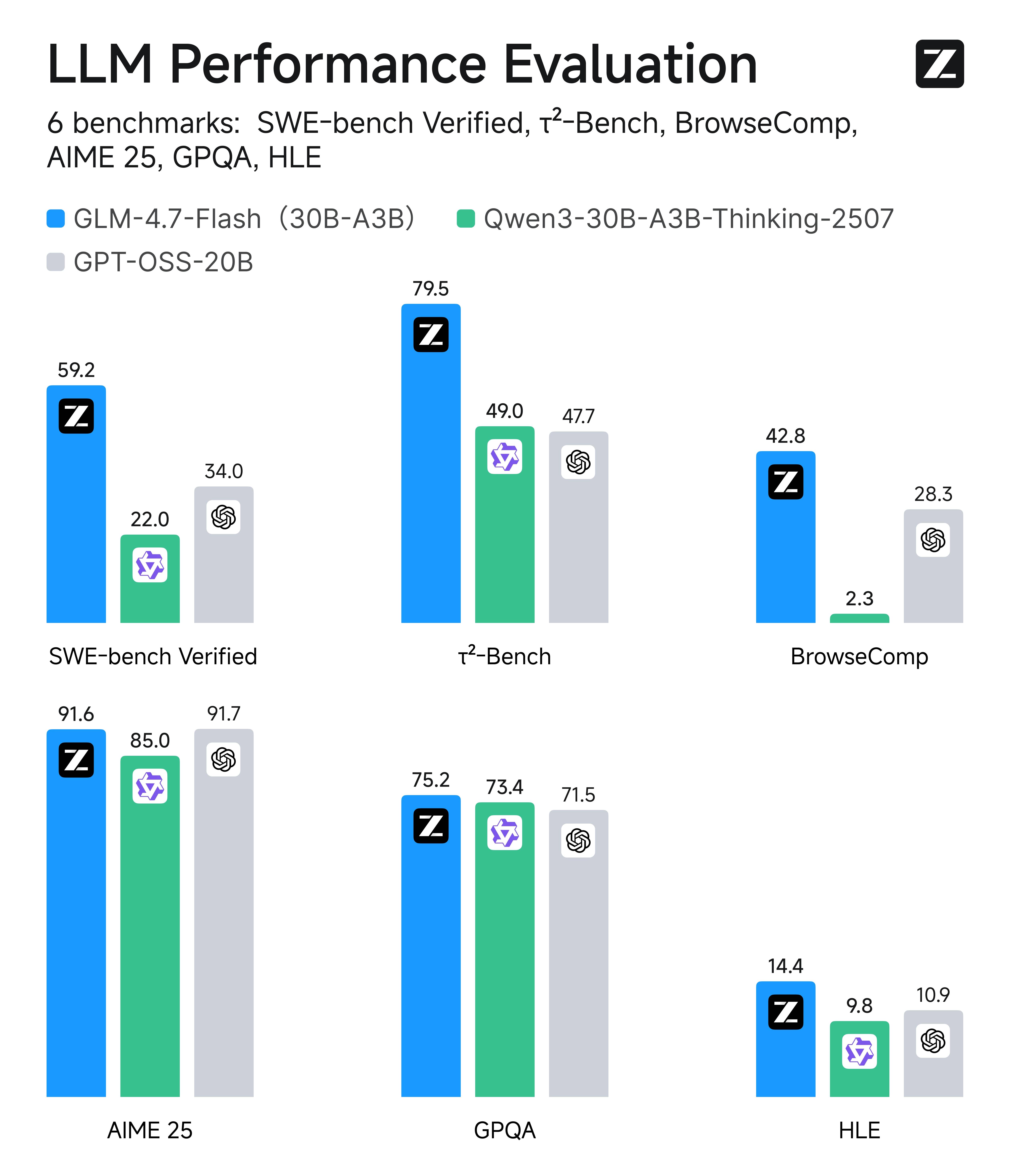
* **Enhanced Tool Invocation Capabilities**: GLM-4.7 demonstrates improved tool invocation skills, scoring 67 points on the BrowseComp web task evaluation and achieving an open-source SOTA of 84.7 points on the τ²-Bench interactive tool invocation benchmark, surpassing Claude Sonnet 4.5
* **Enhanced reasoning capabilities**: Significantly improved mathematical and reasoning skills, achieving 42.8% on the HLE (“Human Last Exam”) benchmark—a 41% increase over GLM-4.6 and surpassing GPT-5.1
* **Enhanced General Capabilities**: GLM-4.7 delivers more concise, intelligent, and empathetic conversations, with more eloquent and immersive writing and role-playing
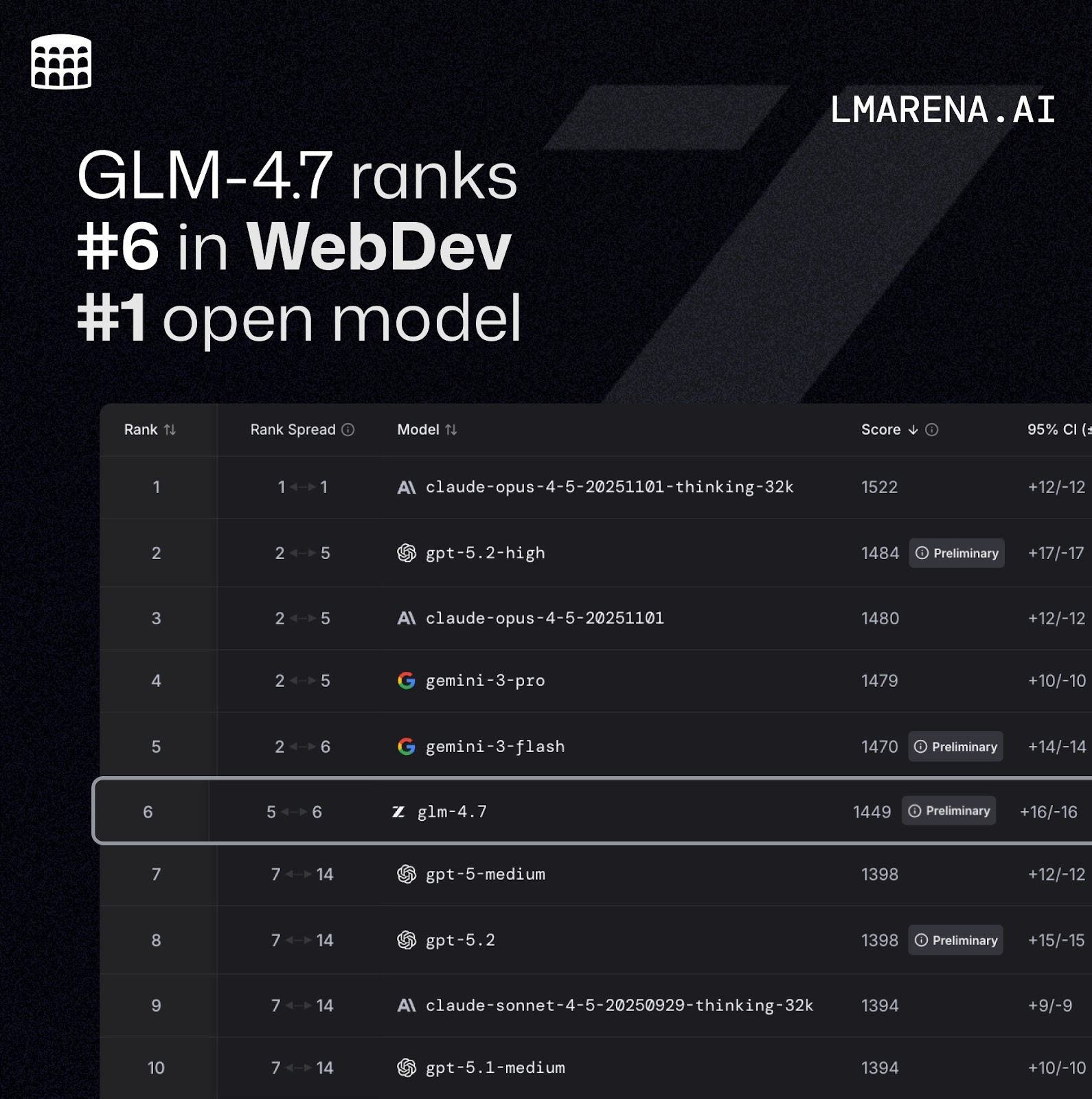 *`Code Arena: A professional coding evaluation system with millions of global users participating in blind tests. GLM-4.7 ranks first among open-source models and domestic models, outperforming GPT-5.2`*
In mainstream benchmark performance, GLM-4.7's coding capabilities align with Claude Sonnet 4.5: Achieved top open-source ranking on SWE-bench-Verified; Reached an open-source SOTA score of 84.9 on LiveCodeBench V6, surpassing Claude Sonnet 4.5; Achieved 73.8% on SWE-bench Verified (a 5.8% improvement over GLM-4.6), 66.7% on SWE-bench Multilingual (a 12.9% improvement), and 41% on Terminal Bench 2.0 (a 16.5% improvement).
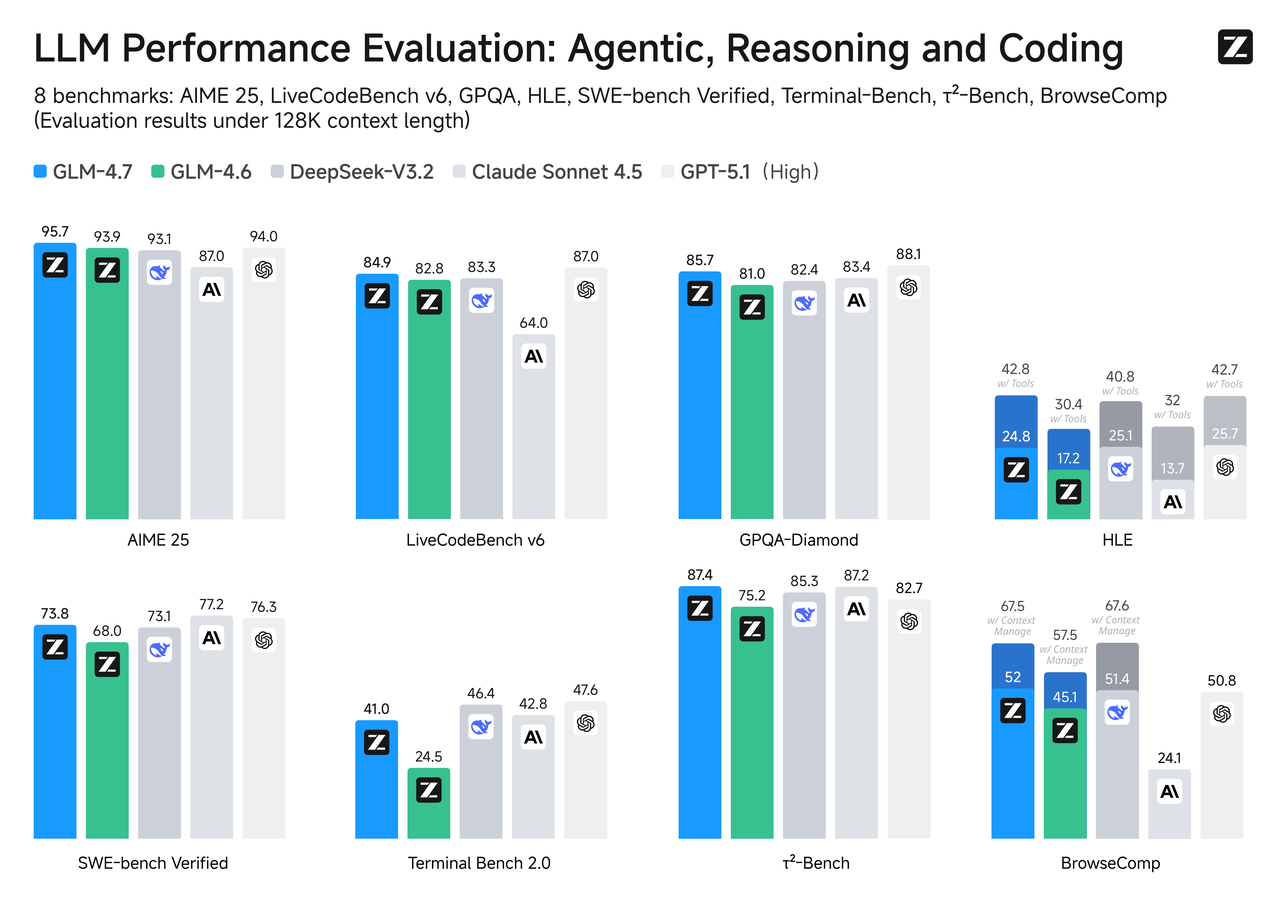
In mainstream benchmarks like SWE-bench Verified and τ²-Bench, GLM-4.7-Flash achieves open-source SOTA scores among models of comparable size. Additionally, compared to similarly sized models, GLM-4.7-Flash demonstrates superior frontend and backend development capabilities.
In internal programming tests, GLM-4.7-Flash excels at both frontend and backend tasks. Beyond programming scenarios, we also recommend experiencing GLM-4.7-Flash in general-purpose applications such as Chinese writing, translation, long-form text processing, and emotional/role-playing interactions.
In the Claude Code environment, we tested 100 real programming tasks covering core capabilities like frontend, backend, and instruction following. Results show GLM-4.7 demonstrates significant improvements over GLM-4.6 in both stability and deliverability.
*`Code Arena: A professional coding evaluation system with millions of global users participating in blind tests. GLM-4.7 ranks first among open-source models and domestic models, outperforming GPT-5.2`*
In mainstream benchmark performance, GLM-4.7's coding capabilities align with Claude Sonnet 4.5: Achieved top open-source ranking on SWE-bench-Verified; Reached an open-source SOTA score of 84.9 on LiveCodeBench V6, surpassing Claude Sonnet 4.5; Achieved 73.8% on SWE-bench Verified (a 5.8% improvement over GLM-4.6), 66.7% on SWE-bench Multilingual (a 12.9% improvement), and 41% on Terminal Bench 2.0 (a 16.5% improvement).

In mainstream benchmarks like SWE-bench Verified and τ²-Bench, GLM-4.7-Flash achieves open-source SOTA scores among models of comparable size. Additionally, compared to similarly sized models, GLM-4.7-Flash demonstrates superior frontend and backend development capabilities.
In internal programming tests, GLM-4.7-Flash excels at both frontend and backend tasks. Beyond programming scenarios, we also recommend experiencing GLM-4.7-Flash in general-purpose applications such as Chinese writing, translation, long-form text processing, and emotional/role-playing interactions.

In the Claude Code environment, we tested 100 real programming tasks covering core capabilities like frontend, backend, and instruction following. Results show GLM-4.7 demonstrates significant improvements over GLM-4.6 in both stability and deliverability. 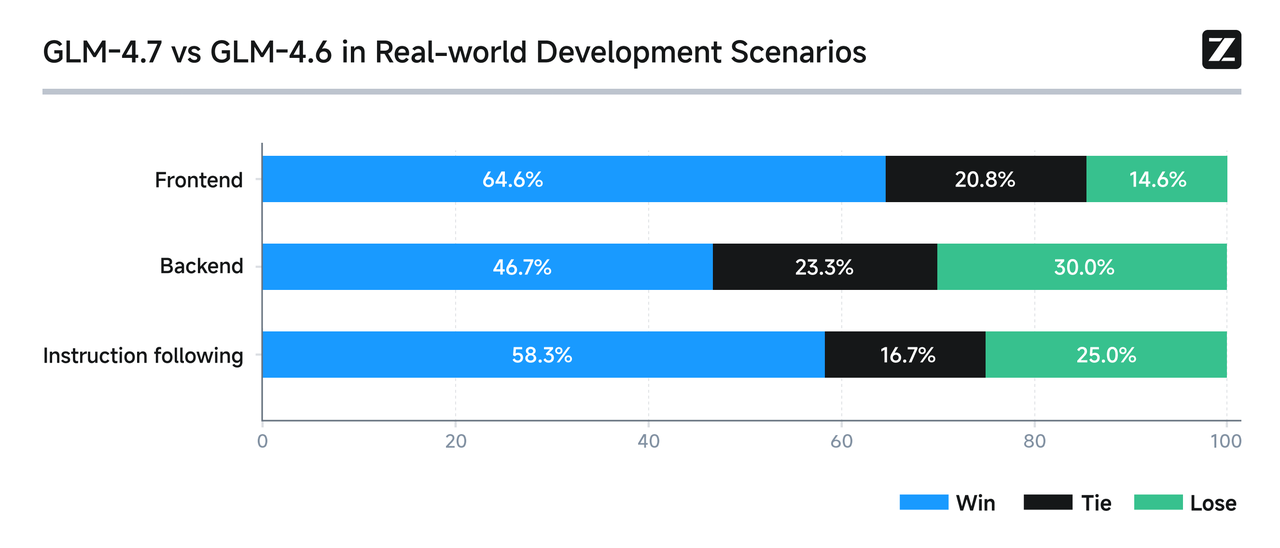 With enhanced programming capabilities, developers can more naturally organize their development workflow around “task delivery,” forming an end-to-end closed loop from requirement understanding to implementation.
GLM-4.7 further enhances the interleaved reasoning capabilities introduced in GLM-4.5 by introducing retained reasoning and round-based reasoning, making complex task execution more stable and controllable.
* Interleaved Reasoning: Performs reasoning before each response/tool invocation, improving compliance with complex instructions and code generation quality.
* Retention-Based Reasoning: Automatically preserves reasoning blocks across multi-turn dialogues, improving cache hit rates and reducing computational costs—ideal for long-term complex tasks.
* Round-Level Reasoning: Enables round-based control of reasoning overhead within a single session—disable reasoning for simple tasks to reduce latency, or enable it for complex tasks to boost accuracy and stability.
[\_Related Documentation: https://docs.z.ai/guides/capabilities/thinking-mode](https://docs.z.ai/guides/capabilities/thinking-mode)
GLM-4.7 demonstrates superior task decomposition and technology stack integration in complex tasks, delivering **complete, executable code** in a single step while clearly identifying critical dependencies and execution steps, significantly reducing manual debugging costs.
Case studies showcase highly interactive mini-games independently developed by GLM-4.7, such as Plants vs. Zombies and Fruit Ninja.
GLM-4.7 enhances its comprehension of visual code. In frontend design, it better interprets UI design specifications, offering more aesthetically pleasing default solutions for layout structures, color harmony, and component styling. This reduces the time developers spend on style “fine-tuning.”
GLM-4.7 delivers significant upgrades in layout and aesthetics for office creation. PPT 16:9 compatibility soars from 52% to 91%, with generated results being essentially “ready to use.” Poster design now features more flexible typography and color schemes, exuding a stronger sense of design.
## Resources
* [API Documentation](/api-reference/llm/chat-completion): Learn how to call the API.
## Quick Start
The following is a full sample code to help you onboard GLM-4.7 with ease.
**Basic Call**
```bash theme={null}
curl -X POST "https://api.z.ai/api/paas/v4/chat/completions" \
-H "Content-Type: application/json" \
-H "Authorization: Bearer your-api-key" \
-d '{
"model": "glm-4.7",
"messages": [
{
"role": "user",
"content": "As a marketing expert, please create an attractive slogan for my product."
},
{
"role": "assistant",
"content": "Sure, to craft a compelling slogan, please tell me more about your product."
},
{
"role": "user",
"content": "Z.AI Open Platform"
}
],
"thinking": {
"type": "enabled"
},
"max_tokens": 4096,
"temperature": 1.0
}'
```
**Streaming Call**
```bash theme={null}
curl -X POST "https://api.z.ai/api/paas/v4/chat/completions" \
-H "Content-Type: application/json" \
-H "Authorization: Bearer your-api-key" \
-d '{
"model": "glm-4.7",
"messages": [
{
"role": "user",
"content": "As a marketing expert, please create an attractive slogan for my product."
},
{
"role": "assistant",
"content": "Sure, to craft a compelling slogan, please tell me more about your product."
},
{
"role": "user",
"content": "Z.AI Open Platform"
}
],
"thinking": {
"type": "enabled"
},
"stream": true,
"max_tokens": 4096,
"temperature": 1.0
}'
```
**Install SDK**
```bash theme={null}
# Install latest version
pip install zai-sdk
# Or specify version
pip install zai-sdk==0.2.3
```
**Verify Installation**
```python theme={null}
import zai
print(zai.__version__)
```
**Basic Call**
```python theme={null}
from zai import ZaiClient
client = ZaiClient(api_key="your-api-key") # Your API Key
response = client.chat.completions.create(
model="glm-4.7",
messages=[
{
"role": "user",
"content": "As a marketing expert, please create an attractive slogan for my product.",
},
{
"role": "assistant",
"content": "Sure, to craft a compelling slogan, please tell me more about your product.",
},
{"role": "user", "content": "Z.AI Open Platform"},
],
thinking={
"type": "enabled",
},
max_tokens=4096,
temperature=1.0,
)
# Get complete response
print(response.choices[0].message)
```
**Streaming Call**
```python theme={null}
from zai import ZaiClient
client = ZaiClient(api_key="your-api-key") # Your API Key
response = client.chat.completions.create(
model="glm-4.7",
messages=[
{
"role": "user",
"content": "As a marketing expert, please create an attractive slogan for my product.",
},
{
"role": "assistant",
"content": "Sure, to craft a compelling slogan, please tell me more about your product.",
},
{"role": "user", "content": "Z.AI Open Platform"},
],
thinking={
"type": "enabled", # Optional: "disabled" or "enabled", default is "enabled"
},
stream=True,
max_tokens=4096,
temperature=0.6,
)
# Stream response
for chunk in response:
if chunk.choices[0].delta.reasoning_content:
print(chunk.choices[0].delta.reasoning_content, end="", flush=True)
if chunk.choices[0].delta.content:
print(chunk.choices[0].delta.content, end="", flush=True)
```
**Install SDK**
**Maven**
```xml theme={null}
ai.z.openapi
zai-sdk
0.3.5
```
**Gradle (Groovy)**
```groovy theme={null}
implementation 'ai.z.openapi:zai-sdk:0.3.5'
```
**Basic Call**
```java theme={null}
import ai.z.openapi.ZaiClient;
import ai.z.openapi.service.model.ChatCompletionCreateParams;
import ai.z.openapi.service.model.ChatCompletionResponse;
import ai.z.openapi.service.model.ChatMessage;
import ai.z.openapi.service.model.ChatMessageRole;
import ai.z.openapi.service.model.ChatThinking;
import java.util.Arrays;
public class BasicChat {
public static void main(String[] args) {
// Initialize client
ZaiClient client = ZaiClient.builder().ofZAI().apiKey("your-api-key").build();
// Create chat completion request
ChatCompletionCreateParams request =
ChatCompletionCreateParams.builder()
.model("glm-4.7")
.messages(
Arrays.asList(
ChatMessage.builder()
.role(ChatMessageRole.USER.value())
.content(
"As a marketing expert, please create an attractive slogan for my product.")
.build(),
ChatMessage.builder()
.role(ChatMessageRole.ASSISTANT.value())
.content(
"Sure, to craft a compelling slogan, please tell me more about your product.")
.build(),
ChatMessage.builder()
.role(ChatMessageRole.USER.value())
.content("Z.AI Open Platform")
.build()))
.thinking(ChatThinking.builder().type("enabled").build())
.maxTokens(4096)
.temperature(1.0f)
.build();
// Send request
ChatCompletionResponse response = client.chat().createChatCompletion(request);
// Get response
if (response.isSuccess()) {
Object reply = response.getData().getChoices().get(0).getMessage();
System.out.println("AI Response: " + reply);
} else {
System.err.println("Error: " + response.getMsg());
}
}
}
```
**Streaming Call**
```java theme={null}
import ai.z.openapi.ZaiClient;
import ai.z.openapi.service.model.ChatCompletionCreateParams;
import ai.z.openapi.service.model.ChatCompletionResponse;
import ai.z.openapi.service.model.ChatMessage;
import ai.z.openapi.service.model.ChatMessageRole;
import ai.z.openapi.service.model.ChatThinking;
import ai.z.openapi.service.model.Delta;
import java.util.Arrays;
public class StreamingChat {
public static void main(String[] args) {
// Initialize client
ZaiClient client = ZaiClient.builder().ofZAI().apiKey("your-api-key").build();
// Create streaming chat completion request
ChatCompletionCreateParams request =
ChatCompletionCreateParams.builder()
.model("glm-4.7")
.messages(
Arrays.asList(
ChatMessage.builder()
.role(ChatMessageRole.USER.value())
.content(
"As a marketing expert, please create an attractive slogan for my product.")
.build(),
ChatMessage.builder()
.role(ChatMessageRole.ASSISTANT.value())
.content(
"Sure, to craft a compelling slogan, please tell me more about your product.")
.build(),
ChatMessage.builder()
.role(ChatMessageRole.USER.value())
.content("Z.AI Open Platform")
.build()))
.thinking(ChatThinking.builder().type("enabled").build())
.stream(true) // Enable streaming output
.maxTokens(4096)
.temperature(1.0f)
.build();
ChatCompletionResponse response = client.chat().createChatCompletion(request);
if (response.isSuccess()) {
response.getFlowable()
.subscribe(
// Process streaming message data
data -> {
if (data.getChoices() != null && !data.getChoices().isEmpty()) {
Delta delta = data.getChoices().get(0).getDelta();
System.out.print(delta + "\n");
}
},
// Process streaming response error
error -> System.err.println("\nStream error: " + error.getMessage()),
// Process streaming response completion event
() -> System.out.println("\nStreaming response completed"));
} else {
System.err.println("Error: " + response.getMsg());
}
}
}
```
**Install SDK**
```bash theme={null}
# Install or upgrade to latest version
pip install --upgrade 'openai>=1.0'
```
**Verify Installation**
```python theme={null}
python -c "import openai; print(openai.__version__)"
```
**Usage Example**
```python theme={null}
from openai import OpenAI
client = OpenAI(
api_key="your-Z.AI-api-key",
base_url="https://api.z.ai/api/paas/v4/",
)
completion = client.chat.completions.create(
model="glm-4.7",
messages=[
{"role": "system", "content": "You are a smart and creative novelist"},
{
"role": "user",
"content": "Please write a short fairy tale story as a fairy tale master",
},
],
)
print(completion.choices[0].message.content)
```
With enhanced programming capabilities, developers can more naturally organize their development workflow around “task delivery,” forming an end-to-end closed loop from requirement understanding to implementation.
GLM-4.7 further enhances the interleaved reasoning capabilities introduced in GLM-4.5 by introducing retained reasoning and round-based reasoning, making complex task execution more stable and controllable.
* Interleaved Reasoning: Performs reasoning before each response/tool invocation, improving compliance with complex instructions and code generation quality.
* Retention-Based Reasoning: Automatically preserves reasoning blocks across multi-turn dialogues, improving cache hit rates and reducing computational costs—ideal for long-term complex tasks.
* Round-Level Reasoning: Enables round-based control of reasoning overhead within a single session—disable reasoning for simple tasks to reduce latency, or enable it for complex tasks to boost accuracy and stability.
[\_Related Documentation: https://docs.z.ai/guides/capabilities/thinking-mode](https://docs.z.ai/guides/capabilities/thinking-mode)
GLM-4.7 demonstrates superior task decomposition and technology stack integration in complex tasks, delivering **complete, executable code** in a single step while clearly identifying critical dependencies and execution steps, significantly reducing manual debugging costs.
Case studies showcase highly interactive mini-games independently developed by GLM-4.7, such as Plants vs. Zombies and Fruit Ninja.
GLM-4.7 enhances its comprehension of visual code. In frontend design, it better interprets UI design specifications, offering more aesthetically pleasing default solutions for layout structures, color harmony, and component styling. This reduces the time developers spend on style “fine-tuning.”
GLM-4.7 delivers significant upgrades in layout and aesthetics for office creation. PPT 16:9 compatibility soars from 52% to 91%, with generated results being essentially “ready to use.” Poster design now features more flexible typography and color schemes, exuding a stronger sense of design.
## Resources
* [API Documentation](/api-reference/llm/chat-completion): Learn how to call the API.
## Quick Start
The following is a full sample code to help you onboard GLM-4.7 with ease.
**Basic Call**
```bash theme={null}
curl -X POST "https://api.z.ai/api/paas/v4/chat/completions" \
-H "Content-Type: application/json" \
-H "Authorization: Bearer your-api-key" \
-d '{
"model": "glm-4.7",
"messages": [
{
"role": "user",
"content": "As a marketing expert, please create an attractive slogan for my product."
},
{
"role": "assistant",
"content": "Sure, to craft a compelling slogan, please tell me more about your product."
},
{
"role": "user",
"content": "Z.AI Open Platform"
}
],
"thinking": {
"type": "enabled"
},
"max_tokens": 4096,
"temperature": 1.0
}'
```
**Streaming Call**
```bash theme={null}
curl -X POST "https://api.z.ai/api/paas/v4/chat/completions" \
-H "Content-Type: application/json" \
-H "Authorization: Bearer your-api-key" \
-d '{
"model": "glm-4.7",
"messages": [
{
"role": "user",
"content": "As a marketing expert, please create an attractive slogan for my product."
},
{
"role": "assistant",
"content": "Sure, to craft a compelling slogan, please tell me more about your product."
},
{
"role": "user",
"content": "Z.AI Open Platform"
}
],
"thinking": {
"type": "enabled"
},
"stream": true,
"max_tokens": 4096,
"temperature": 1.0
}'
```
**Install SDK**
```bash theme={null}
# Install latest version
pip install zai-sdk
# Or specify version
pip install zai-sdk==0.2.3
```
**Verify Installation**
```python theme={null}
import zai
print(zai.__version__)
```
**Basic Call**
```python theme={null}
from zai import ZaiClient
client = ZaiClient(api_key="your-api-key") # Your API Key
response = client.chat.completions.create(
model="glm-4.7",
messages=[
{
"role": "user",
"content": "As a marketing expert, please create an attractive slogan for my product.",
},
{
"role": "assistant",
"content": "Sure, to craft a compelling slogan, please tell me more about your product.",
},
{"role": "user", "content": "Z.AI Open Platform"},
],
thinking={
"type": "enabled",
},
max_tokens=4096,
temperature=1.0,
)
# Get complete response
print(response.choices[0].message)
```
**Streaming Call**
```python theme={null}
from zai import ZaiClient
client = ZaiClient(api_key="your-api-key") # Your API Key
response = client.chat.completions.create(
model="glm-4.7",
messages=[
{
"role": "user",
"content": "As a marketing expert, please create an attractive slogan for my product.",
},
{
"role": "assistant",
"content": "Sure, to craft a compelling slogan, please tell me more about your product.",
},
{"role": "user", "content": "Z.AI Open Platform"},
],
thinking={
"type": "enabled", # Optional: "disabled" or "enabled", default is "enabled"
},
stream=True,
max_tokens=4096,
temperature=0.6,
)
# Stream response
for chunk in response:
if chunk.choices[0].delta.reasoning_content:
print(chunk.choices[0].delta.reasoning_content, end="", flush=True)
if chunk.choices[0].delta.content:
print(chunk.choices[0].delta.content, end="", flush=True)
```
**Install SDK**
**Maven**
```xml theme={null}
ai.z.openapi
zai-sdk
0.3.5
```
**Gradle (Groovy)**
```groovy theme={null}
implementation 'ai.z.openapi:zai-sdk:0.3.5'
```
**Basic Call**
```java theme={null}
import ai.z.openapi.ZaiClient;
import ai.z.openapi.service.model.ChatCompletionCreateParams;
import ai.z.openapi.service.model.ChatCompletionResponse;
import ai.z.openapi.service.model.ChatMessage;
import ai.z.openapi.service.model.ChatMessageRole;
import ai.z.openapi.service.model.ChatThinking;
import java.util.Arrays;
public class BasicChat {
public static void main(String[] args) {
// Initialize client
ZaiClient client = ZaiClient.builder().ofZAI().apiKey("your-api-key").build();
// Create chat completion request
ChatCompletionCreateParams request =
ChatCompletionCreateParams.builder()
.model("glm-4.7")
.messages(
Arrays.asList(
ChatMessage.builder()
.role(ChatMessageRole.USER.value())
.content(
"As a marketing expert, please create an attractive slogan for my product.")
.build(),
ChatMessage.builder()
.role(ChatMessageRole.ASSISTANT.value())
.content(
"Sure, to craft a compelling slogan, please tell me more about your product.")
.build(),
ChatMessage.builder()
.role(ChatMessageRole.USER.value())
.content("Z.AI Open Platform")
.build()))
.thinking(ChatThinking.builder().type("enabled").build())
.maxTokens(4096)
.temperature(1.0f)
.build();
// Send request
ChatCompletionResponse response = client.chat().createChatCompletion(request);
// Get response
if (response.isSuccess()) {
Object reply = response.getData().getChoices().get(0).getMessage();
System.out.println("AI Response: " + reply);
} else {
System.err.println("Error: " + response.getMsg());
}
}
}
```
**Streaming Call**
```java theme={null}
import ai.z.openapi.ZaiClient;
import ai.z.openapi.service.model.ChatCompletionCreateParams;
import ai.z.openapi.service.model.ChatCompletionResponse;
import ai.z.openapi.service.model.ChatMessage;
import ai.z.openapi.service.model.ChatMessageRole;
import ai.z.openapi.service.model.ChatThinking;
import ai.z.openapi.service.model.Delta;
import java.util.Arrays;
public class StreamingChat {
public static void main(String[] args) {
// Initialize client
ZaiClient client = ZaiClient.builder().ofZAI().apiKey("your-api-key").build();
// Create streaming chat completion request
ChatCompletionCreateParams request =
ChatCompletionCreateParams.builder()
.model("glm-4.7")
.messages(
Arrays.asList(
ChatMessage.builder()
.role(ChatMessageRole.USER.value())
.content(
"As a marketing expert, please create an attractive slogan for my product.")
.build(),
ChatMessage.builder()
.role(ChatMessageRole.ASSISTANT.value())
.content(
"Sure, to craft a compelling slogan, please tell me more about your product.")
.build(),
ChatMessage.builder()
.role(ChatMessageRole.USER.value())
.content("Z.AI Open Platform")
.build()))
.thinking(ChatThinking.builder().type("enabled").build())
.stream(true) // Enable streaming output
.maxTokens(4096)
.temperature(1.0f)
.build();
ChatCompletionResponse response = client.chat().createChatCompletion(request);
if (response.isSuccess()) {
response.getFlowable()
.subscribe(
// Process streaming message data
data -> {
if (data.getChoices() != null && !data.getChoices().isEmpty()) {
Delta delta = data.getChoices().get(0).getDelta();
System.out.print(delta + "\n");
}
},
// Process streaming response error
error -> System.err.println("\nStream error: " + error.getMessage()),
// Process streaming response completion event
() -> System.out.println("\nStreaming response completed"));
} else {
System.err.println("Error: " + response.getMsg());
}
}
}
```
**Install SDK**
```bash theme={null}
# Install or upgrade to latest version
pip install --upgrade 'openai>=1.0'
```
**Verify Installation**
```python theme={null}
python -c "import openai; print(openai.__version__)"
```
**Usage Example**
```python theme={null}
from openai import OpenAI
client = OpenAI(
api_key="your-Z.AI-api-key",
base_url="https://api.z.ai/api/paas/v4/",
)
completion = client.chat.completions.create(
model="glm-4.7",
messages=[
{"role": "system", "content": "You are a smart and creative novelist"},
{
"role": "user",
"content": "Please write a short fairy tale story as a fairy tale master",
},
],
)
print(completion.choices[0].message.content)
```