> ## Documentation Index
> Fetch the complete documentation index at: https://docs.z.ai/llms.txt
> Use this file to discover all available pages before exploring further.
# GLM-5-Turbo
## Overview
**GLM-5-Turbo is a foundation model deeply optimized for the OpenClaw scenario.** It has been specifically optimized for the core requirements of OpenClaw tasks since the training phase, enhancing key capabilities such as tool invocation, command following, timed and persistent tasks, and long-chain execution.
ClawBench Enhanced Model
Text
Text
200K
128K
## Capability
Offering multiple thinking modes for different scenarios
Support real-time streaming responses to enhance user interaction experience
Powerful tool invocation capabilities, enabling integration with various external toolsets
Intelligent caching mechanism to optimize performance in long conversations
Support for structured output formats like JSON, facilitating system integration
Flexibly integrate external MCP tools and data sources to expand use cases
## Introducing GLM-5-Turbo
From training data construction to the design of optimization objectives, we have systematically constructed a variety of OpenClaw tasks scenarios based on real-world agent workflows, ensuring that the model is truly capable of executing complex, dynamic, and long-chain tasks. We have significantly enhanced the following core capabilities:
* **Tool Calling—Precise Invocation, No Failures**: GLM-5-Turbo has strengthened its ability to invoke external tools and various skills, ensuring greater stability and reliability in multi-step tasks, thereby enabling OpenClaw tasks to transition from dialogue to execution.
* **Instruction Following—Enhanced Decomposition of Complex Instructions**: The model demonstrates stronger comprehension and decomposition capabilities for complex, multi-layered, and long-chain instructions. It can accurately identify objectives, plan steps, and support collaborative task division among multiple agents.
* **Scheduled and Persistent Tasks — Better Understanding of Time Dimensions, Uninterrupted Long Tasks**: Significantly optimized for scenarios involving scheduled triggers, continuous execution, and long-running tasks. It better understands time-related requirements and maintains execution continuity during complex, long-running tasks.
* **High-Throughput Long Chains — Faster and More Stable Execution**: For Lobster tasks involving high data throughput and long logical chains, GLM-5-Turbo further enhances execution efficiency and response stability, making it better suited for integration into real-world business workflows.
With the growing adoption of **OpenClaw**, evaluating model performance in Openclaw workflows has become a key focus across the industry. Based on extensive analysis of real OpenClaw use cases, we introduce **ZClawBench**, an end-to-end benchmark designed specifically for agent tasks in the OpenClaw ecosystem.
Current OpenClaw workloads span a wide range of task types, including environment setup, software development, information retrieval, data analysis, and content creation. The user base has also expanded beyond early developer adopters to include productivity users, financial professionals, operations engineers, content creators, and research analysts. Meanwhile, the usage of **Skills** has increased rapidly—from **26% to 45% in a short period of time**—highlighting a clear shift toward a more modular and skill-driven agent ecosystem.
Benchmark results show that **GLM-5-Turbo** delivers substantial improvements over **GLM-5** in OpenClaw scenarios, outperforming several leading models across multiple key task categories.
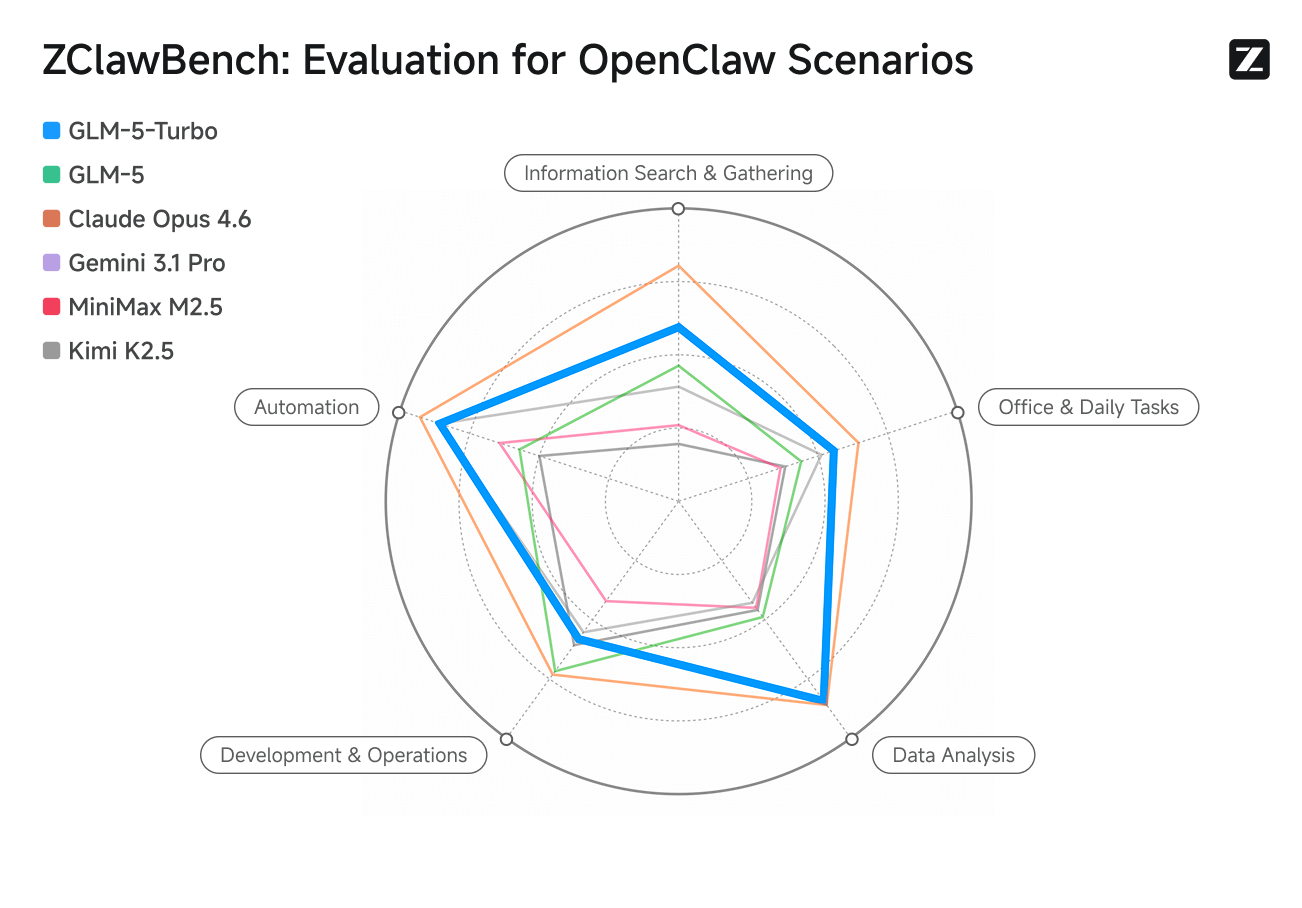
The **ZClawBench** dataset and full evaluation trajectories are now publicly available. We welcome the community to validate, reproduce, and further improve the benchmark.
## Resources
* [API Documentation](/api-reference/llm/chat-completion): Learn how to call the API.
* [OpenClaw Guide](/devpack/tool/openclaw#switching-to-glm-5-turbo-model): Learn how to integrate with OpenClaw.
## Quick Start
The following is a full sample code to help you onboard GLM-5-Turbo with ease.
**Basic Call**
```bash theme={null}
curl -X POST "https://api.z.ai/api/paas/v4/chat/completions" \
-H "Content-Type: application/json" \
-H "Authorization: Bearer your-api-key" \
-d '{
"model": "glm-5-turbo",
"messages": [
{
"role": "user",
"content": "As a marketing expert, please create an attractive slogan for my product."
},
{
"role": "assistant",
"content": "Sure, to craft a compelling slogan, please tell me more about your product."
},
{
"role": "user",
"content": "Z.AI Open Platform"
}
],
"thinking": {
"type": "enabled"
},
"max_tokens": 4096,
"temperature": 1.0
}'
```
**Streaming Call**
```bash theme={null}
curl -X POST "https://api.z.ai/api/paas/v4/chat/completions" \
-H "Content-Type: application/json" \
-H "Authorization: Bearer your-api-key" \
-d '{
"model": "glm-5-turbo",
"messages": [
{
"role": "user",
"content": "As a marketing expert, please create an attractive slogan for my product."
},
{
"role": "assistant",
"content": "Sure, to craft a compelling slogan, please tell me more about your product."
},
{
"role": "user",
"content": "Z.AI Open Platform"
}
],
"thinking": {
"type": "enabled"
},
"stream": true,
"max_tokens": 4096,
"temperature": 1.0
}'
```
**Install SDK**
```bash theme={null}
# Install latest version
pip install zai-sdk
# Or specify version
pip install zai-sdk==0.2.3
```
**Verify Installation**
```python theme={null}
import zai
print(zai.__version__)
```
**Basic Call**
```python theme={null}
from zai import ZaiClient
client = ZaiClient(api_key="your-api-key") # Your API Key
response = client.chat.completions.create(
model="glm-5-turbo",
messages=[
{
"role": "user",
"content": "As a marketing expert, please create an attractive slogan for my product.",
},
{
"role": "assistant",
"content": "Sure, to craft a compelling slogan, please tell me more about your product.",
},
{"role": "user", "content": "Z.AI Open Platform"},
],
thinking={
"type": "enabled",
},
max_tokens=4096,
temperature=1.0,
)
# Get complete response
print(response.choices[0].message)
```
**Streaming Call**
```python theme={null}
from zai import ZaiClient
client = ZaiClient(api_key="your-api-key") # Your API Key
response = client.chat.completions.create(
model="glm-5-turbo",
messages=[
{
"role": "user",
"content": "As a marketing expert, please create an attractive slogan for my product.",
},
{
"role": "assistant",
"content": "Sure, to craft a compelling slogan, please tell me more about your product.",
},
{"role": "user", "content": "Z.AI Open Platform"},
],
thinking={
"type": "enabled", # Optional: "disabled" or "enabled", default is "enabled"
},
stream=True,
max_tokens=4096,
temperature=0.6,
)
# Stream response
for chunk in response:
if chunk.choices[0].delta.reasoning_content:
print(chunk.choices[0].delta.reasoning_content, end="", flush=True)
if chunk.choices[0].delta.content:
print(chunk.choices[0].delta.content, end="", flush=True)
```
**Install SDK**
**Maven**
```xml theme={null}
ai.z.openapi
zai-sdk
0.3.5
```
**Gradle (Groovy)**
```groovy theme={null}
implementation 'ai.z.openapi:zai-sdk:0.3.5'
```
**Basic Call**
```java theme={null}
import ai.z.openapi.ZaiClient;
import ai.z.openapi.service.model.ChatCompletionCreateParams;
import ai.z.openapi.service.model.ChatCompletionResponse;
import ai.z.openapi.service.model.ChatMessage;
import ai.z.openapi.service.model.ChatMessageRole;
import ai.z.openapi.service.model.ChatThinking;
import java.util.Arrays;
public class BasicChat {
public static void main(String[] args) {
// Initialize client
ZaiClient client = ZaiClient.builder().ofZAI().apiKey("your-api-key").build();
// Create chat completion request
ChatCompletionCreateParams request =
ChatCompletionCreateParams.builder()
.model("glm-5-turbo")
.messages(
Arrays.asList(
ChatMessage.builder()
.role(ChatMessageRole.USER.value())
.content(
"As a marketing expert, please create an attractive slogan for my product.")
.build(),
ChatMessage.builder()
.role(ChatMessageRole.ASSISTANT.value())
.content(
"Sure, to craft a compelling slogan, please tell me more about your product.")
.build(),
ChatMessage.builder()
.role(ChatMessageRole.USER.value())
.content("Z.AI Open Platform")
.build()))
.thinking(ChatThinking.builder().type("enabled").build())
.maxTokens(4096)
.temperature(1.0f)
.build();
// Send request
ChatCompletionResponse response = client.chat().createChatCompletion(request);
// Get response
if (response.isSuccess()) {
Object reply = response.getData().getChoices().get(0).getMessage();
System.out.println("AI Response: " + reply);
} else {
System.err.println("Error: " + response.getMsg());
}
}
}
```
**Streaming Call**
```java theme={null}
import ai.z.openapi.ZaiClient;
import ai.z.openapi.service.model.ChatCompletionCreateParams;
import ai.z.openapi.service.model.ChatCompletionResponse;
import ai.z.openapi.service.model.ChatMessage;
import ai.z.openapi.service.model.ChatMessageRole;
import ai.z.openapi.service.model.ChatThinking;
import ai.z.openapi.service.model.Delta;
import java.util.Arrays;
public class StreamingChat {
public static void main(String[] args) {
// Initialize client
ZaiClient client = ZaiClient.builder().ofZAI().apiKey("your-api-key").build();
// Create streaming chat completion request
ChatCompletionCreateParams request =
ChatCompletionCreateParams.builder()
.model("glm-5-turbo")
.messages(
Arrays.asList(
ChatMessage.builder()
.role(ChatMessageRole.USER.value())
.content(
"As a marketing expert, please create an attractive slogan for my product.")
.build(),
ChatMessage.builder()
.role(ChatMessageRole.ASSISTANT.value())
.content(
"Sure, to craft a compelling slogan, please tell me more about your product.")
.build(),
ChatMessage.builder()
.role(ChatMessageRole.USER.value())
.content("Z.AI Open Platform")
.build()))
.thinking(ChatThinking.builder().type("enabled").build())
.stream(true) // Enable streaming output
.maxTokens(4096)
.temperature(1.0f)
.build();
ChatCompletionResponse response = client.chat().createChatCompletion(request);
if (response.isSuccess()) {
response.getFlowable()
.subscribe(
// Process streaming message data
data -> {
if (data.getChoices() != null && !data.getChoices().isEmpty()) {
Delta delta = data.getChoices().get(0).getDelta();
System.out.print(delta + "\n");
}
},
// Process streaming response error
error -> System.err.println("\nStream error: " + error.getMessage()),
// Process streaming response completion event
() -> System.out.println("\nStreaming response completed"));
} else {
System.err.println("Error: " + response.getMsg());
}
}
}
```
**Install SDK**
```bash theme={null}
# Install or upgrade to latest version
pip install --upgrade 'openai>=1.0'
```
**Verify Installation**
```python theme={null}
python -c "import openai; print(openai.__version__)"
```
**Usage Example**
```python theme={null}
from openai import OpenAI
client = OpenAI(
api_key="your-Z.AI-api-key",
base_url="https://api.z.ai/api/paas/v4/",
)
completion = client.chat.completions.create(
model="glm-5-turbo",
messages=[
{"role": "system", "content": "You are a smart and creative novelist"},
{
"role": "user",
"content": "Please write a short fairy tale story as a fairy tale master",
},
],
)
print(completion.choices[0].message.content)
```