> ## Documentation Index
> Fetch the complete documentation index at: https://docs.z.ai/llms.txt
> Use this file to discover all available pages before exploring further.
# GLM-5.1
## Overview
**GLM-5.1** is Z.AI’s latest flagship model, designed for **long-horizon tasks**. It can work continuously and autonomously on a single task for up to 8 hours, completing the full loop from planning and execution to iterative optimization and delivering production-grade results.
In both general capability and coding performance, GLM-5.1 is overall aligned with Claude Opus 4.6. It demonstrates stronger sustained execution in **long-horizon autonomous tasks, complex engineering optimization, and real-world development workflows**, making it an ideal foundation for building autonomous agents and long-horizon coding agents.
Flagship Foundation Model
Text
Text
200K
128K
## Capability
Offering multiple thinking modes for different scenarios
Support real-time streaming responses to enhance user interaction experience
Powerful tool invocation capabilities, enabling integration with various external toolsets
Intelligent caching mechanism to optimize performance in long conversations
Support for structured output formats like JSON, facilitating system integration
Flexibly integrate external MCP tools and data sources to expand application scenarios
## Usage
Further optimized for agentic coding workflows such as Claude Code and OpenClaw, GLM-5.1 offers stronger long-horizon planning, stepwise execution, process adjustment, and result delivery. It performs significantly better on long-running development tasks and complex coding problems, making it well suited for real-world engineering work with multiple stages and strong interdependencies.
More robust in open-ended Q\&A, complex instruction following, and multi-turn interactions, with richer responses, more complete content, stronger instruction adherence, and better long-context understanding. It is well suited for high-quality everyday assistance and complex information workflows.
Further improved in literary expression, plot development, character portrayal, and style control, making it suitable for fiction excerpts, story concepts, and copywriting tasks that require strong expressiveness and consistency.
Well suited for website generation, interactive pages, and front-end prototyping. Outputs show less templated structure, more diverse visual expression, and higher overall task completion quality, enabling a faster path from requirements to usable deliverables.
Broadly improved across PowerPoint, Word, PDF, and Excel tasks, with stronger capabilities in complex content organization, layout design, and structured output. Default visual quality and overall polish are significantly improved, making it suitable for high-intensity production scenarios such as long-form documents, reports, teaching materials, and research papers.
## Introducing GLM-5.1
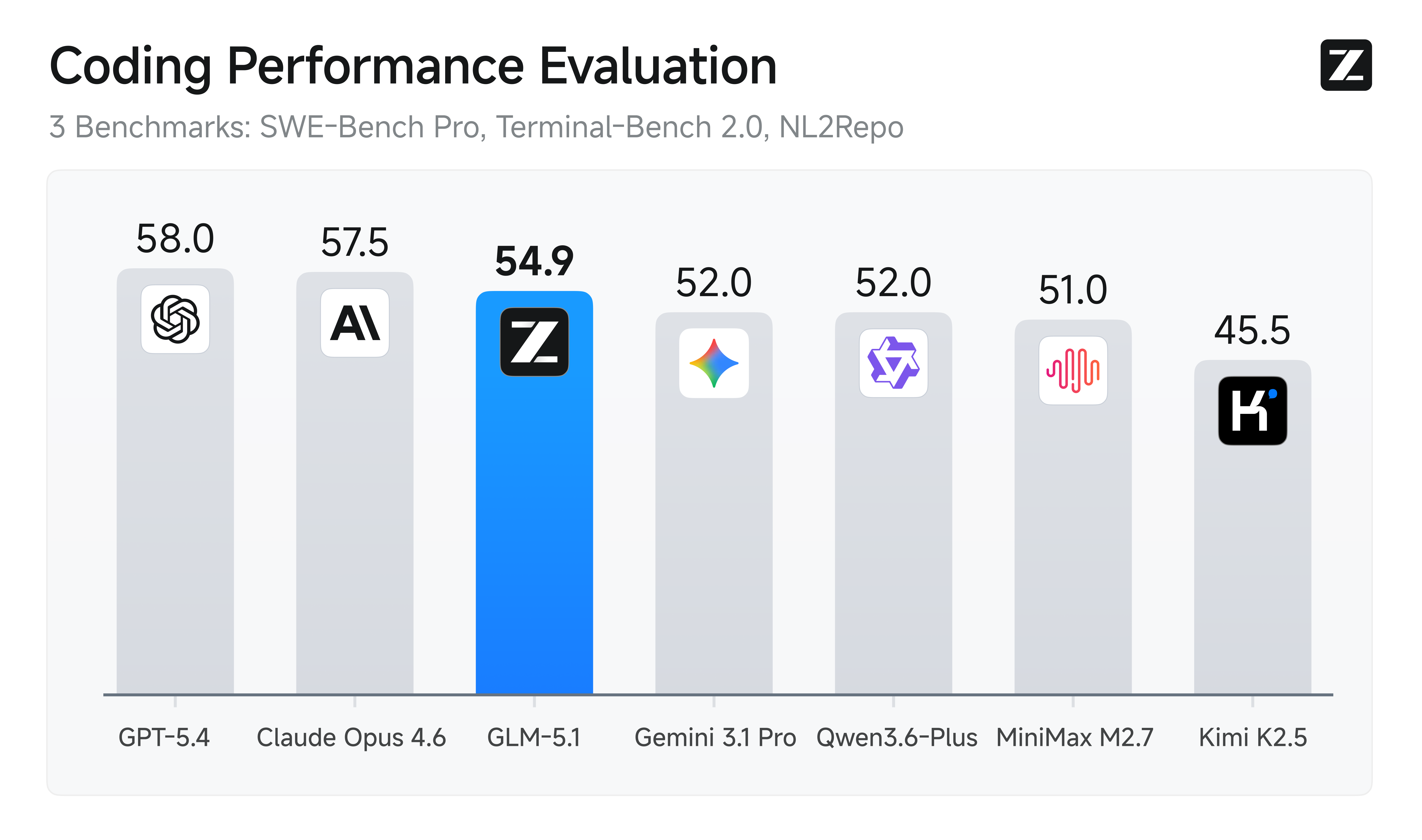
GLM-5.1 ranks among the world’s top-tier models in both overall capability and coding performance, with overall performance aligned with Claude Opus 4.6 and leading results across multiple key benchmarks.
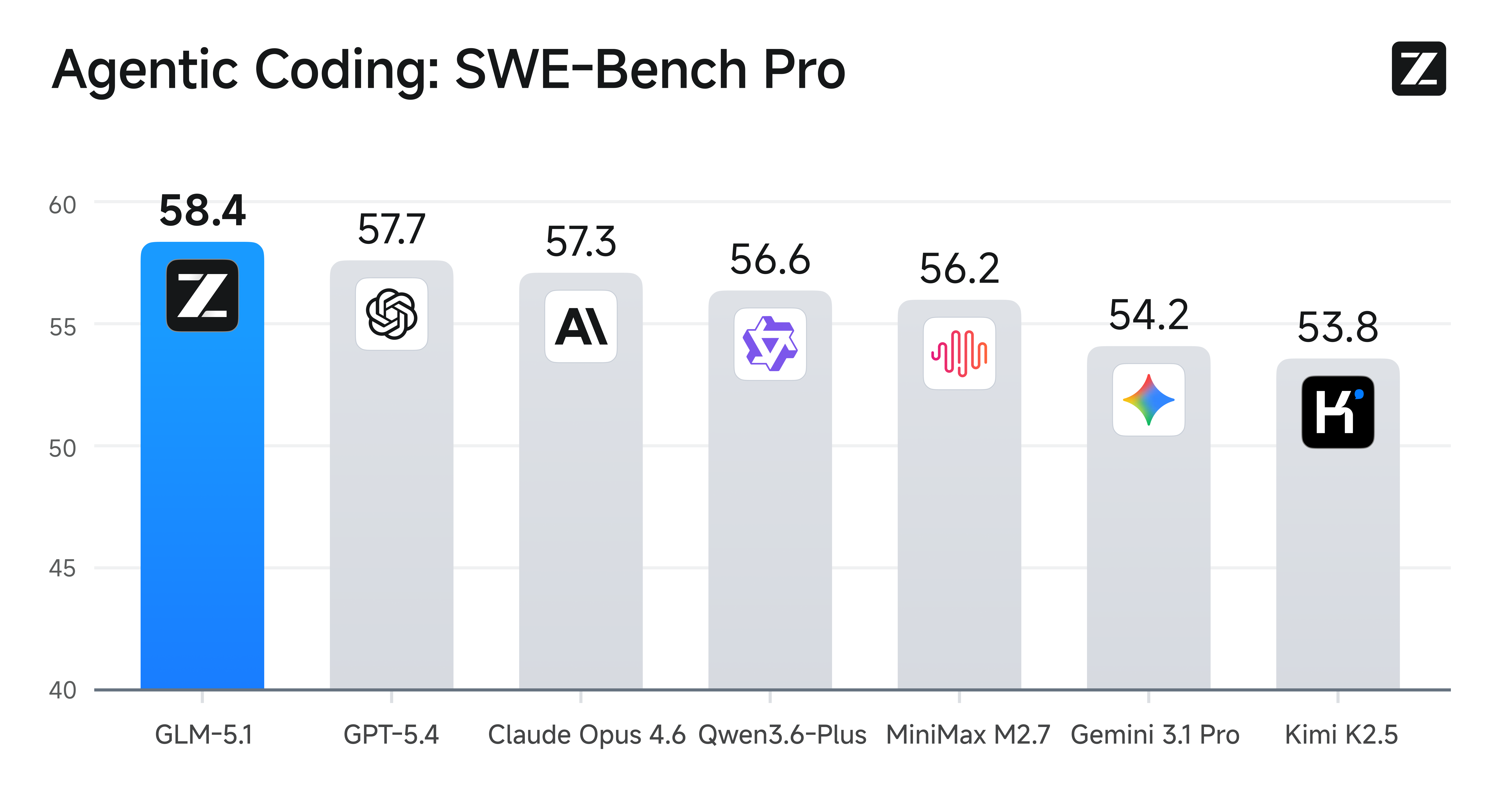
On SWE-Bench Pro, GLM-5.1 achieves a score of **58.4**, outperforming GPT-5.4, Claude Opus 4.6, and Gemini 3.1 Pro, setting a new state-of-the-art result. At the same time, across 12 representative benchmarks covering reasoning, coding, agents, tool use, and browsing, GLM-5.1 demonstrates a broad and well-balanced capability profile.
This shows that GLM-5.1 is not a single-metric improvement. Instead, it advances simultaneously across **general intelligence, real-world coding, and complex task execution**, making it a stronger foundation for general-purpose agent systems and engineering production scenarios.
GLM-5.1 shows especially strong gains on long-horizon tasks, with major improvements in **sustained execution, closed-loop optimization, and engineering delivery** under complex objectives. Compared with models primarily designed for minute-level interactions, GLM-5.1 can work autonomously on a single task for up to 8 hours, completing the full process from planning and execution to testing, fixing, and delivery.
Under the same evaluation standard, GLM-5.1 is one of the few models capable of 8-hour sustained execution, and the first Chinese model to reach this level. The way we evaluate model capability is shifting from “how smart it is in a single turn” to “how long it can work reliably on a long-horizon task, and what it can actually deliver.”
This capability is not simply about having a longer context window. It requires the model to **maintain goal alignment over extended execution, reducing strategy drift, error accumulation, and ineffective trial and error**, and enabling truly autonomous execution for complex engineering tasks.
One of GLM-5.1’s key breakthroughs is its ability to form an autonomous “**experiment–analyze–optimize**” loop in long-horizon tasks, rather than stopping at one-shot code generation. The model can proactively run benchmarks, identify bottlenecks, adjust strategies, and continuously improve results through iterative refinement.
In representative cases, GLM-5.1 can build a complete Linux desktop system from scratch within 8 hours. It can autonomously carry out 655 iterations, completing the entire optimization pipeline and boosting vector database query throughput to 6.9× that of the initial production version. On the KernelBench Level 3 optimization benchmark, it performs thousands of tool-invocation-driven optimizations on real machine learning workloads, achieving a 3.6× geometric mean speedup—significantly surpassing the 1.49× achieved by torch.compile in max-autotune mode.
These results show that GLM-5.1 is already capable of autonomous exploration, continuous improvement, and stable delivery in complex engineering environments, enabling it to take on higher-value tasks such as system building, performance optimization, and long-horizon coding agents.
## Resources
* [API Documentation](/api-reference/llm/chat-completion): Learn how to call the API.
## Quick Start
The following is a full sample code to help you onboard GLM-5.1 with ease.
**Basic Call**
```bash theme={null}
curl -X POST "https://api.z.ai/api/paas/v4/chat/completions" \
-H "Content-Type: application/json" \
-H "Authorization: Bearer your-api-key" \
-d '{
"model": "glm-5.1",
"messages": [
{
"role": "system",
"content": "You are a senior full-stack software engineer, proficient in frontend development, backend architecture design, and modern web technology stacks."
},
{
"role": "user",
"content": "Design and build a personal blog website for me, including a homepage, article list page, and article detail page, using React + Node.js technology stack."
}
],
"thinking": {
"type": "enabled"
},
"max_tokens": 4096,
"temperature": 1.0
}'
```
**Streaming Call**
```bash theme={null}
curl -X POST "https://api.z.ai/api/paas/v4/chat/completions" \
-H "Content-Type: application/json" \
-H "Authorization: Bearer your-api-key" \
-d '{
"model": "glm-5.1",
"messages": [
{
"role": "system",
"content": "You are a senior full-stack software engineer, proficient in frontend development, backend architecture design, and modern web technology stacks."
},
{
"role": "user",
"content": "Design and build a personal blog website for me, including a homepage, article list page, and article detail page, using React + Node.js technology stack."
}
],
"thinking": {
"type": "enabled"
},
"stream": true,
"max_tokens": 4096,
"temperature": 1.0
}'
```
**Install SDK**
```bash theme={null}
# Install latest version
pip install zai-sdk
# Or specify version
pip install zai-sdk==0.2.3
```
**Verify Installation**
```python theme={null}
import zai
print(zai.__version__)
```
**Basic Call**
```python theme={null}
from zai import ZaiClient
client = ZaiClient(api_key="your-api-key") # Your API Key
response = client.chat.completions.create(
model="glm-5.1",
messages=[
{
"role": "system",
"content": "You are a senior full-stack software engineer, proficient in frontend development, backend architecture design, and modern web technology stacks.",
},
{
"role": "user",
"content": "Design and build a personal blog website for me, including a homepage, article list page, and article detail page, using React + Node.js technology stack.",
},
],
thinking={
"type": "enabled",
},
max_tokens=4096,
temperature=1.0,
)
# Get complete response
print(response.choices[0].message)
```
**Streaming Call**
```python theme={null}
from zai import ZaiClient
client = ZaiClient(api_key="your-api-key") # Your API Key
response = client.chat.completions.create(
model="glm-5.1",
messages=[
{
"role": "system",
"content": "You are a senior full-stack software engineer, proficient in frontend development, backend architecture design, and modern web technology stacks.",
},
{
"role": "user",
"content": "Design and build a personal blog website for me, including a homepage, article list page, and article detail page, using React + Node.js technology stack.",
},
],
thinking={
"type": "enabled", # Optional: "disabled" or "enabled", default is "enabled"
},
stream=True,
max_tokens=4096,
temperature=0.6,
)
# Stream response
for chunk in response:
if chunk.choices[0].delta.reasoning_content:
print(chunk.choices[0].delta.reasoning_content, end="", flush=True)
if chunk.choices[0].delta.content:
print(chunk.choices[0].delta.content, end="", flush=True)
```
**Install SDK**
**Maven**
```xml theme={null}
ai.z.openapi
zai-sdk
0.3.5
```
**Gradle (Groovy)**
```groovy theme={null}
implementation 'ai.z.openapi:zai-sdk:0.3.5'
```
**Basic Call**
```java theme={null}
import ai.z.openapi.ZaiClient;
import ai.z.openapi.service.model.ChatCompletionCreateParams;
import ai.z.openapi.service.model.ChatCompletionResponse;
import ai.z.openapi.service.model.ChatMessage;
import ai.z.openapi.service.model.ChatMessageRole;
import ai.z.openapi.service.model.ChatThinking;
import java.util.Arrays;
public class BasicChat {
public static void main(String[] args) {
// Initialize client
ZaiClient client = ZaiClient.builder().ofZAI().apiKey("your-api-key").build();
// Create chat completion request
ChatCompletionCreateParams request = ChatCompletionCreateParams.builder()
.model("glm-5.1")
.messages(
Arrays.asList(
ChatMessage.builder()
.role(ChatMessageRole.SYSTEM.value())
.content(
"You are a senior full-stack software engineer, proficient in frontend development, backend architecture design, and modern web technology stacks.")
.build(),
ChatMessage.builder()
.role(ChatMessageRole.USER.value())
.content(
"Design and build a personal blog website for me, including a homepage, article list page, and article detail page, using React + Node.js technology stack.")
.build()))
.thinking(ChatThinking.builder().type("enabled").build())
.maxTokens(4096)
.temperature(1.0f)
.build();
// Send request
ChatCompletionResponse response = client.chat().createChatCompletion(request);
// Get response
if (response.isSuccess()) {
Object reply = response.getData().getChoices().get(0).getMessage();
System.out.println("AI Response: " + reply);
} else {
System.err.println("Error: " + response.getMsg());
}
}
}
```
**Streaming Call**
```java theme={null}
import ai.z.openapi.ZaiClient;
import ai.z.openapi.service.model.ChatCompletionCreateParams;
import ai.z.openapi.service.model.ChatCompletionResponse;
import ai.z.openapi.service.model.ChatMessage;
import ai.z.openapi.service.model.ChatMessageRole;
import ai.z.openapi.service.model.ChatThinking;
import ai.z.openapi.service.model.Delta;
import java.util.Arrays;
public class StreamingChat {
public static void main(String[] args) {
// Initialize client
ZaiClient client = ZaiClient.builder().ofZAI().apiKey("your-api-key").build();
// Create streaming chat completion request
ChatCompletionCreateParams request = ChatCompletionCreateParams.builder()
.model("glm-5.1")
.messages(
Arrays.asList(
ChatMessage.builder()
.role(ChatMessageRole.SYSTEM.value())
.content(
"You are a senior full-stack software engineer, proficient in frontend development, backend architecture design, and modern web technology stacks.")
.build(),
ChatMessage.builder()
.role(ChatMessageRole.USER.value())
.content(
"Design and build a personal blog website for me, including a homepage, article list page, and article detail page, using React + Node.js technology stack.")
.build()))
.thinking(ChatThinking.builder().type("enabled").build())
.stream(true) // Enable streaming output
.maxTokens(4096)
.temperature(1.0f)
.build();
ChatCompletionResponse response = client.chat().createChatCompletion(request);
if (response.isSuccess()) {
response.getFlowable()
.subscribe(
// Process streaming message data
data -> {
if (data.getChoices() != null && !data.getChoices().isEmpty()) {
Delta delta = data.getChoices().get(0).getDelta();
System.out.print(delta + "\n");
}
},
// Process streaming response error
error -> System.err.println("\nStream error: " + error.getMessage()),
// Process streaming response completion event
() -> System.out.println("\nStreaming response completed"));
} else {
System.err.println("Error: " + response.getMsg());
}
}
}
```
**Install SDK**
```bash theme={null}
# Install or upgrade to latest version
pip install --upgrade 'openai>=1.0'
```
**Verify Installation**
```python theme={null}
python -c "import openai; print(openai.__version__)"
```
**Usage Example**
```python theme={null}
from openai import OpenAI
client = OpenAI(
api_key="your-Z.AI-api-key",
base_url="https://api.z.ai/api/paas/v4/",
)
completion = client.chat.completions.create(
model="glm-5.1",
messages=[
{"role": "system", "content": "You are a senior full-stack software engineer, proficient in frontend development, backend architecture design, and modern web technology stacks."},
{
"role": "user",
"content": "Design and build a personal blog website for me, including a homepage, article list page, and article detail page, using React + Node.js technology stack.",
},
],
)
print(completion.choices[0].message.content)
```