> ## Documentation Index
> Fetch the complete documentation index at: https://docs.z.ai/llms.txt
> Use this file to discover all available pages before exploring further.
# GLM-5.2
## Overview
**GLM-5.2** is a flagship model built for the era of long-horizon tasks. With truly usable 1M-token context, it has been tested to handle project-scale engineering context, delivering more stable long-task execution, more reliable adherence to engineering standards, and higher success rates in development scenarios. A single task can complete the full development workflow—from requirements to deployable products across multiple platforms.
Flagship Foundation Model
Text
Text
1M
128K
## Capability
Offering multiple thinking modes for different scenarios
Support real-time streaming responses to enhance user interaction experience
Powerful tool invocation capabilities, enabling integration with various external toolsets
Intelligent caching mechanism to optimize performance in long conversations
Support for structured output formats like JSON, facilitating system integration
Flexibly integrate external MCP tools and data sources to expand application scenarios
## Usage
This is the best starting point to experience the generational leap of GLM-5.2. It can continuously retain module boundaries, architectural constraints, API contracts, directory structures, and historical decisions, significantly reducing the sense of context fragmentation in the later stages of long-running tasks. For complex projects, the key experience is that the model does not merely read more context—it can carry forward the engineering judgments formed earlier into subsequent execution.
**Recommended way to try it**: Choose a real business codebase, preferably one that includes backend, frontend or client-side code, configuration files, tests, documentation, and engineering conventions. First, ask the model to perform a technical audit:
> Please read the current project and output a system architecture map, core module responsibilities, key API contracts, major data flows, core call chains, potential technical debt, and the engineering constraints that must be followed in future refactoring.
GLM-5.2 is more stable in cross-file, multi-step, long-chain tasks. It first breaks down the goal, identifies dependencies and risks, then implements, verifies, and closes the task in stages. This makes it suitable for tasks that require continuous progress, such as module decoupling, API migration, directory restructuring, SDK adaptation, and cross-language refactoring.
**Recommended way to try it**: Choose a medium-sized refactoring task, define clear boundaries, and enable `/goal` mode:
> Please complete the decoupling and refactoring of the current module without changing the business logic, API signatures, or runtime behavior. First provide the execution plan, impact scope, risk boundaries, and verification method. After completion, run the necessary tests and output the verification results.
GLM-5.2 shows stronger consistency in following engineering standards, especially in long-context and multi-round execution. It is better at adhering to code style, architectural boundaries, dependency constraints, build processes, testing requirements, and commit boundaries, reducing risks such as out-of-scope changes, invalid dependencies, skipped verification, or unauthorized commits.
**Recommended way to try it**: Provide the model with your team’s real engineering standards, such as lint rules, build commands, testing requirements, commit conventions, and prohibited actions in `CLAUDE.md` or `Agent.md`. Then give it a real modification task:
> Please strictly follow the engineering standards of the current repository. Do not introduce new dependencies, do not modify API contracts, and do not commit changes proactively. After completing the modification, run the build, lint, and tests, then report the verification results and any uncovered risks.
In mobile development scenarios, GLM-5.2 can cover client-side architecture, streaming messages, long-connection states, local state management, keyboard behavior, scrolling logic, system notifications, permission mechanisms, and background recovery. More importantly, it can use ADB, logcat, screenshots, and runtime logs to locate real-device issues, making it closely aligned with practical mobile engineering workflows.
**Recommended way to try it**: Choose a real Android or Mini Program task and let the model go from implementation to validation:
> Please implement a native Android client in Kotlin that connects to the existing server-side API and supports multi-session conversations, streaming messages, voice input, notifications, and reconnection after disconnection. After completion, install it on a real device using ADB, and debug it with logcat and screenshots.
GLM-5.2 can handle page subpackages, custom components, page-level components, page stack management, `wx.request` wrapping and API-layer adaptation, authentication and login state maintenance (`wx.login` + custom login state), app/page/component lifecycle management, and exception handling in Mini Program development. It is suitable for testing whether the model can reorganize an existing Web page, official website, or backend capability into a runnable project that complies with Mini Program platform requirements.
**Recommended way to try it**: Choose an existing Web project, specify the target technology stack — native Mini Program, Taro, or uni-app — and migrate all Web features into a Mini Program version:
> Please migrate all features of the current Web project into a WeChat Mini Program. Use the \[native/Taro/uni-app] technology stack. First analyze the page structure, core user paths, backend API contracts, and platform constraints, including package size limits, domain allowlists, and HTTPS requirements. Then complete the implementation of pages, components, page navigation, and data flows. After completion, explain how to run the project, which APIs have been integrated, which features remain uncovered, and what can be optimized next.
GLM-5.2 is well suited for testing rule understanding, state machine design, level structure, scoring logic, resource loading, interaction feedback, and settlement flows in mini game development. Compared with static pages, this type of task better demonstrates the model’s understanding of complex states, user paths, and product completeness.
**Recommended way to try it**: Provide a complete but not overly detailed gameplay goal, and let the model first design the rules, then implement a runnable version:
> Please develop a lightweight level-based mini game. First design the core gameplay loop, state machine, level structure, scoring rules, failure and settlement logic, then implement basic features including start, pause, resume, settlement, restart, and local save. After completion, explain the project structure, verified features, and possible next-step extensions.
GLM-5.2 can turn the model architecture, loss functions, data pipelines, and training/inference scripts described in a paper into runnable code that aligns with the paper. It can correctly set up the model structure in one pass, maintain consistency across multiple files, and autonomously run, debug, and fix code and environment issues. What it delivers is not just code snippets, but an engineering project that can truly reproduce the paper’s reported results.
**Recommended way to try it**: Pick a paper with a model and experiments, preferably one with open-source code or public metrics, and provide the paper and data to the model. See whether it can implement the model, run it successfully, and align the results with the paper:
> Please reproduce the experiments based on this paper and dataset. Fill in implementation details not explicitly described in the paper. Use PyTorch to build the model architecture and loss functions, construct the data pipeline and training/inference scripts, and ensure the project runs successfully with consistency across multiple files. Autonomously identify and fix runtime issues, verify the paper’s metrics item by item until they are aligned, and explain the reproduction path, key changes, and any remaining gaps.
In Code-to-Video scenarios, GLM-5.2 can use the Remotion framework to create videos programmatically with React code, including components, parameters, and animation logic, and then render them into MP4. In simple terms, it treats video creation as writing code. It covers the full workflow from translating natural-language ideas into Remotion React code to rendering video output, enabling code-driven generation of a runnable, demo-ready video.
**Recommended way to try it**: Choose a real video creation task and let the model start from a single natural-language idea, then gradually produce a renderable, playable, and iterable video:
> Please create a new composition in Remotion and add a map. Start from Los Angeles, zoom the camera out while keeping LA in focus. Then draw an animated route from Los Angeles to New York and have the camera follow the route. Add one more stop to the journey — this time, we are going to Paris.
## Introducing GLM-5.2
The foundation of long-horizon tasks is not having a 1M context, but making 1M context truly usable. GLM-5.2 delivers a Solid 1M lossless context and has undergone months of specialized training for long-horizon Coding Agent scenarios, covering high-value tasks such as large-scale implementation, automated research, and performance optimization.
Compared to solutions that merely extend context length, GLM-5.2 maintains more stable performance at ultra-long context, even surpassing Opus in select real-world benchmarks.
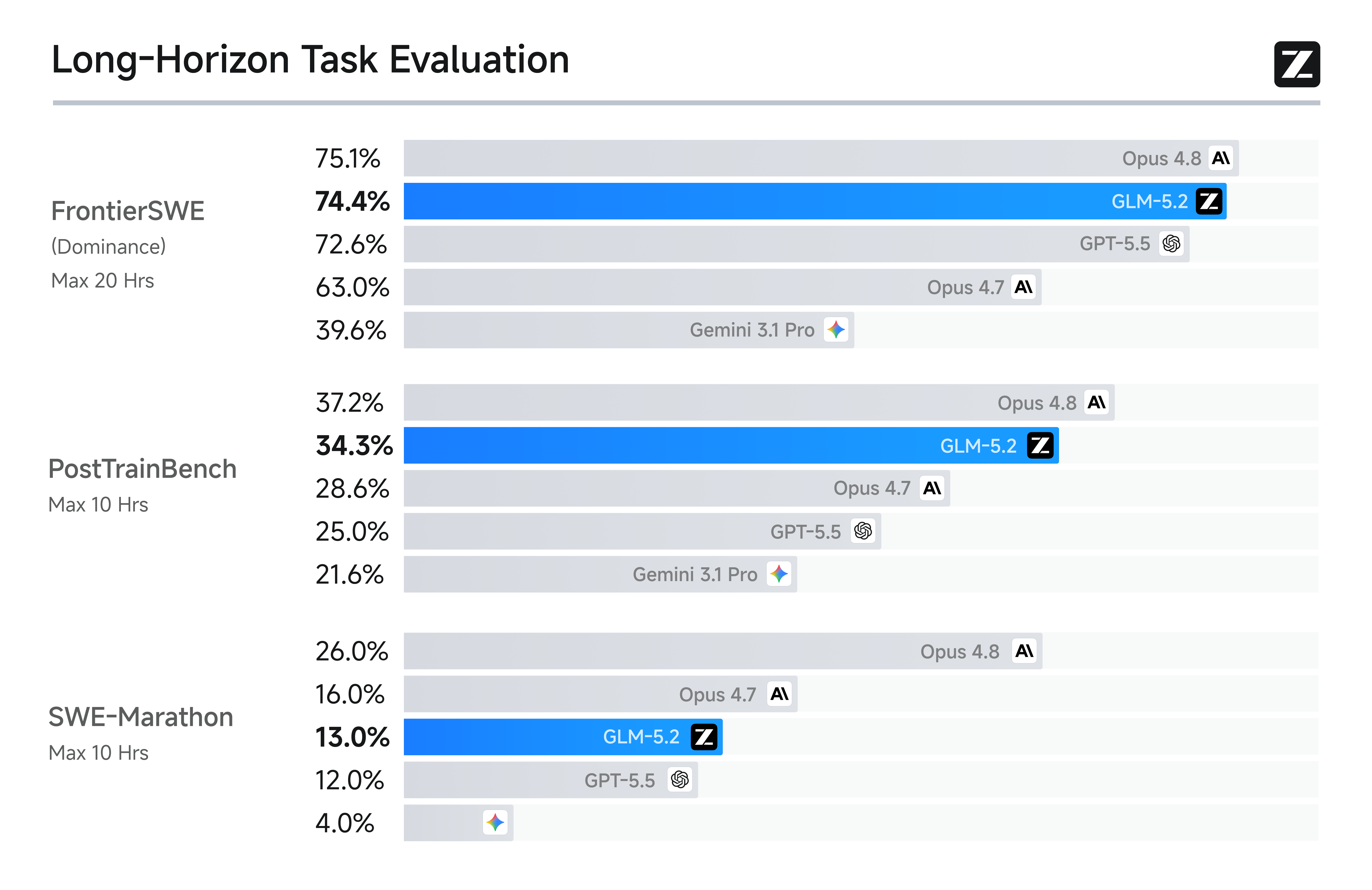
GLM-5.2 delivers state-of-the-art long-horizon coding performance among open-source models. Across FrontierSWE, PostTrainBench, and SWE-Marathon, it consistently ranks among the top models overall—trailing Opus 4.8 by just 1% on FrontierSWE, outperforming GPT-5.5 and Opus 4.7 on multiple benchmarks, and remaining the highest-ranked open-source model across all three. These results demonstrate that GLM-5.2's 1M context window translates into practical long-horizon engineering capability.
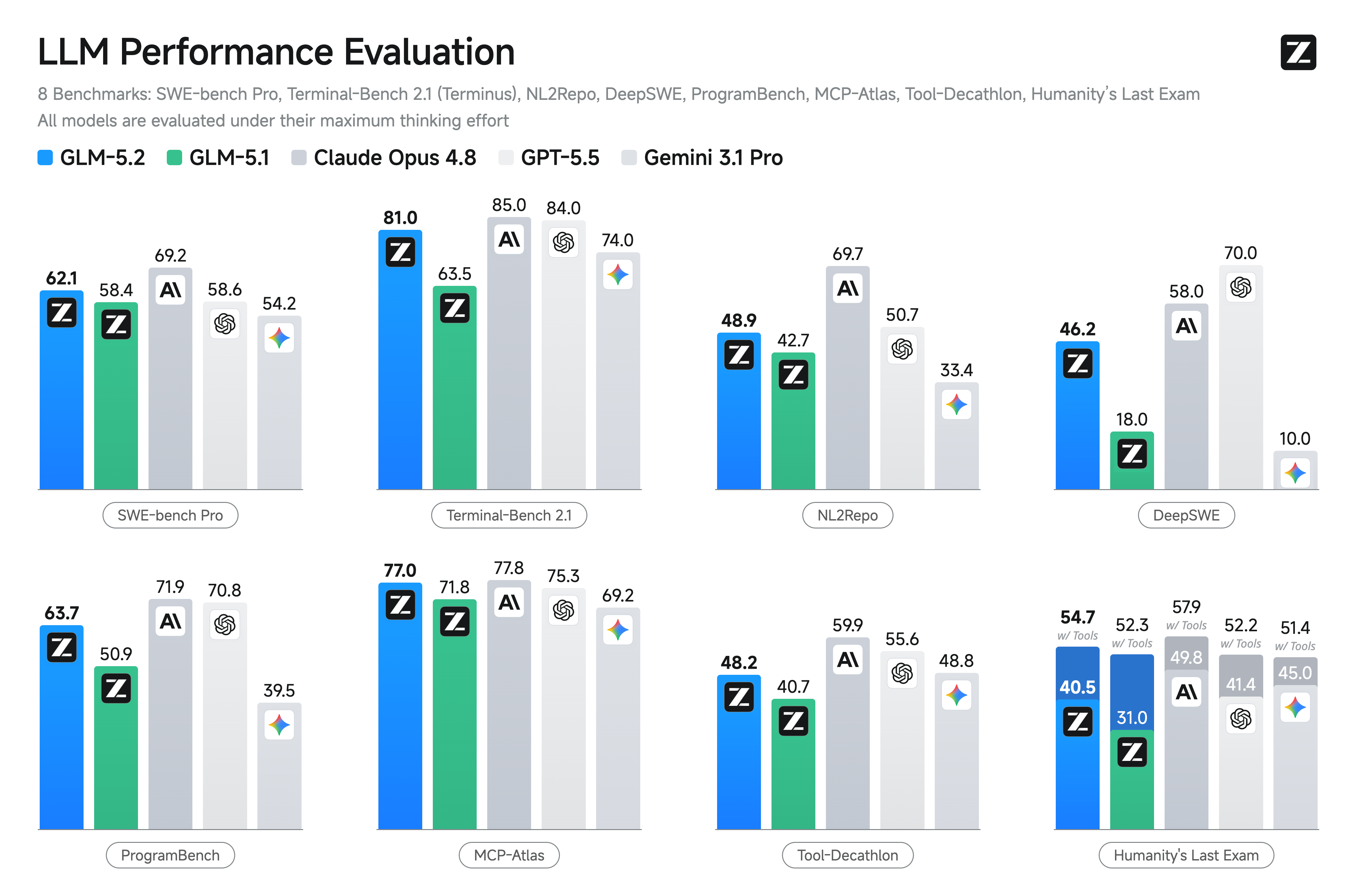
On standard coding benchmarks, GLM-5.2 is the strongest open-source model, improving on GLM-5.1 by a wide margin: 81.0 vs. 62.0 on Terminal-Bench 2.1 and 62.1 vs. 58.4 on SWE-bench Pro. It also closes much of the gap to the closed-source frontier — on Terminal-Bench 2.1 (81.0) it lands within a few points of Claude Opus 4.8 (85.0) — while staying ahead of Gemini 3.1 Pro.
Before its official release, GLM-5.2 was made available in advance to GLM Coding Plan users. Developers reported improvements mainly in the following areas:
* Stronger project-level context capacity, enabling an entire codebase to be placed within a single reasoning workflow;
* More stable long-horizon task execution, allowing complex tasks to progress continuously without easily going off track;
* More reliable adherence to production-grade engineering standards, helping enforce hard constraints in team development workflows;
* Stronger client-side and mobile engineering capabilities, going beyond app generation to support a complete on-device debugging loop.
[↗ Blog](https://z.ai/blog/glm-5.2)
## Resources
* [API Documentation](/api-reference/llm/chat-completion): Learn how to call the API.
## Quick Start
The following is a full sample code to help you onboard GLM-5.2 with ease.
**Basic Call**
```bash theme={null}
curl -X POST "https://api.z.ai/api/paas/v4/chat/completions" \
-H "Content-Type: application/json" \
-H "Authorization: Bearer your-api-key" \
-d '{
"model": "glm-5.2",
"messages": [
{
"role": "system",
"content": "You are a senior full-stack software engineer, proficient in frontend development, backend architecture design, and modern web technology stacks."
},
{
"role": "user",
"content": "Design and build a personal blog website for me, including a homepage, article list page, and article detail page, using React + Node.js technology stack."
}
],
"thinking": {
"type": "enabled"
},
"reasoning_effort": "max",
"max_tokens": 4096,
"temperature": 1.0
}'
```
**Streaming Call**
```bash theme={null}
curl -X POST "https://api.z.ai/api/paas/v4/chat/completions" \
-H "Content-Type: application/json" \
-H "Authorization: Bearer your-api-key" \
-d '{
"model": "glm-5.2",
"messages": [
{
"role": "system",
"content": "You are a senior full-stack software engineer, proficient in frontend development, backend architecture design, and modern web technology stacks."
},
{
"role": "user",
"content": "Design and build a personal blog website for me, including a homepage, article list page, and article detail page, using React + Node.js technology stack."
}
],
"thinking": {
"type": "enabled"
},
"reasoning_effort": "max",
"stream": true,
"max_tokens": 4096,
"temperature": 1.0
}'
```
**Install SDK**
```bash theme={null}
# Install latest version
pip install zai-sdk
# Or specify version
pip install zai-sdk==0.2.3
```
**Verify Installation**
```python theme={null}
import zai
print(zai.__version__)
```
**Basic Call**
```python theme={null}
from zai import ZaiClient
client = ZaiClient(api_key="your-api-key") # Your API Key
response = client.chat.completions.create(
model="glm-5.2",
messages=[
{
"role": "system",
"content": "You are a senior full-stack software engineer, proficient in frontend development, backend architecture design, and modern web technology stacks.",
},
{
"role": "user",
"content": "Design and build a personal blog website for me, including a homepage, article list page, and article detail page, using React + Node.js technology stack.",
},
],
thinking={
"type": "enabled",
},
reasoning_effort="max",
max_tokens=4096,
temperature=1.0,
)
# Get complete response
print(response.choices[0].message)
```
**Streaming Call**
```python theme={null}
from zai import ZaiClient
client = ZaiClient(api_key="your-api-key") # Your API Key
response = client.chat.completions.create(
model="glm-5.2",
messages=[
{
"role": "system",
"content": "You are a senior full-stack software engineer, proficient in frontend development, backend architecture design, and modern web technology stacks.",
},
{
"role": "user",
"content": "Design and build a personal blog website for me, including a homepage, article list page, and article detail page, using React + Node.js technology stack.",
},
],
thinking={
"type": "enabled", # Optional: "disabled" or "enabled", default is "enabled"
},
reasoning_effort="max",
stream=True,
max_tokens=4096,
temperature=0.6,
)
# Stream response
for chunk in response:
if chunk.choices[0].delta.reasoning_content:
print(chunk.choices[0].delta.reasoning_content, end="", flush=True)
if chunk.choices[0].delta.content:
print(chunk.choices[0].delta.content, end="", flush=True)
```
**Install SDK**
**Maven**
```xml theme={null}
ai.z.openapi
zai-sdk
0.3.5
```
**Gradle (Groovy)**
```groovy theme={null}
implementation 'ai.z.openapi:zai-sdk:0.3.5'
```
**Basic Call**
```java theme={null}
import ai.z.openapi.ZaiClient;
import ai.z.openapi.service.model.ChatCompletionCreateParams;
import ai.z.openapi.service.model.ChatCompletionResponse;
import ai.z.openapi.service.model.ChatMessage;
import ai.z.openapi.service.model.ChatMessageRole;
import ai.z.openapi.service.model.ChatThinking;
import java.util.Arrays;
public class BasicChat {
public static void main(String[] args) {
// Initialize client
ZaiClient client = ZaiClient.builder().ofZAI().apiKey("your-api-key").build();
// Create chat completion request
ChatCompletionCreateParams request = ChatCompletionCreateParams.builder()
.model("glm-5.2")
.messages(
Arrays.asList(
ChatMessage.builder()
.role(ChatMessageRole.SYSTEM.value())
.content(
"You are a senior full-stack software engineer, proficient in frontend development, backend architecture design, and modern web technology stacks.")
.build(),
ChatMessage.builder()
.role(ChatMessageRole.USER.value())
.content(
"Design and build a personal blog website for me, including a homepage, article list page, and article detail page, using React + Node.js technology stack.")
.build()))
.thinking(ChatThinking.builder().type("enabled").build())
.reasoningEffort("max")
.maxTokens(4096)
.temperature(1.0f)
.build();
// Send request
ChatCompletionResponse response = client.chat().createChatCompletion(request);
// Get response
if (response.isSuccess()) {
Object reply = response.getData().getChoices().get(0).getMessage();
System.out.println("AI Response: " + reply);
} else {
System.err.println("Error: " + response.getMsg());
}
}
}
```
**Streaming Call**
```java theme={null}
import ai.z.openapi.ZaiClient;
import ai.z.openapi.service.model.ChatCompletionCreateParams;
import ai.z.openapi.service.model.ChatCompletionResponse;
import ai.z.openapi.service.model.ChatMessage;
import ai.z.openapi.service.model.ChatMessageRole;
import ai.z.openapi.service.model.ChatThinking;
import ai.z.openapi.service.model.Delta;
import java.util.Arrays;
public class StreamingChat {
public static void main(String[] args) {
// Initialize client
ZaiClient client = ZaiClient.builder().ofZAI().apiKey("your-api-key").build();
// Create streaming chat completion request
ChatCompletionCreateParams request = ChatCompletionCreateParams.builder()
.model("glm-5.2")
.messages(
Arrays.asList(
ChatMessage.builder()
.role(ChatMessageRole.SYSTEM.value())
.content(
"You are a senior full-stack software engineer, proficient in frontend development, backend architecture design, and modern web technology stacks.")
.build(),
ChatMessage.builder()
.role(ChatMessageRole.USER.value())
.content(
"Design and build a personal blog website for me, including a homepage, article list page, and article detail page, using React + Node.js technology stack.")
.build()))
.thinking(ChatThinking.builder().type("enabled").build())
.reasoningEffort("max")
.stream(true) // Enable streaming output
.maxTokens(4096)
.temperature(1.0f)
.build();
ChatCompletionResponse response = client.chat().createChatCompletion(request);
if (response.isSuccess()) {
response.getFlowable()
.subscribe(
// Process streaming message data
data -> {
if (data.getChoices() != null && !data.getChoices().isEmpty()) {
Delta delta = data.getChoices().get(0).getDelta();
System.out.print(delta + "\n");
}
},
// Process streaming response error
error -> System.err.println("\nStream error: " + error.getMessage()),
// Process streaming response completion event
() -> System.out.println("\nStreaming response completed"));
} else {
System.err.println("Error: " + response.getMsg());
}
}
}
```
**Install SDK**
```bash theme={null}
# Install or upgrade to latest version
pip install --upgrade 'openai>=1.0'
```
**Verify Installation**
```python theme={null}
python -c "import openai; print(openai.__version__)"
```
**Usage Example**
```python theme={null}
from openai import OpenAI
client = OpenAI(
api_key="your-Z.AI-api-key",
base_url="https://api.z.ai/api/paas/v4/",
)
completion = client.chat.completions.create(
model="glm-5.2",
messages=[
{"role": "system", "content": "You are a senior full-stack software engineer, proficient in frontend development, backend architecture design, and modern web technology stacks."},
{
"role": "user",
"content": "Design and build a personal blog website for me, including a homepage, article list page, and article detail page, using React + Node.js technology stack.",
},
],
)
print(completion.choices[0].message.content)
```