> ## Documentation Index
> Fetch the complete documentation index at: https://docs.z.ai/llms.txt
> Use this file to discover all available pages before exploring further.
# GLM-5
Tired of limits? GLM-5 access is currently available for GLM Coding Plan **Pro and Max** — monthly access to world-class models, compatible with top coding tools like Claude Code and Open Code. [Try it now →](https://z.ai/subscribe?utm_campaign=Platform_Ops&_channel_track_key=DaprgHIc)
## Overview
**GLM-5** is Z.AI's new-generation foundation model, designed for **Agentic Engineering**, capable of providing reliable productivity in complex system engineering and long-range Agent tasks. In terms of Coding and Agent capabilities, GLM-5 has achieved state-of-the-art (SOTA) performance in open source, with its usability in real programming scenarios approaching that of Claude Opus 4.5.
Foundation Model
Text
Text
200K
128K
## Capability
Offering multiple thinking modes for different scenarios
Support real-time streaming responses to enhance user interaction experience
Powerful tool invocation capabilities, enabling integration with various external toolsets
Intelligent caching mechanism to optimize performance in long conversations
Support for structured output formats like JSON, facilitating system integration
## Usage
It can automatically generate runnable code based on natural language, covering development processes such as front-end, back-end, and data processing, significantly shortening the iteration cycle from requirements to products.
Capable of autonomous decision-making and tool invocation, it can complete the full-process intelligent agent tasks from understanding, planning to execution and self-check under ambiguous and complex objectives, achieving "input from a single sentence to complete deliverables".
With strong long-range planning and memory capabilities, it can stably complete complex work tasks that span multiple stages, involve multiple steps, and have strong logical connections, ensuring instruction compliance and goal consistency.
It can accurately understand and consistently maintain character settings, remain consistent in narrative, emotion, and logic, and achieve a natural, evolvable, and highly immersive role-playing experience.
Significantly enhanced in long text consistency and complex character development, it can stably output high-quality script content that can directly enter the production process.
Capable of accurately converting formal texts into professional translations that conform to the expression habits of the target language, achieving full alignment of semantics, terminology, and expression.
It can accurately extract key fields and logical relationships from complex texts such as contracts, announcements, and financial reports, stably convert the original content into analyzable Structured Data, and contribute to enterprise data governance and automation.
It can accurately identify key information in complex texts such as customer service tickets and automatically complete quality inspection and risk identification, significantly improving Operational Efficiency.
## Introducing GLM-5
The brand-new GLM-5 foundation lays a solid groundwork for the capability evolution from "writing code" to "building entire projects":
* **Expanded Parameter Scale**: Increased from 355B (32B activated) to 744B (40B activated), with pre-training data upgraded from 23T to 28.5T. Larger-scale pre-training computing power has significantly improved the model’s general intelligence.
* **Asynchronous Reinforcement Learning**: A new "Slime" framework has been developed to support larger model scales and more complex reinforcement learning tasks, enhancing the efficiency of post-training workflows. An asynchronous agent reinforcement learning algorithm is proposed, enabling the model to continuously learn from long-range interactions and fully unlock the potential of pre-trained models.
* **Sparse Attention Mechanism**: DeepSeek Sparse Attention is integrated for the first time, maintaining lossless long-text performance while drastically reducing model deployment costs and improving Token Efficiency.
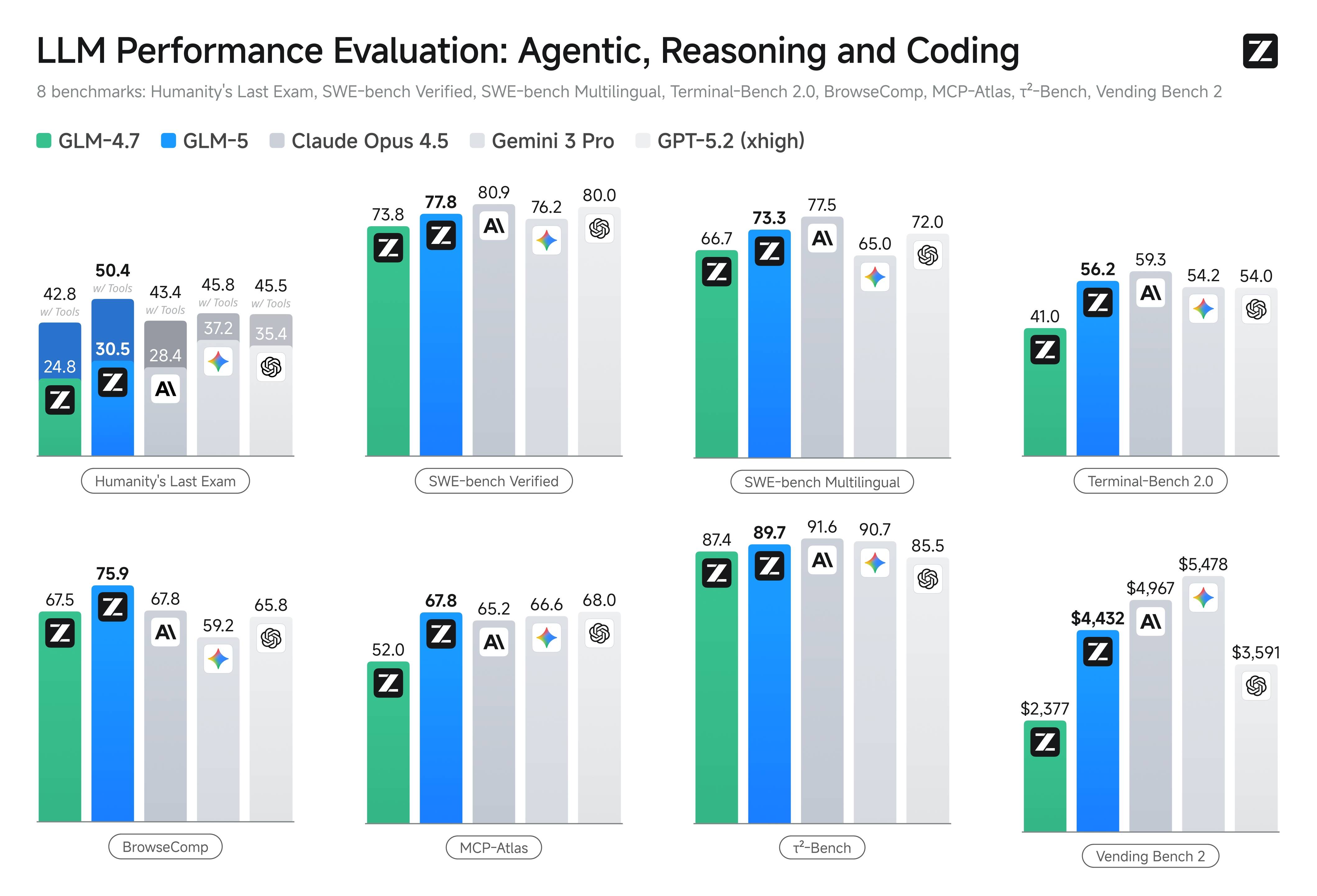
GLM-5 achieves performance alignment with Claude Opus 4.5 in software engineering tasks, **reaching the highest scores among open-weight models across widely recognized industry benchmarks**.
On SWE-bench Verified and Terminal Bench 2.0, GLM-5 records leading open-model scores of 77.8 and 56.2, respectively — surpassing Gemini 3.0 Pro in overall performance.
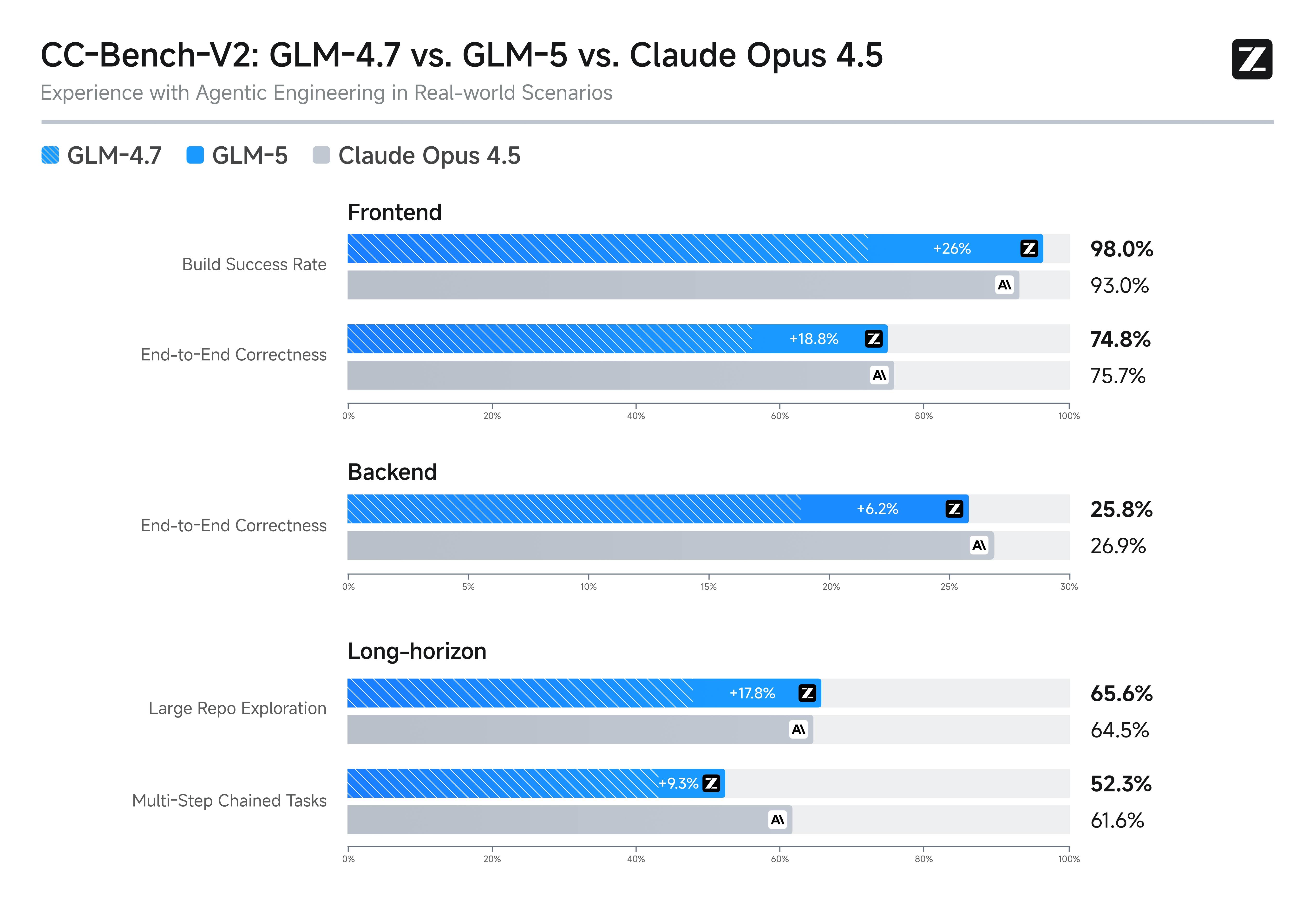
In internal evaluations aligned with the Claude Code task distribution, GLM-5 demonstrates substantial gains over GLM-4.7 across frontend development, backend systems engineering, and long-horizon execution tasks.
The model can autonomously perform agentic long-range planning, backend refactoring, and deep debugging with minimal human intervention—delivering a development experience that approaches Opus 4.5 in both reliability and execution depth.
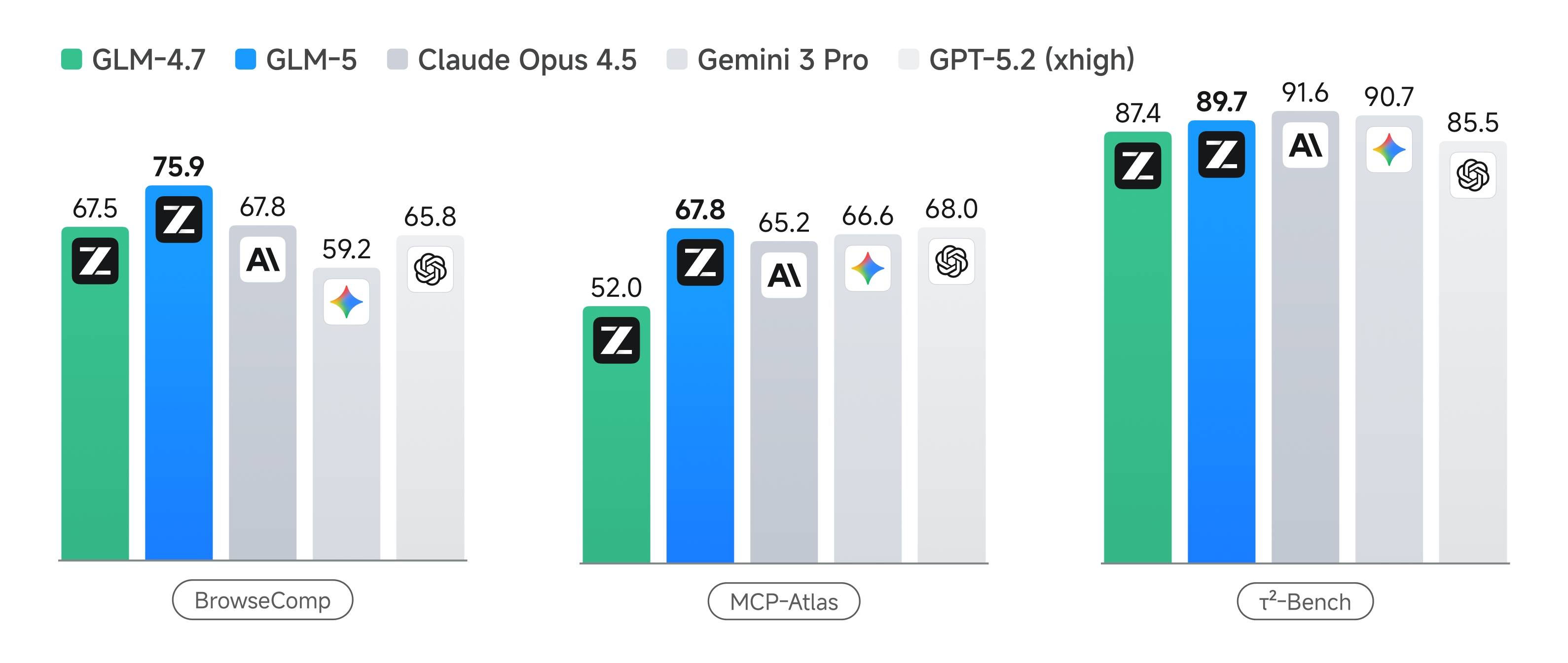
GLM-5 achieves state-of-the-art performance among open-weight models in agentic capability, ranking first across multiple authoritative benchmarks. On BrowseComp (web-scale retrieval and information synthesis), MCP-Atlas (tool invocation and multi-step task execution), and τ²-Bench (complex multi-tool planning and orchestration), GLM-5 delivers top open-model results across the board.
These capabilities define the core of Agentic Engineering. A capable agent must go beyond generating code or completing isolated tasks — it must sustain goal alignment over long horizons, manage intermediate resources, coordinate tool usage, and resolve multi-step dependencies without losing coherence.
## Resources
* [API Documentation](/api-reference/llm/chat-completion): Learn how to call the API.
## Quick Start
The following is a full sample code to help you onboard GLM-5 with ease.
**Basic Call**
```bash theme={null}
curl -X POST "https://api.z.ai/api/paas/v4/chat/completions" \
-H "Content-Type: application/json" \
-H "Authorization: Bearer your-api-key" \
-d '{
"model": "glm-5",
"messages": [
{
"role": "user",
"content": "As a marketing expert, please create an attractive slogan for my product."
},
{
"role": "assistant",
"content": "Sure, to craft a compelling slogan, please tell me more about your product."
},
{
"role": "user",
"content": "Z.AI Open Platform"
}
],
"thinking": {
"type": "enabled"
},
"max_tokens": 4096,
"temperature": 1.0
}'
```
**Streaming Call**
```bash theme={null}
curl -X POST "https://api.z.ai/api/paas/v4/chat/completions" \
-H "Content-Type: application/json" \
-H "Authorization: Bearer your-api-key" \
-d '{
"model": "glm-5",
"messages": [
{
"role": "user",
"content": "As a marketing expert, please create an attractive slogan for my product."
},
{
"role": "assistant",
"content": "Sure, to craft a compelling slogan, please tell me more about your product."
},
{
"role": "user",
"content": "Z.AI Open Platform"
}
],
"thinking": {
"type": "enabled"
},
"stream": true,
"max_tokens": 4096,
"temperature": 1.0
}'
```
**Install SDK**
```bash theme={null}
# Install latest version
pip install zai-sdk
# Or specify version
pip install zai-sdk==0.2.3
```
**Verify Installation**
```python theme={null}
import zai
print(zai.__version__)
```
**Basic Call**
```python theme={null}
from zai import ZaiClient
client = ZaiClient(api_key="your-api-key") # Your API Key
response = client.chat.completions.create(
model="glm-5",
messages=[
{
"role": "user",
"content": "As a marketing expert, please create an attractive slogan for my product.",
},
{
"role": "assistant",
"content": "Sure, to craft a compelling slogan, please tell me more about your product.",
},
{"role": "user", "content": "Z.AI Open Platform"},
],
thinking={
"type": "enabled",
},
max_tokens=4096,
temperature=1.0,
)
# Get complete response
print(response.choices[0].message)
```
**Streaming Call**
```python theme={null}
from zai import ZaiClient
client = ZaiClient(api_key="your-api-key") # Your API Key
response = client.chat.completions.create(
model="glm-5",
messages=[
{
"role": "user",
"content": "As a marketing expert, please create an attractive slogan for my product.",
},
{
"role": "assistant",
"content": "Sure, to craft a compelling slogan, please tell me more about your product.",
},
{"role": "user", "content": "Z.AI Open Platform"},
],
thinking={
"type": "enabled", # Optional: "disabled" or "enabled", default is "enabled"
},
stream=True,
max_tokens=4096,
temperature=0.6,
)
# Stream response
for chunk in response:
if chunk.choices[0].delta.reasoning_content:
print(chunk.choices[0].delta.reasoning_content, end="", flush=True)
if chunk.choices[0].delta.content:
print(chunk.choices[0].delta.content, end="", flush=True)
```
**Install SDK**
**Maven**
```xml theme={null}
ai.z.openapi
zai-sdk
0.3.5
```
**Gradle (Groovy)**
```groovy theme={null}
implementation 'ai.z.openapi:zai-sdk:0.3.5'
```
**Basic Call**
```java theme={null}
import ai.z.openapi.ZaiClient;
import ai.z.openapi.service.model.ChatCompletionCreateParams;
import ai.z.openapi.service.model.ChatCompletionResponse;
import ai.z.openapi.service.model.ChatMessage;
import ai.z.openapi.service.model.ChatMessageRole;
import ai.z.openapi.service.model.ChatThinking;
import java.util.Arrays;
public class BasicChat {
public static void main(String[] args) {
// Initialize client
ZaiClient client = ZaiClient.builder().ofZAI().apiKey("your-api-key").build();
// Create chat completion request
ChatCompletionCreateParams request =
ChatCompletionCreateParams.builder()
.model("glm-5")
.messages(
Arrays.asList(
ChatMessage.builder()
.role(ChatMessageRole.USER.value())
.content(
"As a marketing expert, please create an attractive slogan for my product.")
.build(),
ChatMessage.builder()
.role(ChatMessageRole.ASSISTANT.value())
.content(
"Sure, to craft a compelling slogan, please tell me more about your product.")
.build(),
ChatMessage.builder()
.role(ChatMessageRole.USER.value())
.content("Z.AI Open Platform")
.build()))
.thinking(ChatThinking.builder().type("enabled").build())
.maxTokens(4096)
.temperature(1.0f)
.build();
// Send request
ChatCompletionResponse response = client.chat().createChatCompletion(request);
// Get response
if (response.isSuccess()) {
Object reply = response.getData().getChoices().get(0).getMessage();
System.out.println("AI Response: " + reply);
} else {
System.err.println("Error: " + response.getMsg());
}
}
}
```
**Streaming Call**
```java theme={null}
import ai.z.openapi.ZaiClient;
import ai.z.openapi.service.model.ChatCompletionCreateParams;
import ai.z.openapi.service.model.ChatCompletionResponse;
import ai.z.openapi.service.model.ChatMessage;
import ai.z.openapi.service.model.ChatMessageRole;
import ai.z.openapi.service.model.ChatThinking;
import ai.z.openapi.service.model.Delta;
import java.util.Arrays;
public class StreamingChat {
public static void main(String[] args) {
// Initialize client
ZaiClient client = ZaiClient.builder().ofZAI().apiKey("your-api-key").build();
// Create streaming chat completion request
ChatCompletionCreateParams request =
ChatCompletionCreateParams.builder()
.model("glm-5")
.messages(
Arrays.asList(
ChatMessage.builder()
.role(ChatMessageRole.USER.value())
.content(
"As a marketing expert, please create an attractive slogan for my product.")
.build(),
ChatMessage.builder()
.role(ChatMessageRole.ASSISTANT.value())
.content(
"Sure, to craft a compelling slogan, please tell me more about your product.")
.build(),
ChatMessage.builder()
.role(ChatMessageRole.USER.value())
.content("Z.AI Open Platform")
.build()))
.thinking(ChatThinking.builder().type("enabled").build())
.stream(true) // Enable streaming output
.maxTokens(4096)
.temperature(1.0f)
.build();
ChatCompletionResponse response = client.chat().createChatCompletion(request);
if (response.isSuccess()) {
response.getFlowable()
.subscribe(
// Process streaming message data
data -> {
if (data.getChoices() != null && !data.getChoices().isEmpty()) {
Delta delta = data.getChoices().get(0).getDelta();
System.out.print(delta + "\n");
}
},
// Process streaming response error
error -> System.err.println("\nStream error: " + error.getMessage()),
// Process streaming response completion event
() -> System.out.println("\nStreaming response completed"));
} else {
System.err.println("Error: " + response.getMsg());
}
}
}
```
**Install SDK**
```bash theme={null}
# Install or upgrade to latest version
pip install --upgrade 'openai>=1.0'
```
**Verify Installation**
```python theme={null}
python -c "import openai; print(openai.__version__)"
```
**Usage Example**
```python theme={null}
from openai import OpenAI
client = OpenAI(
api_key="your-Z.AI-api-key",
base_url="https://api.z.ai/api/paas/v4/",
)
completion = client.chat.completions.create(
model="glm-5",
messages=[
{"role": "system", "content": "You are a smart and creative novelist"},
{
"role": "user",
"content": "Please write a short fairy tale story as a fairy tale master",
},
],
)
print(completion.choices[0].message.content)
```