> ## Documentation Index
> Fetch the complete documentation index at: https://docs.z.ai/llms.txt
> Use this file to discover all available pages before exploring further.

# CogVideoX-3

## <Icon icon="rectangle-list" iconType="solid" color="#ffffff" size={36} />   Overview

CogVideoX-3 features new frame generation capabilities that significantly improve image stability and clarity. It also delivers superior performance in handling subjects with significant movement, better adheres to instructions, and provides more realistic simulations. Additionally, it enhances the rendering of high-definition real-world and 3D-style scenes.

<CardGroup cols={3}>
  <Card title="Price" icon="circle-dollar" color="#ffffff">
    \$0.2 / video
  </Card>

  <Card title="Input Modality" icon="arrow-down-right" color="#ffffff">
    Image / Text / Start and End Frame
  </Card>

  <Card title="Output Modality" icon="arrow-down-left" color="#ffffff">
    Video
  </Card>
</CardGroup>

## <Icon icon="list" iconType="solid" color="#ffffff" size={36} />   Usage

<AccordionGroup>
  <Accordion title="Advertising and Marketing">
    Input product images or copy to quickly generate dynamic ads in multiple styles, supporting scene transitions and realistic lighting rendering.
  </Accordion>

  <Accordion title="Short Video Creation">
    Convert single-frame images or text scripts into smooth, naturally animated short videos, covering both realistic and 3D styles.
  </Accordion>

  <Accordion title="Tourism Promotion">
    Upload scenic spot photos and promotional text to generate immersive tourism short videos with realistic natural landscapes.
  </Accordion>

  <Accordion title="Film and TV Production">
    Input storyboards or character design images to automatically generate dynamic preview clips, simulating seamless camera movements and realistic physical interactions.
  </Accordion>
</AccordionGroup>

## <Icon icon="bars-sort" iconType="solid" color="#ffffff" size={36} />   Resources

* [API Documentation](/api-reference/video/cogvideox-3\&vidu): Learn how to call the API.

## <Icon icon="arrow-down-from-line" iconType="solid" color="#ffffff" size={36} />   Introducing CogVideoX-3

<Steps>
  <Step title="Significantly Improved Subject Clarity" titleSize="h3">
    Videos generated by CogVideoX-3 feature clear subjects, stable frames, reduced distortion issues, and support for subjects to move extensively, resulting in more natural and fluid dynamic performance.

    <table>
      <tr>
        <th className="w-[30%] p-1 font-semibold">
          Prompt
        </th>

        <th className="p-1 font-semibold">
          Video
        </th>
      </tr>

      <tr>
        <td className="flex flex-col p-1">
          The petals were blown by the wind, spinning continuously and transforming into a person.
        </td>

        <td>
          <video className="m-0 p-1" src="https://cdn.bigmodel.cn/static/platform/videos/cogvideo/4.mp4" controls />
        </td>
      </tr>

      <tr>
        <td className="flex flex-col p-1">
          Nezha happily took a sip of wine, then showed off the brand of wine.

          <img className="m-0 mb-1" src="https://cdn.bigmodel.cn/markdown/1752546583242cogvideo1.png?attname=cogvideo1.png" alt="wine" />
        </td>

        <td>
          <video className="m-0 p-1" src="https://cdn.bigmodel.cn/static/platform/videos/cogvideo/7.mp4" controls />
        </td>
      </tr>
    </table>
  </Step>

  <Step title="Better Command Compliance and Realistic Physical Simulation" stepNumber={2} titleSize="h3">
    Deeply understands the intent of text commands and accurately reproduces creative requirements. Whether it is having a character perform specific actions or simulating natural physical phenomena, it can be presented in accordance with real-world logic.

    <table>
      <tr>
        <th className="w-[30%] p-1 font-semibold">
          Prompt
        </th>

        <th className="p-1 font-semibold">
          Video
        </th>
      </tr>

      <tr>
        <td className="flex flex-col p-1">
          A pair of hands holding a fruit knife, slicing a whole red tomato into slices.
        </td>

        <td>
          <video className="m-0 p-1" src="https://cdn.bigmodel.cn/static/platform/videos/cogvideo/8.mp4" controls />
        </td>
      </tr>

      <tr>
        <td className="flex flex-col p-1">
          In an open-plan office, an employee is looking down at his phone. Suddenly, the manager appears and taps him on the shoulder. Startled, he quickly puts his phone away.
        </td>

        <td>
          <video className="m-0 p-1" src="https://cdn.bigmodel.cn/static/platform/videos/cogvideo/6.mp4" controls />
        </td>
      </tr>
    </table>
  </Step>

  <Step title="Enhanced High-Definition Realistic-Style Scenes and 3D-Style Scene Rendering" stepNumber={3} titleSize="h3">
    For realistic styles, it can create high-definition textures akin to real-life photography; when switching to 3D styles, it can precisely shape three-dimensional forms and scene atmospheres, effortlessly handling multiple styles.

    <table>
      <tr>
        <th className="w-[30%] p-1 font-semibold">
          Prompt
        </th>

        <th className="p-1 font-semibold">
          Video
        </th>
      </tr>

      <tr>
        <td className="flex flex-col p-1">
          A high-angle shot captures Dou E and the sky. Dou E was an innocent woman from ancient China who was wrongfully accused. At this moment, she is looking up and shouting. Under the scorching June sun, white snow falls from the sky, scattering upon contact with bloodstains. Her clothes flutter slightly, accompanied by a 3D particle wind.
        </td>

        <td>
          <video className="m-0 p-1" src="https://cdn.bigmodel.cn/static/platform/videos/cogvideo/3.mp4" controls />
        </td>
      </tr>

      <tr>
        <td className="flex flex-col p-1">
          A stylish anthropomorphic snow leopard wearing a white leopard-print fashion coat, super fluffy, plush, thick, and luxurious, walking the runway in ultra-high definition with a cinematic feel, reminiscent of a blockbuster movie, like a Victoria's Secret fashion show. The runway is lined with spectators taking photos on both sides.
        </td>

        <td>
          <video className="m-0 p-1" src="https://cdn.bigmodel.cn/static/platform/videos/cogvideo/5.mp4" controls />
        </td>
      </tr>
    </table>
  </Step>

  <Step title="Added Start and End Frame Generation" stepNumber={4} titleSize="h3">
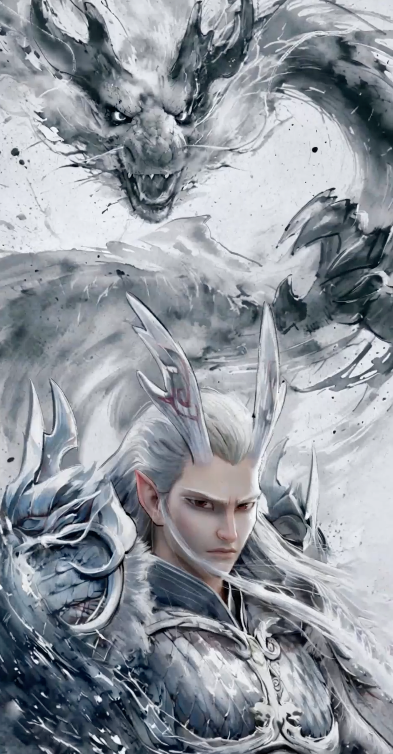
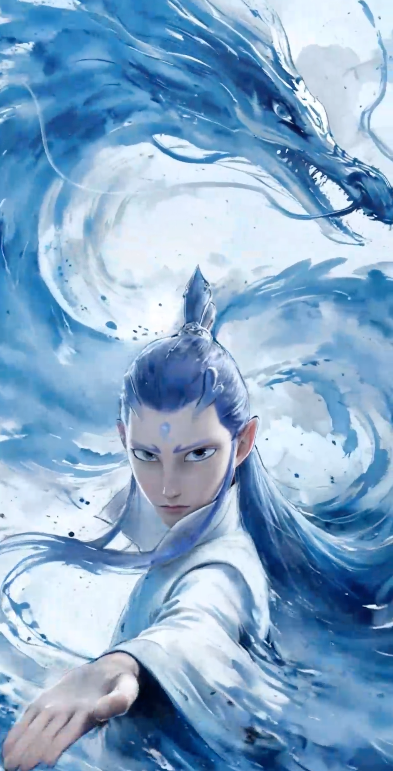
    Supports users providing start and end frames, automatically generating seamless transition content, allowing static frames to naturally connect into dynamic narratives, and linking complete creative concepts.

    <table>
      <tr>
        <th className="w-[30%] p-1 font-semibold">
          Prompt
        </th>

        <th className="p-1 font-semibold">
          Start Frame
        </th>

        <th className="p-1 font-semibold">
          End Frame
        </th>

        <th className="w-[30%] p-1 font-semibold">
          Video
        </th>
      </tr>

      <tr>
        <td className="flex flex-col p-1">
          The Dragon King transforms into Ao Bing, with ink wash-style shading. The main character slowly transforms, highlighting the details of the transformation. The camera rotates smoothly, creating a natural and fluid transition.
        </td>

        <td className="align-top">
          <img className="m-0 p-1" src="https://cdn.bigmodel.cn/markdown/1752547571093cogvideo2.png?attname=cogvideo2.png" />
        </td>

        <td className="align-top">
          <img className="m-0 p-1" src="https://cdn.bigmodel.cn/markdown/1752547589957cogvideo3.png?attname=cogvideo3.png" />
        </td>

        <td className="align-top">
          <video className="m-0 p-1" src="https://cdn.bigmodel.cn/static/platform/videos/cogvideo/1.mp4" controls />
        </td>
      </tr>

      <tr>
        <td className="flex flex-col p-1">
          The character holds a gun in both hands and shoots wildly at the computer screen. The computer catches fire, explodes, and shatters into pieces, sending debris flying everywhere. The office lights flicker.
        </td>

        <td className="align-top">
          <img className="m-0 p-1" src="https://cdn.bigmodel.cn/markdown/1752547801491cogvideo4.png?attname=cogvideo4.png" />
        </td>

        <td className="align-top">
          <img className="m-0 p-1" src="https://cdn.bigmodel.cn/markdown/1752547813297cogvideo5.png?attname=cogvideo5.png" />
        </td>

        <td className="align-top">
          <video className="m-0 p-1" src="https://cdn.bigmodel.cn/static/platform/videos/cogvideo/2.mp4" controls />
        </td>
      </tr>
    </table>
  </Step>
</Steps>

## <Icon icon="rectangle-code" iconType="solid" color="#ffffff" size={36} />    Quick Start

<Tabs>
  <Tab title="Text-to-Video Generation">
    **Install SDK**

    ```bash theme={null}
    # Install latest version
    pip install zai-sdk

    # Or specify version
    pip install zai-sdk==0.2.2
    ```

    **Verify Installation**

    ```python theme={null}
    import zai
    print(zai.__version__)
    ```

    ```python theme={null}
    from zai import ZaiClient
    client = ZaiClient(api_key="your-api-key")

    # Generate video
    response = client.videos.generations(
        model="cogvideox-3",
        prompt="A cat is playing with a ball.",
        quality="quality",  # Output mode, "quality" for quality priority, "speed" for speed priority
        with_audio=True, # Whether to include audio
        size="1920x1080",  # Video resolution, supports up to 4K (e.g., "3840x2160")
        fps=30,  # Frame rate, can be 30 or 60
    )
    print(response)

    # Get video result
    result = client.videos.retrieve_videos_result(id=response.id)
    print(result)
    ```
  </Tab>

  <Tab title="Image-to-Video Generation">
    **Install SDK**

    ```bash theme={null}
    # Install latest version
    pip install zai-sdk

    # Or specify version
    pip install zai-sdk==0.2.2
    ```

    **Verify Installation**

    ```python theme={null}
    import zai
    print(zai.__version__)
    ```

    ```python theme={null}
    from zai import ZaiClient

    # Initialize the client, please fill in your own APIKey.
    client = ZaiClient(api_key="your-api-key")

    # Define the URL address of the image.
    image_url = "https://img.iplaysoft.com/wp-content/uploads/2019/free-images/free_stock_photo.jpg"  # 替换为您的图片URL地址

    # Call the video generation interface.
    response = client.videos.generations(
        model="cogvideox-3",  # The video generation model used.
        image_url=image_url,  # Please provide the image URL or Base64 encoding.
        prompt="Make the picture move.",
        quality="quality",  # Output mode: "quality" prioritizes quality, and "speed" prioritizes speed.
        with_audio=True,
        size="1920x1080",  # Video resolution, supports up to 4K (e.g., "3840x2160").
        fps=30,  # Frame rate, optional values are 30 or 60.
    )

    # Print the returned result.
    print(response)

    # Get video result
    result = client.videos.retrieve_videos_result(id=response.id)
    print(result)
    ```
  </Tab>

  <Tab title="Start and End Frame">
    **Install SDK**

    ```bash theme={null}
    # Install latest version
    pip install zai-sdk

    # Or specify version
    pip install zai-sdk==0.2.2
    ```

    **Verify Installation**

    ```python theme={null}
    import zai
    print(zai.__version__)
    ```

    ```python theme={null}
    from zai import ZaiClient

    # Initialize client, please fill in your own APIKey
    client = ZaiClient(api_key="your-api-key")

    # Define URLs for first frame and last frame
    sample_first_frame = "https://gd-hbimg.huaban.com/ccee58d77afe8f5e17a572246b1994f7e027657fe9e6-qD66In_fw1200webp"
    sample_last_frame = "https://gd-hbimg.huaban.com/cc2601d568a72d18d90b2cc7f1065b16b2d693f7fa3f7-hDAwNq_fw1200webp"

    # Call video generation API (assuming image_urls is supported)
    response = client.videos.generations(
        model="cogvideox-3",  # Video generation model to use
        image_url=[sample_first_frame, sample_last_frame],  # List of URLs for first and last frames
        prompt="Animate the scene",
        quality="quality",  # Output mode, "quality" for quality priority, "speed" for speed priority
        with_audio=True,
        size="1920x1080",  # Video resolution, supports up to 4K (e.g., "3840x2160")
        fps=30,  # Frame rate, can be 30 or 60
    )

    # Print response
    print(response)

    # Get video result
    result = client.videos.retrieve_videos_result(id=response.id)
    print(result)
    ```
  </Tab>
</Tabs>