> ## Documentation Index
> Fetch the complete documentation index at: https://docs.z.ai/llms.txt
> Use this file to discover all available pages before exploring further.
# Vidu 2
## Overview
Vidu 2 is a next-generation video generation model that strikes a balance between speed and quality. It focuses on image-to-video generation and keyframe-based video creation, supporting 720P resolution for videos up to 4 seconds long.
With significantly faster generation speed and reduced cost, it addresses color distortion issues in image-to-video outputs, delivering stable and controllable visuals ideal for e-commerce scenarios.
Enhanced semantic understanding between keyframes and improved consistency with multiple reference images make Vidu 2 a highly efficient tool for mass production in pan-entertainment, internet content, anime short series, and advertising.
\$0.2 / video
Image-to-Video Generation
4S
720P
\$0.2 / video
Start and End Frame
5S
720P
\$0.4 / video
Reference-based Video Generation
4S
720P
## Capability Description
Generate a video by providing a starting frame or both starting and ending frames along with corresponding text descriptions.
Support input of two images: the first uploaded image is treated as the starting frame, and the second as the ending frame. The model uses these images as input parameters to generate the video.
Generate a video from a text prompt; currently supports both a general style and an anime style optimized for animation.
The URL link for the video generated by the model is valid for one day. Please save it as soon as possible if needed.
## Usage
* Input a single frame or IP elements to quickly generate short videos with coherent storylines and interactive special effects
* Supports diverse visual styles from anime-inspired to realistic
* Tailored for mass production of UGC creative content on short video platforms
* Input static character images or keyframes to generate smooth animated sequences and micro-dramas
* Accurately reproduce detailed character movements (e.g., facial expressions)
* Supports mass production in various styles such as Chinese and Japanese anime
* Designed to meet animation studios’ needs for IP-based content expansion
* Input real product images to intelligently generate dynamic advertising videos
* Clearly showcase product features such as 3C details and beauty product textures
* Automatically adapt to various platform formats, such as vertical videos for Tiktok and horizontal layouts for social feeds
## Resources
[API Documentation](/api-reference/video/cogvideox-3\&vidu): Learn how to call the API.
## Introducing Vidu2
With optimized model computing architecture, video rendering efficiency is significantly enhanced. This allows daily content teams to respond quickly to trending topics, and enables e-commerce sellers to mass-produce product display videos on demand—greatly reducing content delivery time and helping creators seize traffic windows.
The cost of generating 720P resolution videos has dropped to 40% of the Q1 version. Small and medium-sized brands can now create batch videos for multiple SKUs, while advertising teams can test creative concepts like "product close-ups + scenario storytelling" at a lower cost—meeting full-platform marketing needs without breaking the content budget.
* The model addresses the "texture color shift" issue—accurately restoring details like the silky glow of satin or the matte finish of leather in clothing videos. In e-commerce scenarios, product colors are displayed more realistically.
* Dynamic frame compensation is optimized, ensuring smooth, shake-free motion for rotating 3C products or hand demonstrations in beauty tutorials.
* Multiple visual styles are supported, enabling eye-catching content like “product close-up + stylized camera movement,” ideal for e-commerce main images and short-form promotional videos.
The model strikes a balance between creativity and stability, delivering significantly improved performance and semantic understanding—making it the optimal solution for keyframe-based video generation.
By accurately analyzing scene logic and action continuity, transitions between frames are smooth and natural, enhancing narrative coherence throughout the content.
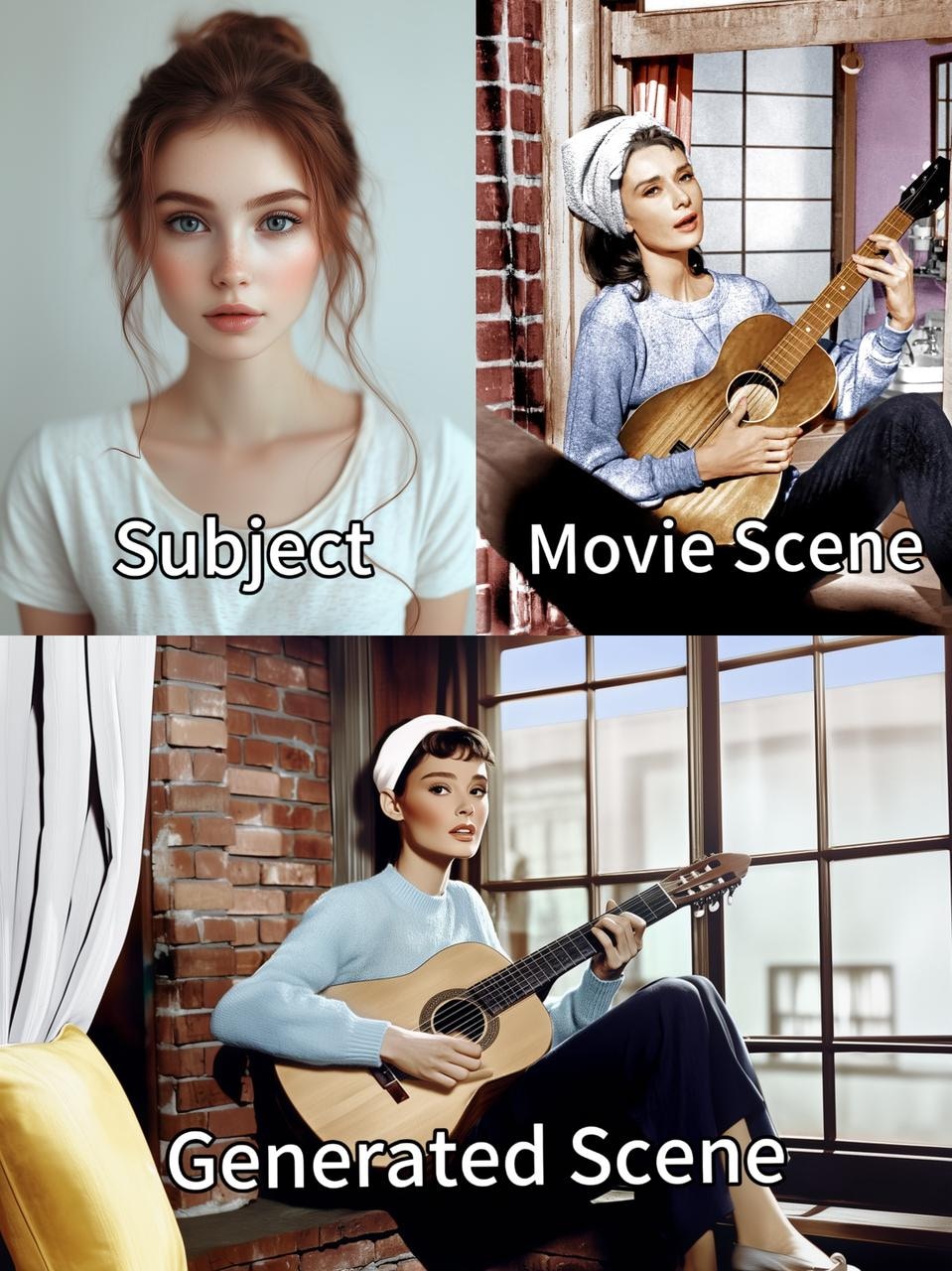
When inputting multi-element materials, the visual style of the generated video (such as tone and lighting) can be highly unified.
For example, in a cultural tourism promotional video, the transition between scenes such as the sunrise over an ancient city, street market scenes, and folk performances maintains consistency with the “Chinese style filter.”
In anime IP derivative content, the actions and expressions of characters in different plot scenes can also strictly adhere to the original settings, facilitating the coherent creation of multi-scene, multi-element content.
 ## Quick Start
### 1. Image-to-Video Generation
```json theme={null}
curl --location --request POST 'https://api.z.ai/api/paas/v4/videos/generations' \
--header 'Authorization: Bearer {your apikey}' \
--header 'Content-Type: application/json' \
--data-raw '{
"model":"vidu2-image",
"image_url":"https://example.com/path/to/your/image.jpg",
"prompt":"Peter Rabbit drives a small car along the road, his face filled with joy and happiness.",
"duration":4,
"size":"720x480",
"movement_amplitude":"auto"
}'
```
**Install SDK**
```bash theme={null}
# Install latest version
pip install zai-sdk
# Or specify version
pip install zai-sdk==0.2.3
```
**Verify Installation**
```python theme={null}
import zai
print(zai.__version__)
```
```python theme={null}
from zai import ZaiClient
# Initialize the client, please replace your-api-key with your own APIKey.
client = ZaiClient(api_key="your-api-key")
# Video generation example from images.
response = client.videos.generations(
model="vidu2-image",
image_url="https://example.com/path/to/your/image.jpg",
prompt="Peter Rabbit is driving a small car, cruising on the road, with a face full of happiness and joy.",
duration=4,
size="1280x720",
movement_amplitude="auto"
)
# Print the response result.
print(response)
```
**Install SDK**
**Maven**
```xml theme={null}
ai.z.openapi
zai-sdk
0.3.5
```
**Gradle (Groovy)**
```groovy theme={null}
implementation 'ai.z.openapi:zai-sdk:0.3.5'
```
```java theme={null}
import ai.z.openapi.ZaiClient;
import ai.z.openapi.service.videos.VideoCreateParams;
import ai.z.openapi.service.videos.VideosResponse;
public class Vidu2Example {
public static void main(String[] args) throws InterruptedException {
String apiKey = "your_api_key"; // Please fill in your own APIKey.
ZaiClient client = ZaiClient.builder().ofZAI().apiKey(apiKey).build();
// Construct video generation request parameters.
VideoCreateParams request = VideoCreateParams.builder()
.model("vidu2-image")
.imageUrl("https://example.com/path/to/your/image.jpg")
.prompt("Peter Rabbit is driving a small car, cruising on the road, with a face full of happiness and joy.")
.duration(4)
.size("1280x720")
.build();
// Initiate video generation request.
VideosResponse response = client.videos().videoGenerations(request);
System.out.println(response.getData());
// Wait for 10 minutes, then asynchronously retrieve the final generated video using the task ID.
Thread.sleep(600000L);
VideosResponse videosResponse = client.videos().videoGenerationsResult(response.getData().getId());
System.out.println(videosResponse.getData().getVideoResult());
}
}
```
### 2. Start and End Frame
```json theme={null}
curl --location --request POST 'https://api.z.ai/api/paas/v4/videos/generations' \
--header 'Authorization: Bearer {your apikey}' \
--header 'Content-Type: application/json' \
--data-raw '{
"model":"vidu2-start-end",
"image_url":["https://example.com/path/to/your/image1.jpg","https://example.com/path/to/your/image2.jpg"],
"prompt":"Peter Rabbit drives a small car along the road, his face filled with joy and happiness.",
"duration":4,
"size":"720x480",
"movement_amplitude":"auto"
}'
```
```python theme={null}
from zai import ZaiClient
# Initialize the client, please replace "your-api-key" with your own APIKey.
client = ZaiClient(api_key="your-api-key")
# Define URLs for first frame and last frame
sample_first_frame = "https://gd-hbimg.huaban.com/ccee58d77afe8f5e17a572246b1994f7e027657fe9e6-qD66In_fw1200webp"
sample_last_frame = "https://gd-hbimg.huaban.com/cc2601d568a72d18d90b2cc7f1065b16b2d693f7fa3f7-hDAwNq_fw1200webp"
# Video generation request (first and last frame mode)
response = client.videos.generations(
model="vidu2-start-end",
image_url=[sample_first_frame, sample_last_frame], # The first and last frame images
prompt="Peter Rabbit driving a car, wandering on the road, with a happy and joyful expression on his face.",
duration=4, #Video duration (seconds)
size="1280x720", # Video resolution
movement_amplitude="auto", # Movement amplitude
)
# Print the response result
print(response)
```
### 3. Reference-based Video Generation
```json theme={null}
curl --location --request POST 'https://api.z.ai/api/paas/v4/videos/generations' \
--header 'Authorization: Bearer {your apikey}' \
--header 'Content-Type: application/json' \
--data-raw '{
"model":"vidu2-reference",
"image_url":["https://example.com/path/to/your/image1.jpg","https://example.com/path/to/your/image2.jpg","https://example.com/path/to/your/image3.jpg"],
"prompt":"Peter Rabbit drives a small car along the road, his face filled with joy and happiness.",
"duration":4,
"aspect_ratio":"16:9",
"size":"720x480",
"movement_amplitude":"auto",
"with_audio":true
}'
```
```python theme={null}
from zai import ZaiClient
# Initialize client with your API key (replace 'your-api-key')
client = ZaiClient(api_key="your-api-key")
ref_image_url = [
"https://gd-hbimg.huaban.com/ccee58d77afe8f5e17a572246b1994f7e027657fe9e6-qD66In_fw1200webp",
"https://gd-hbimg.huaban.com/cc2601d568a72d18d90b2cc7f1065b16b2d693f7fa3f7-hDAwNq_fw1200webp",
"https://gd-hbimg.huaban.com/cc2601d568a72d18d90b2cc7f1065b16b2d693f7fa3f7-hDAwNq_fw1200webp"
]
# Generate video using reference images
response = client.videos.generations(
model="vidu2-reference", # Using reference image model
image_url=ref_image_url, # List of reference image URLs
prompt="Peter Rabbit driving a car, wandering on the road, with a happy and joyful expression on his face.",
duration=4, # Video duration in seconds
aspect_ratio="16:9", # Standard widescreen aspect ratio
size="1280x720", # HD resolution
movement_amplitude="auto", # Automatic motion control
with_audio=True, # Enable audio generation
)
# Print API response
print(response)
```
## Quick Start
### 1. Image-to-Video Generation
```json theme={null}
curl --location --request POST 'https://api.z.ai/api/paas/v4/videos/generations' \
--header 'Authorization: Bearer {your apikey}' \
--header 'Content-Type: application/json' \
--data-raw '{
"model":"vidu2-image",
"image_url":"https://example.com/path/to/your/image.jpg",
"prompt":"Peter Rabbit drives a small car along the road, his face filled with joy and happiness.",
"duration":4,
"size":"720x480",
"movement_amplitude":"auto"
}'
```
**Install SDK**
```bash theme={null}
# Install latest version
pip install zai-sdk
# Or specify version
pip install zai-sdk==0.2.3
```
**Verify Installation**
```python theme={null}
import zai
print(zai.__version__)
```
```python theme={null}
from zai import ZaiClient
# Initialize the client, please replace your-api-key with your own APIKey.
client = ZaiClient(api_key="your-api-key")
# Video generation example from images.
response = client.videos.generations(
model="vidu2-image",
image_url="https://example.com/path/to/your/image.jpg",
prompt="Peter Rabbit is driving a small car, cruising on the road, with a face full of happiness and joy.",
duration=4,
size="1280x720",
movement_amplitude="auto"
)
# Print the response result.
print(response)
```
**Install SDK**
**Maven**
```xml theme={null}
ai.z.openapi
zai-sdk
0.3.5
```
**Gradle (Groovy)**
```groovy theme={null}
implementation 'ai.z.openapi:zai-sdk:0.3.5'
```
```java theme={null}
import ai.z.openapi.ZaiClient;
import ai.z.openapi.service.videos.VideoCreateParams;
import ai.z.openapi.service.videos.VideosResponse;
public class Vidu2Example {
public static void main(String[] args) throws InterruptedException {
String apiKey = "your_api_key"; // Please fill in your own APIKey.
ZaiClient client = ZaiClient.builder().ofZAI().apiKey(apiKey).build();
// Construct video generation request parameters.
VideoCreateParams request = VideoCreateParams.builder()
.model("vidu2-image")
.imageUrl("https://example.com/path/to/your/image.jpg")
.prompt("Peter Rabbit is driving a small car, cruising on the road, with a face full of happiness and joy.")
.duration(4)
.size("1280x720")
.build();
// Initiate video generation request.
VideosResponse response = client.videos().videoGenerations(request);
System.out.println(response.getData());
// Wait for 10 minutes, then asynchronously retrieve the final generated video using the task ID.
Thread.sleep(600000L);
VideosResponse videosResponse = client.videos().videoGenerationsResult(response.getData().getId());
System.out.println(videosResponse.getData().getVideoResult());
}
}
```
### 2. Start and End Frame
```json theme={null}
curl --location --request POST 'https://api.z.ai/api/paas/v4/videos/generations' \
--header 'Authorization: Bearer {your apikey}' \
--header 'Content-Type: application/json' \
--data-raw '{
"model":"vidu2-start-end",
"image_url":["https://example.com/path/to/your/image1.jpg","https://example.com/path/to/your/image2.jpg"],
"prompt":"Peter Rabbit drives a small car along the road, his face filled with joy and happiness.",
"duration":4,
"size":"720x480",
"movement_amplitude":"auto"
}'
```
```python theme={null}
from zai import ZaiClient
# Initialize the client, please replace "your-api-key" with your own APIKey.
client = ZaiClient(api_key="your-api-key")
# Define URLs for first frame and last frame
sample_first_frame = "https://gd-hbimg.huaban.com/ccee58d77afe8f5e17a572246b1994f7e027657fe9e6-qD66In_fw1200webp"
sample_last_frame = "https://gd-hbimg.huaban.com/cc2601d568a72d18d90b2cc7f1065b16b2d693f7fa3f7-hDAwNq_fw1200webp"
# Video generation request (first and last frame mode)
response = client.videos.generations(
model="vidu2-start-end",
image_url=[sample_first_frame, sample_last_frame], # The first and last frame images
prompt="Peter Rabbit driving a car, wandering on the road, with a happy and joyful expression on his face.",
duration=4, #Video duration (seconds)
size="1280x720", # Video resolution
movement_amplitude="auto", # Movement amplitude
)
# Print the response result
print(response)
```
### 3. Reference-based Video Generation
```json theme={null}
curl --location --request POST 'https://api.z.ai/api/paas/v4/videos/generations' \
--header 'Authorization: Bearer {your apikey}' \
--header 'Content-Type: application/json' \
--data-raw '{
"model":"vidu2-reference",
"image_url":["https://example.com/path/to/your/image1.jpg","https://example.com/path/to/your/image2.jpg","https://example.com/path/to/your/image3.jpg"],
"prompt":"Peter Rabbit drives a small car along the road, his face filled with joy and happiness.",
"duration":4,
"aspect_ratio":"16:9",
"size":"720x480",
"movement_amplitude":"auto",
"with_audio":true
}'
```
```python theme={null}
from zai import ZaiClient
# Initialize client with your API key (replace 'your-api-key')
client = ZaiClient(api_key="your-api-key")
ref_image_url = [
"https://gd-hbimg.huaban.com/ccee58d77afe8f5e17a572246b1994f7e027657fe9e6-qD66In_fw1200webp",
"https://gd-hbimg.huaban.com/cc2601d568a72d18d90b2cc7f1065b16b2d693f7fa3f7-hDAwNq_fw1200webp",
"https://gd-hbimg.huaban.com/cc2601d568a72d18d90b2cc7f1065b16b2d693f7fa3f7-hDAwNq_fw1200webp"
]
# Generate video using reference images
response = client.videos.generations(
model="vidu2-reference", # Using reference image model
image_url=ref_image_url, # List of reference image URLs
prompt="Peter Rabbit driving a car, wandering on the road, with a happy and joyful expression on his face.",
duration=4, # Video duration in seconds
aspect_ratio="16:9", # Standard widescreen aspect ratio
size="1280x720", # HD resolution
movement_amplitude="auto", # Automatic motion control
with_audio=True, # Enable audio generation
)
# Print API response
print(response)
```