> ## Documentation Index
> Fetch the complete documentation index at: https://docs.z.ai/llms.txt
> Use this file to discover all available pages before exploring further.
# GLM-4.5V
## Overview
GLM-4.5V is Z.AI's new generation of visual reasoning models based on the MOE architecture. With a total of 106B parameters and 12B activation parameters, it achieves SOTA performance among open-source VLMs of the same level in various benchmark tests, covering common tasks such as image, video, document understanding, and GUI tasks.
* Input: \$0.6 per million tokens
* Output: \$1.8 per million tokens
Video / Image / Text / File
Text
16K
## Usage
Analyze webpage screenshots or screen recording videos, understand layout and interaction logic, and generate complete and usable webpage code with one click.
Precisely identify and locate target objects, suitable for practical scenarios such as security checks, quality inspections, content reviews, and remote sensing monitoring.
Recognize and process screen images, support execution of commands like clicking and sliding, providing reliable support for intelligent agents to complete operational tasks.
Deeply analyze complex documents spanning dozens of pages, support summarization, translation, chart extraction, and can propose insights based on content.
Strong reasoning ability and rich world knowledge, capable of deducing background information of images without using search.
Able to parse long video content and accurately infer the time, characters, events, and logical relationships within the video.
Can solve complex text-image combined problems, suitable for K12 educational scenarios for problem-solving and explanation.
## Resources
* [API Documentation](/api-reference/llm/chat-completion): Learn how to call the API.
## Introducing GLM-4.5V
GLM-4.5V, based on Z.AI's flagship GLM-4.5-Air, continues the iterative upgrade of the GLM-4.1V-Thinking technology route, achieving comprehensive performance at the same level as open-source SOTA models in 42 public visual multimodal benchmarks, covering common tasks such as image, video, document understanding, and GUI tasks.
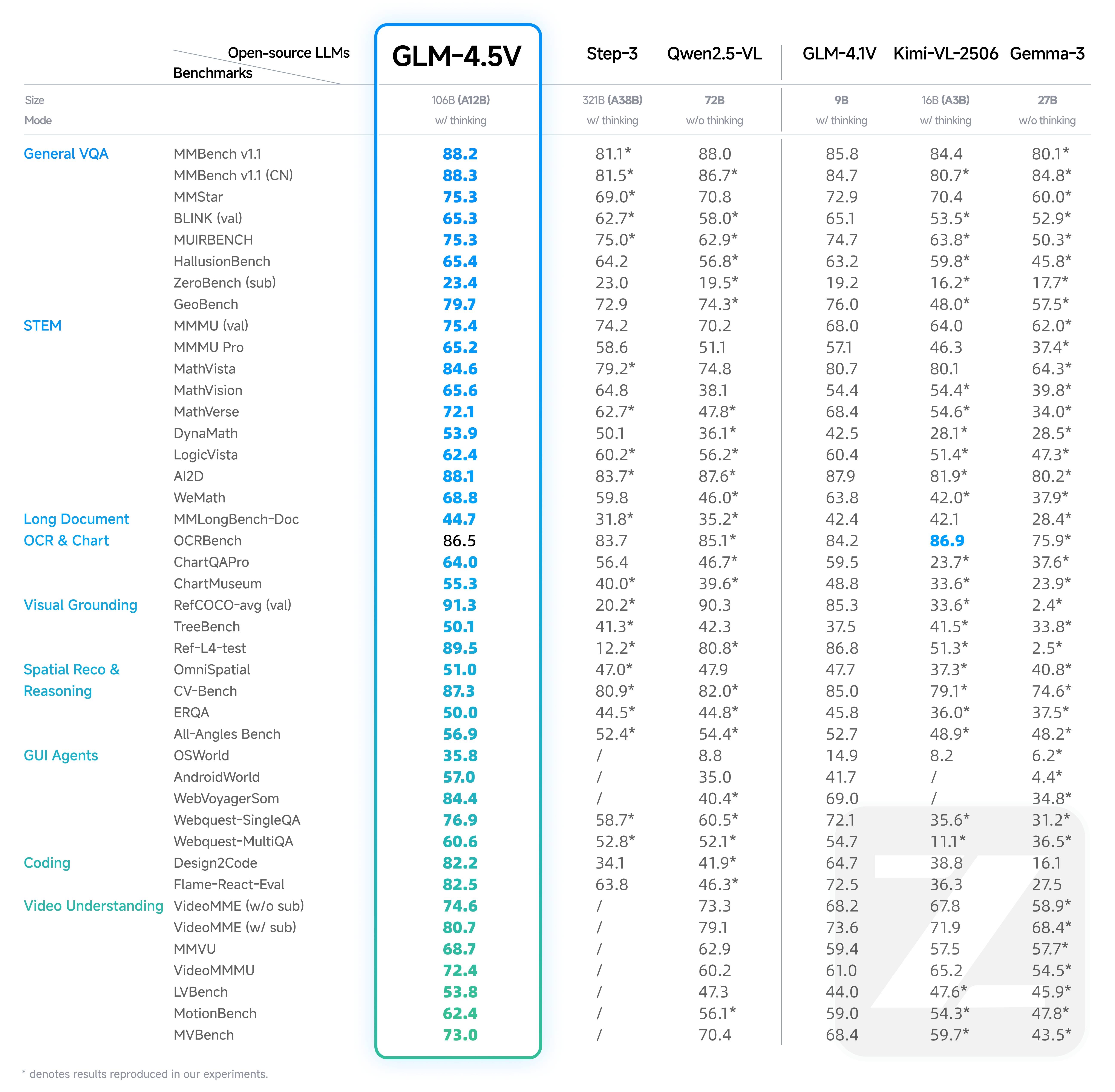
GLM-4.5V introduces a new "Thinking Mode" switch, allowing users to freely switch between quick response and deep reasoning, flexibly balancing processing speed and output quality according to task requirements.
## Examples
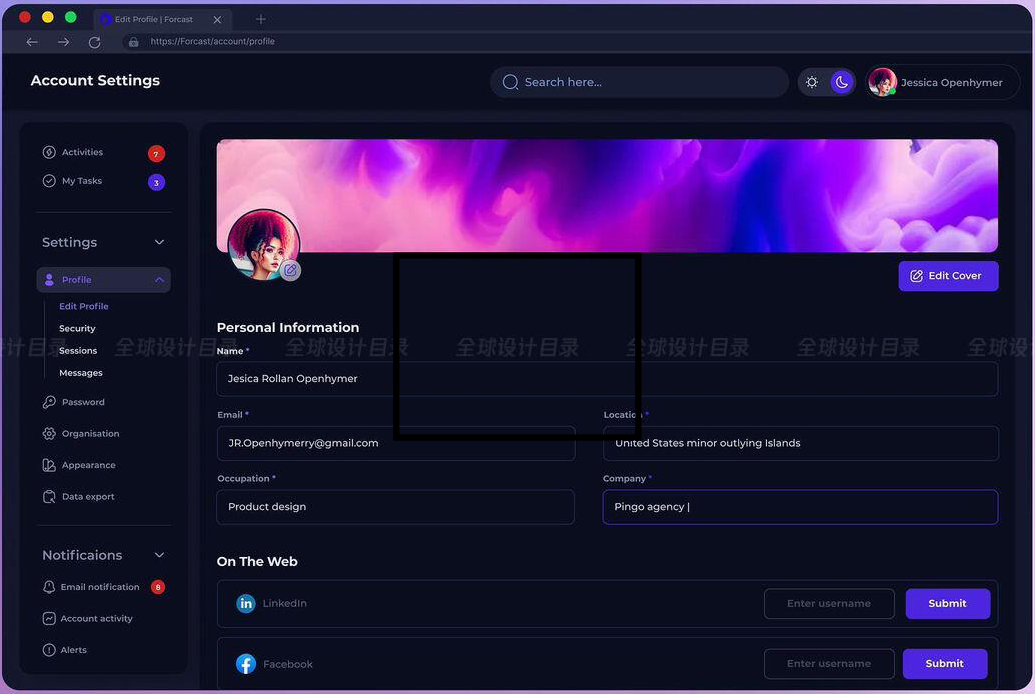
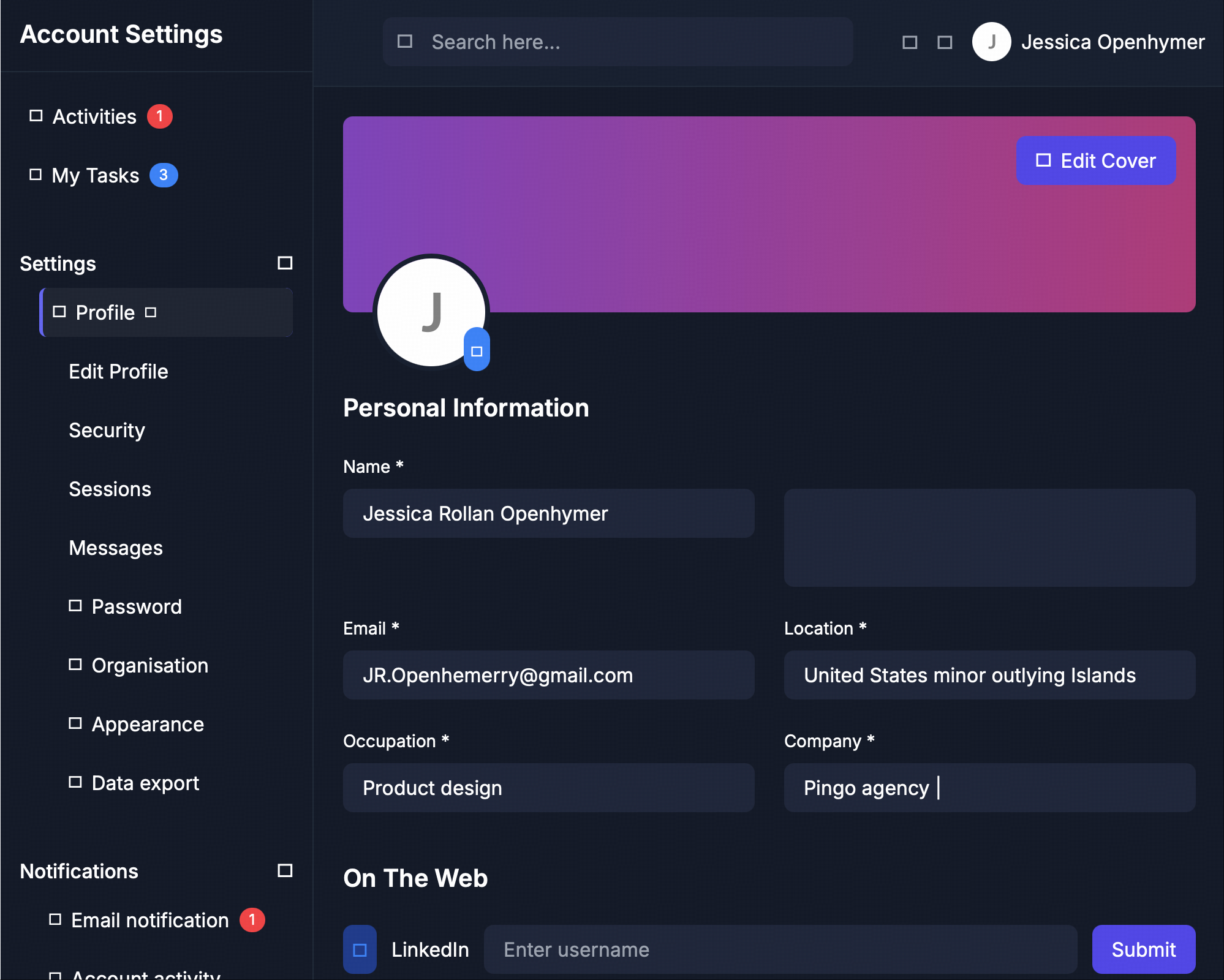
Please generate a high - quality UI interface using CSS and HTML based on the webpage I provided.
Screenshot of the rendered web page:
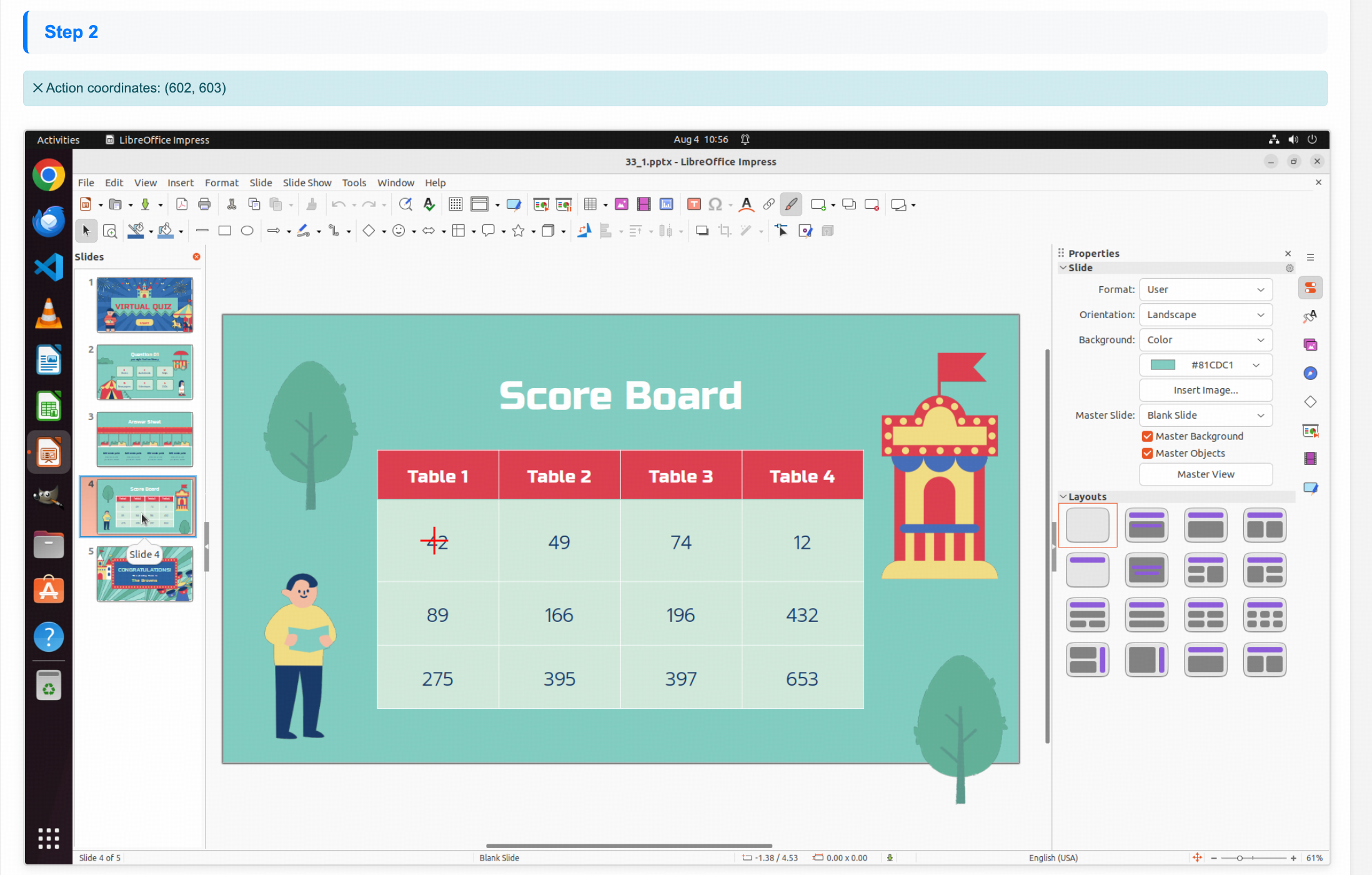
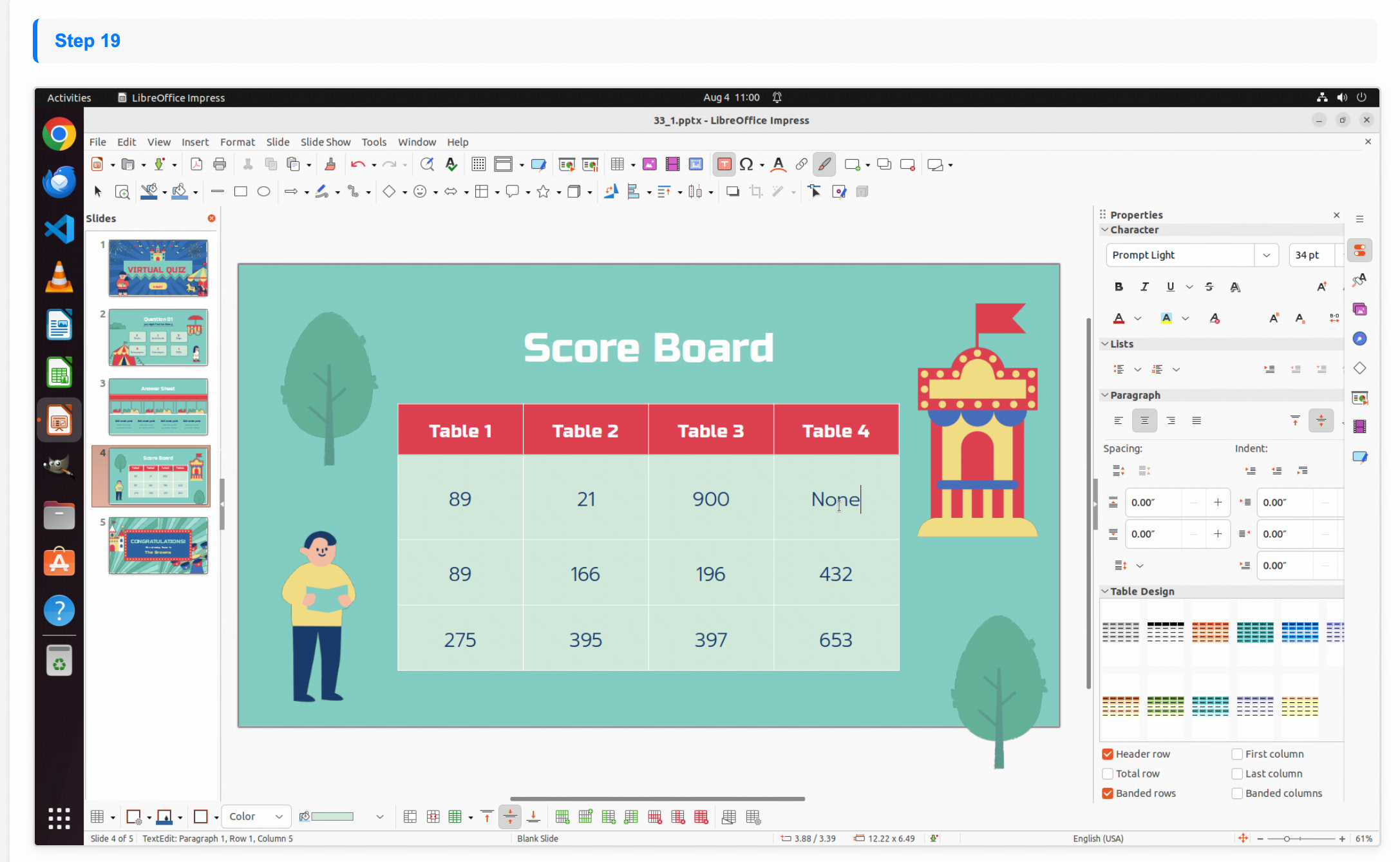
Modify the data in the first row on slide 4 to "89", "21", "900" and "None"
Modification result:
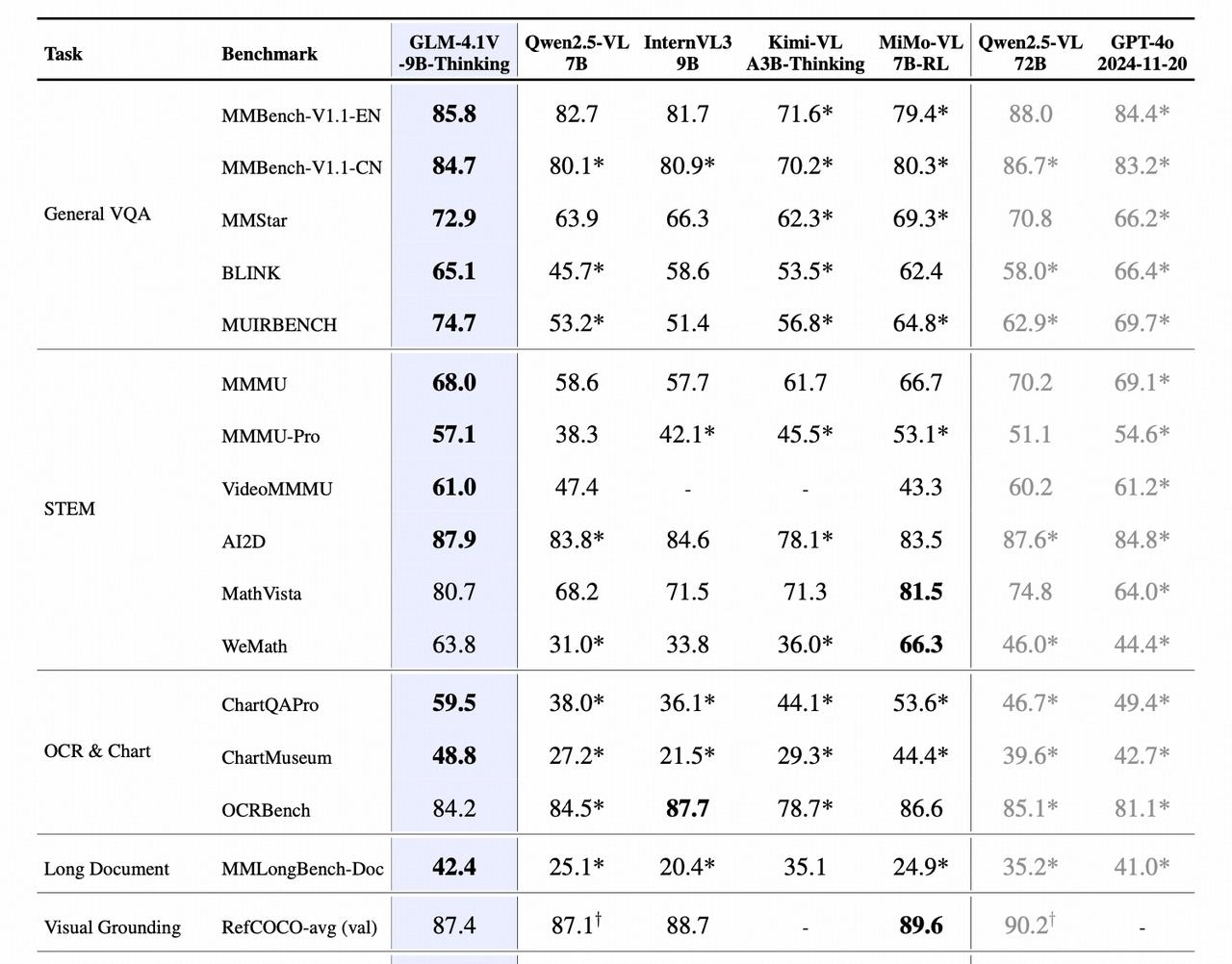
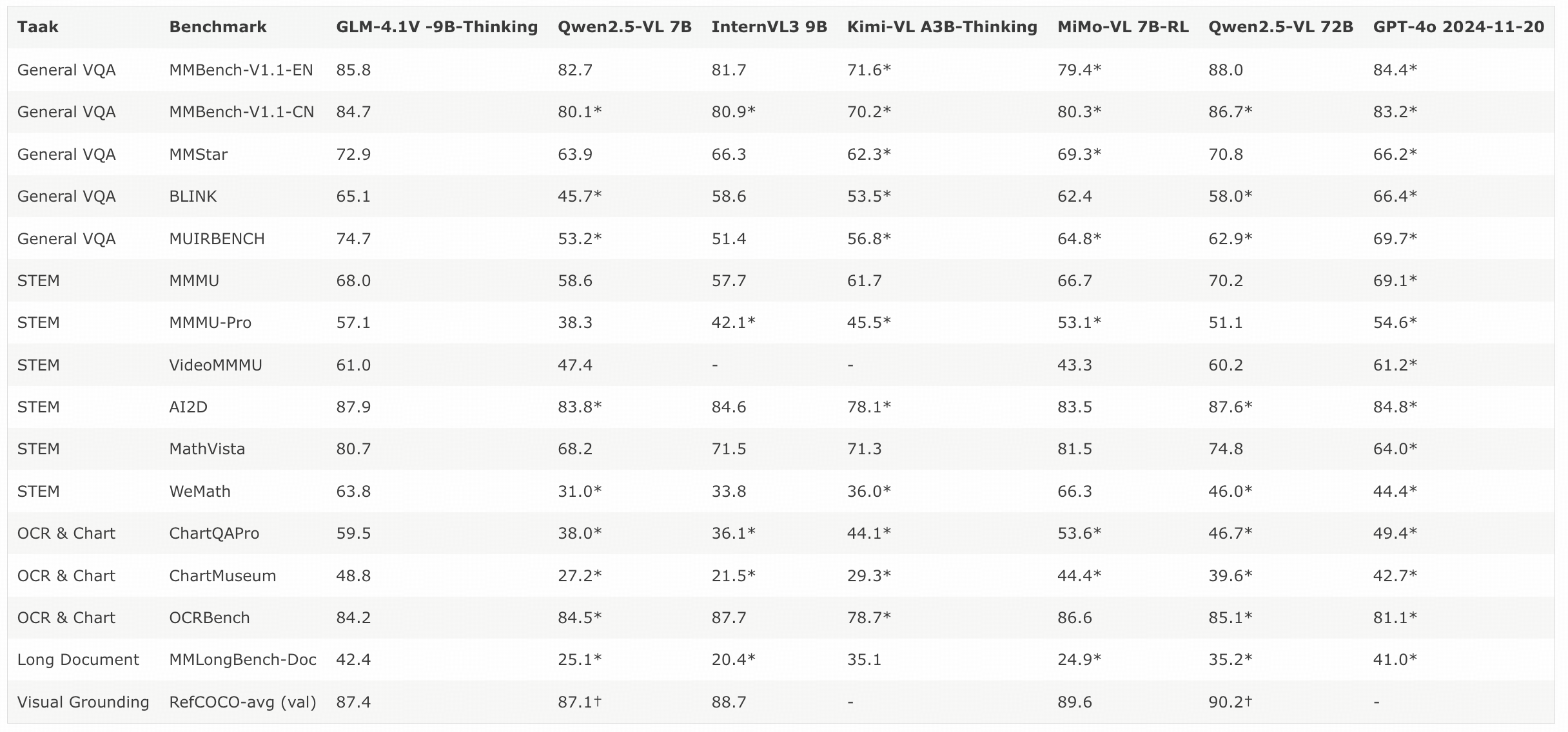
Convert the table in the image to Markdown format
Rendered result:

Tell me the position of the couple in the picture. The short-haired guy is wearing a pink top and blue shorts, and the girl is in a cyan dress. Answer in \[x1,y1,x2,y2] format.
```
The position of the couple in the
picture, where the short-haired
guy is wearing a pink top and blue
shorts, and the girl is in a cyan
dress, is [835,626,931,883].
```
Rendered result:

## Quick Start
**Basic Call**
```bash theme={null}
curl --location 'https://api.z.ai/api/paas/v4/chat/completions' \
--header 'Authorization: Bearer YOUR_API_KEY' \
--header 'Accept-Language: en-US,en' \
--header 'Content-Type: application/json' \
--data '{
"model": "glm-4.5v",
"messages": [
{
"role": "user",
"content": [
{
"type": "image_url",
"image_url": {
"url": "https://cloudcovert-1305175928.cos.ap-guangzhou.myqcloud.com/%E5%9B%BE%E7%89%87grounding.PNG"
}
},
{
"type": "text",
"text": "Where is the second bottle of beer from the right on the table? Provide coordinates in [[xmin,ymin,xmax,ymax]] format"
}
]
}
],
"thinking": {
"type":"enabled"
}
}'
```
**Streaming Call**
```bash theme={null}
curl --location 'https://api.z.ai/api/paas/v4/chat/completions' \
--header 'Authorization: Bearer YOUR_API_KEY' \
--header 'Accept-Language: en-US,en' \
--header 'Content-Type: application/json' \
--data '{
"model": "glm-4.5v",
"messages": [
{
"role": "user",
"content": [
{
"type": "image_url",
"image_url": {
"url": "https://cloudcovert-1305175928.cos.ap-guangzhou.myqcloud.com/%E5%9B%BE%E7%89%87grounding.PNG"
}
},
{
"type": "text",
"text": "Where is the second bottle of beer from the right on the table? Provide coordinates in [[xmin,ymin,xmax,ymax]] format"
}
]
}
],
"thinking": {
"type":"enabled"
},
"stream": true
}'
```
**Install SDK**
```bash theme={null}
# Install the latest version
pip install zai-sdk
# Or specify a version
pip install zai-sdk==0.2.3
```
**Verify installation**
```python theme={null}
import zai
print(zai.__version__)
```
**Basic Call**
```python theme={null}
from zai import ZaiClient
client = ZaiClient(api_key="") # Enter your own APIKey
response = client.chat.completions.create(
model="glm-4.5v", # Enter the name of the model you want to call
messages=[
{
"content": [
{
"type": "image_url",
"image_url": {
"url": "https://cloudcovert-1305175928.cos.ap-guangzhou.myqcloud.com/%E5%9B%BE%E7%89%87grounding.PNG"
}
},
{
"type": "text",
"text": "Where is the second bottle of beer from the right on the table? Provide coordinates in [[xmin,ymin,xmax,ymax]] format"
}
],
"role": "user"
}
],
thinking={
"type":"enabled"
}
)
print(response.choices[0].message)
```
**Streaming Call**
```python theme={null}
from zai import ZaiClient
client = ZaiClient(api_key="") # Enter your own APIKey
response = client.chat.completions.create(
model="glm-4.5v", # Enter the name of the model you want to call
messages=[
{
"content": [
{
"type": "image_url",
"image_url": {
"url": "https://cloudcovert-1305175928.cos.ap-guangzhou.myqcloud.com/%E5%9B%BE%E7%89%87grounding.PNG"
}
},
{
"type": "text",
"text": "Where is the second bottle of beer from the right on the table? Provide coordinates in [[xmin,ymin,xmax,ymax]] format"
}
],
"role": "user"
}
],
thinking={
"type":"enabled"
},
stream=True
)
for chunk in response:
if chunk.choices[0].delta.reasoning_content:
print(chunk.choices[0].delta.reasoning_content, end='', flush=True)
if chunk.choices[0].delta.content:
print(chunk.choices[0].delta.content, end='', flush=True)
```
**Install SDK**
**Maven**
```xml theme={null}
ai.z.openapi
zai-sdk
0.3.5
```
**Gradle (Groovy)**
```groovy theme={null}
implementation 'ai.z.openapi:zai-sdk:0.3.5'
```
**Basic Call**
```java theme={null}
import ai.z.openapi.ZaiClient;
import ai.z.openapi.service.model.*;
import ai.z.openapi.core.Constants;
import java.util.Arrays;
public class GLM45VExample {
public static void main(String[] args) {
String apiKey = ""; // Enter your own APIKey
ZaiClient client = ZaiClient.builder().ofZAI()
.apiKey(apiKey)
.build();
ChatCompletionCreateParams request = ChatCompletionCreateParams.builder()
.model("glm-4.5v")
.messages(Arrays.asList(
ChatMessage.builder()
.role(ChatMessageRole.USER.value())
.content(Arrays.asList(
MessageContent.builder()
.type("text")
.text("Where is the second bottle of beer from the right on the table? Provide coordinates in [[xmin,ymin,xmax,ymax]] format")
.build(),
MessageContent.builder()
.type("image_url")
.imageUrl(ImageUrl.builder()
.url("https://cloudcovert-1305175928.cos.ap-guangzhou.myqcloud.com/%E5%9B%BE%E7%89%87grounding.PNG")
.build())
.build()))
.build()))
.thinking(ChatThinking.builder()
.type("enabled")
.build())
.build();
ChatCompletionResponse response = client.chat().createChatCompletion(request);
if (response.isSuccess()) {
Object reply = response.getData().getChoices().get(0).getMessage();
System.out.println(reply);
} else {
System.err.println("Error: " + response.getMsg());
}
}
}
```
**Streaming Call**
```java theme={null}
import ai.z.openapi.ZaiClient;
import ai.z.openapi.service.model.*;
import ai.z.openapi.core.Constants;
import java.util.Arrays;
public class GLM45VStreamExample {
public static void main(String[] args) {
String apiKey = ""; // Enter your own APIKey
ZaiClient client = ZaiClient.builder().ofZAI()
.apiKey(apiKey)
.build();
ChatCompletionCreateParams request = ChatCompletionCreateParams.builder()
.model("glm-4.5v")
.messages(Arrays.asList(
ChatMessage.builder()
.role(ChatMessageRole.USER.value())
.content(Arrays.asList(
MessageContent.builder()
.type("text")
.text("Where is the second bottle of beer from the right on the table? Provide coordinates in [[xmin,ymin,xmax,ymax]] format")
.build(),
MessageContent.builder()
.type("image_url")
.imageUrl(ImageUrl.builder()
.url("https://cloudcovert-1305175928.cos.ap-guangzhou.myqcloud.com/%E5%9B%BE%E7%89%87grounding.PNG")
.build())
.build()))
.build()))
.thinking(ChatThinking.builder()
.type("enabled")
.build())
.stream(true)
.build();
ChatCompletionResponse response = client.chat().createChatCompletion(request);
if (response.isSuccess()) {
response.getFlowable().subscribe(
// Process streaming message data
data -> {
if (data.getChoices() != null && !data.getChoices().isEmpty()) {
Delta delta = data.getChoices().get(0).getDelta();
System.out.print(delta + "\n");
}},
// Process streaming response error
error -> System.err.println("\nStream error: " + error.getMessage()),
// Process streaming response completion event
() -> System.out.println("\nStreaming response completed")
);
} else {
System.err.println("Error: " + response.getMsg());
}
}
}
```