> ## Documentation Index
> Fetch the complete documentation index at: https://docs.z.ai/llms.txt
> Use this file to discover all available pages before exploring further.
# GLM-5V-Turbo
## Overview
GLM-5V-Turbo is Z.AI's first **multimodal coding foundation model**, built for **vision-based coding tasks**. It can natively process multimodal inputs such as images, video, and text, while also excelling at long-horizon planning, complex coding, and action execution. **Deeply optimized for agent workflows**, it works seamlessly with agents such as Claude Code and OpenClaw to complete the full loop of "understand the environment → plan actions → execute tasks".
Multimodal Coding Model
Video / Image / Text / File
Text
200K
128K
## Capability
Offering multiple thinking modes for different scenarios
Powerful vision understanding capabilities, with support for images, video, and files
Support real-time streaming responses to enhance user interaction experience
Powerful tool invocation capabilities, enabling integration with various external toolsets
Intelligent caching mechanism to optimize performance in long conversations
## Usage
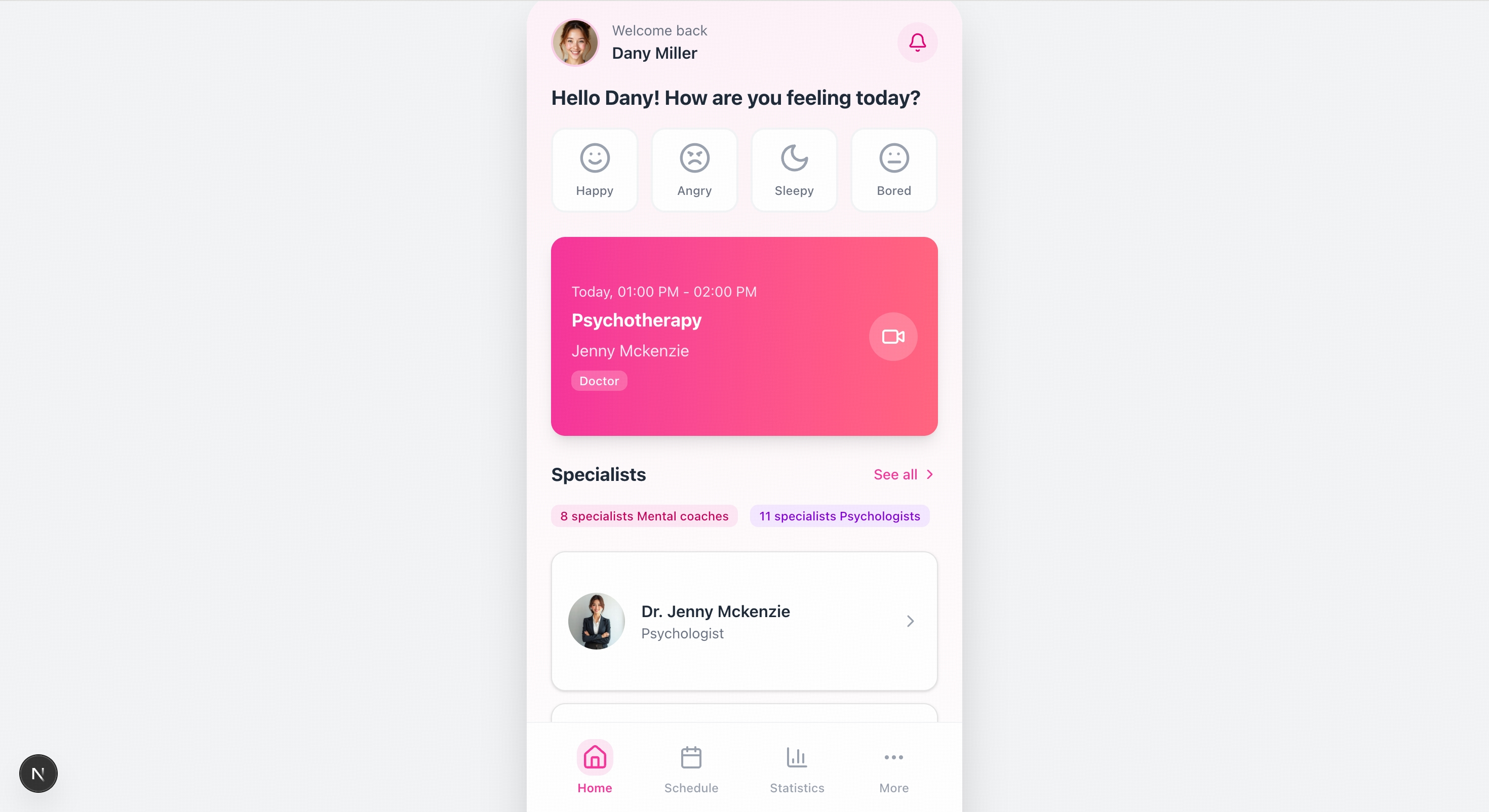
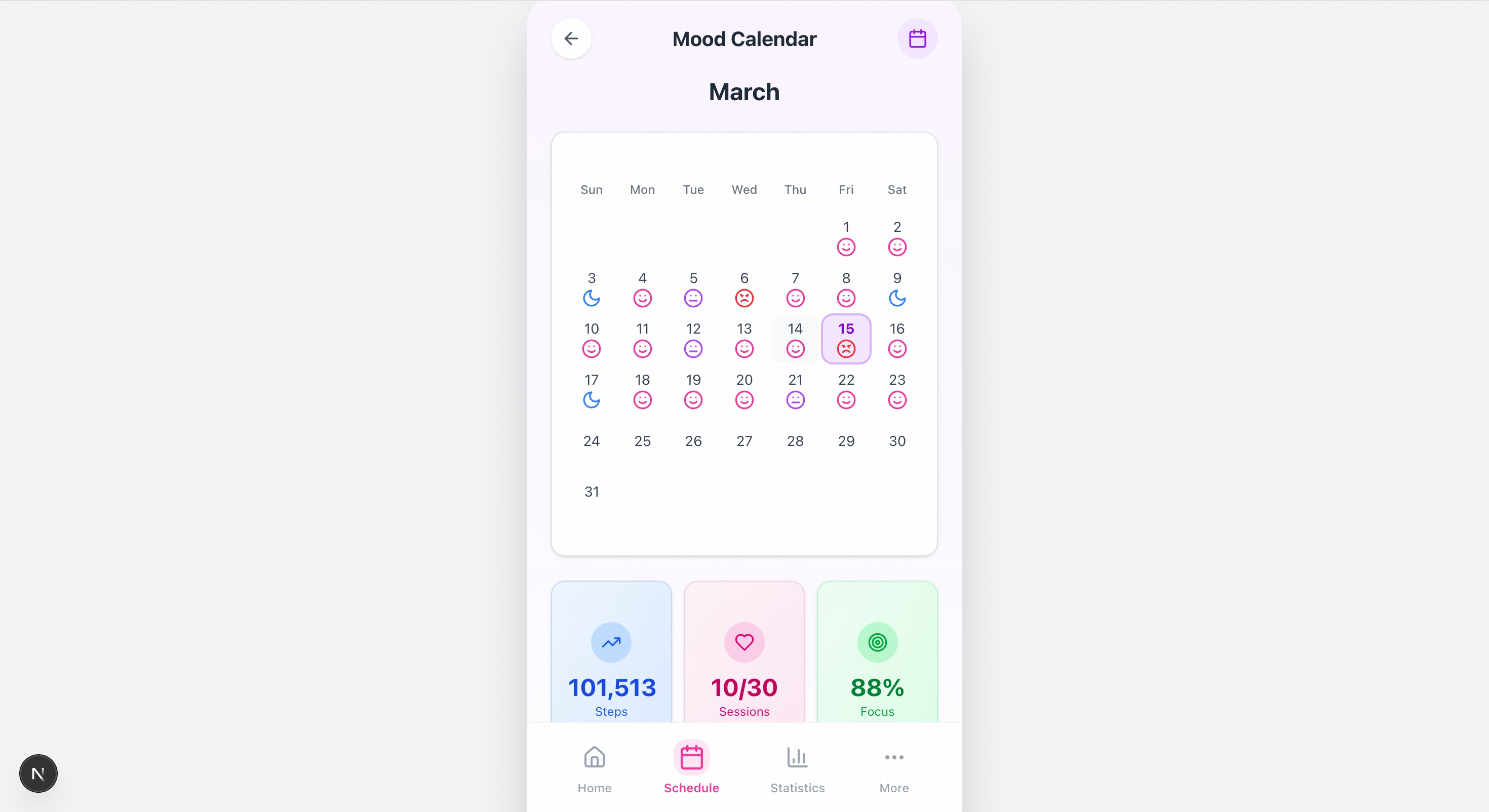
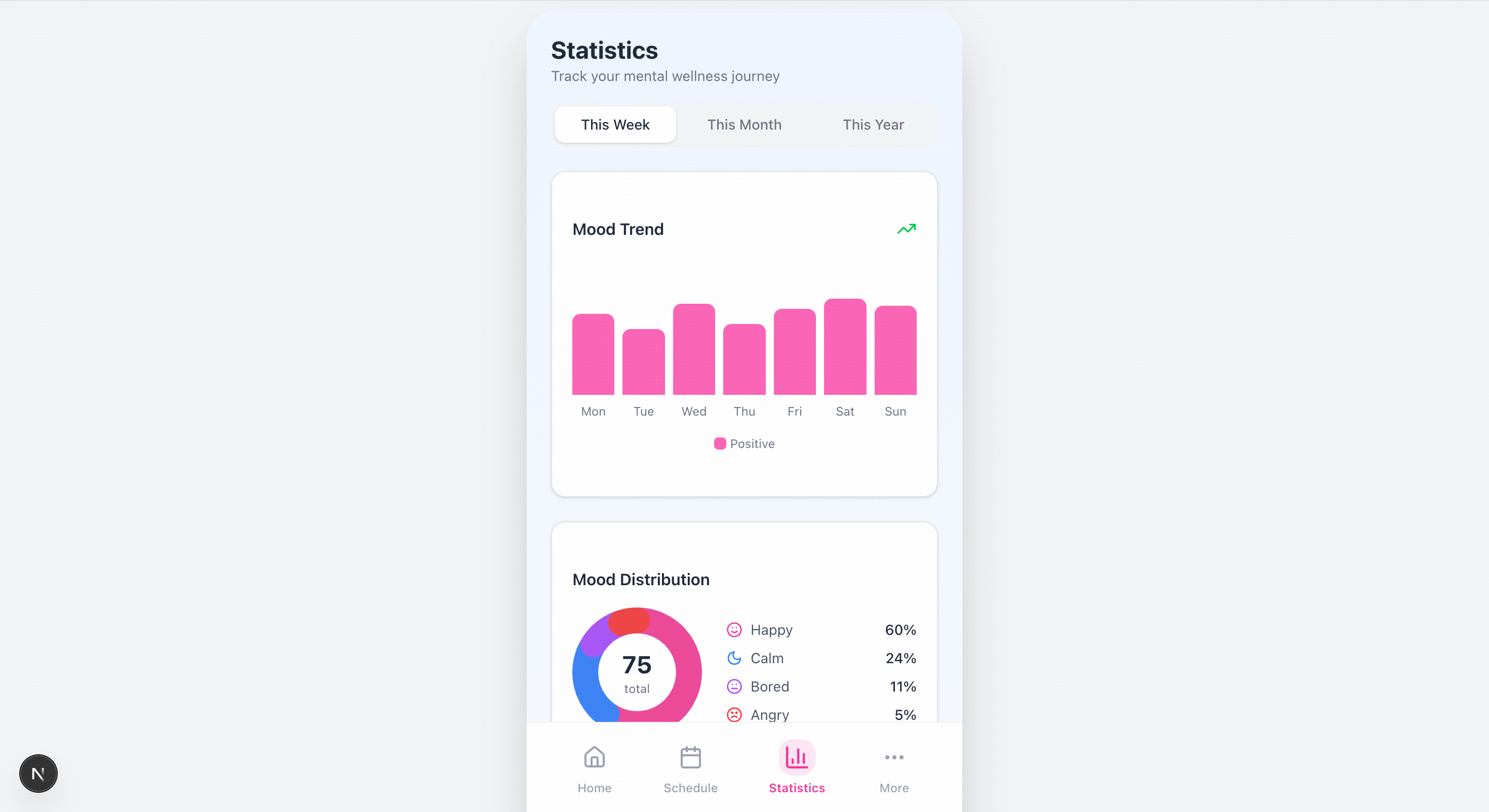
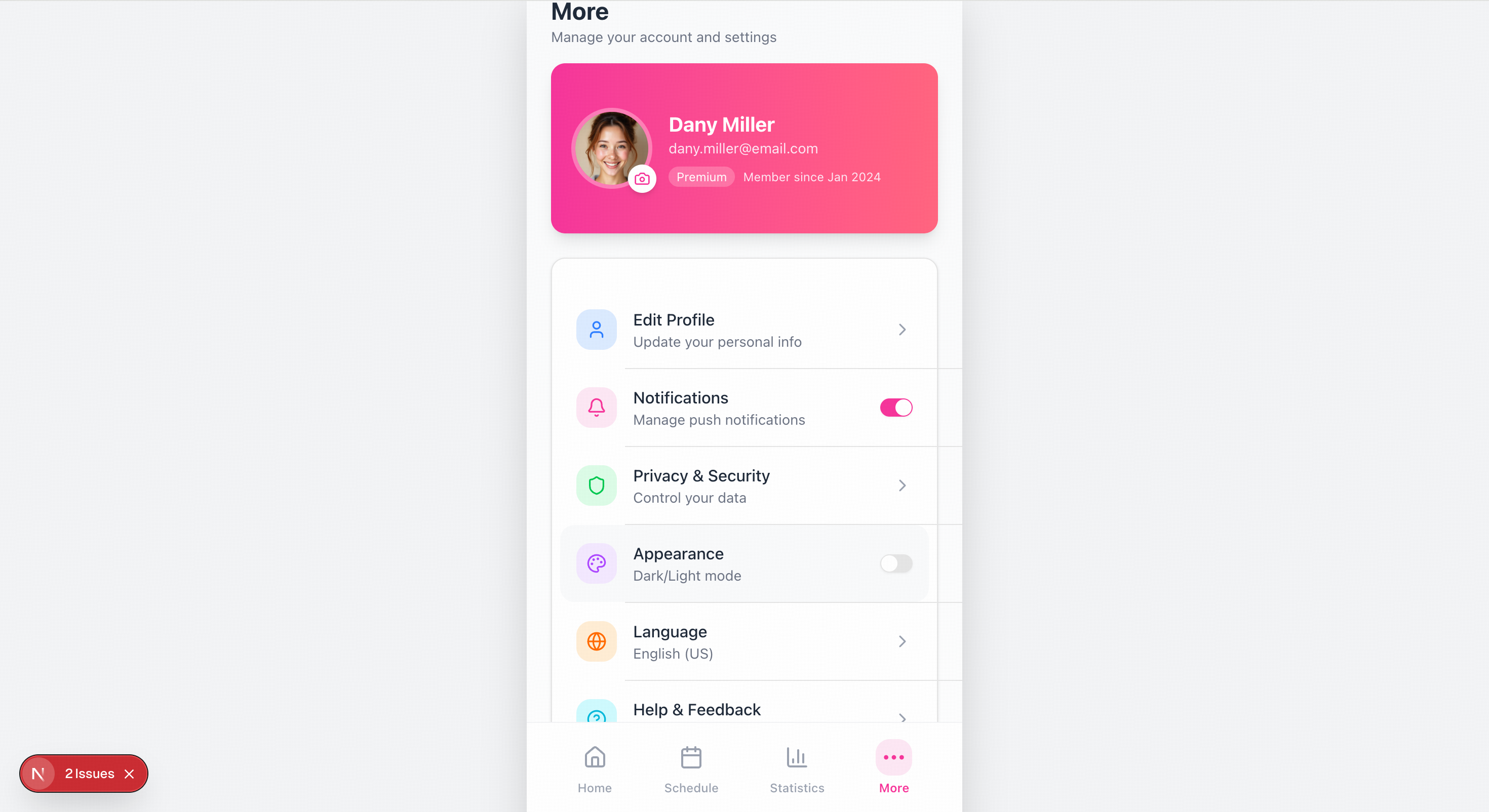
Send a design mockup or reference image, and the model can directly understand the layout, color palette, component hierarchy, and interaction logic, then generate a complete runnable frontend project. For wireframes, it reconstructs structure and functionality; for high-fidelity designs, it aims for pixel-level visual consistency.
Works with frameworks such as Claude Code to autonomously browse target websites, map page transitions, collect visual assets and interaction details, and directly generate code based on the exploration results—upgrading from "recreating from a screenshot" to "recreating through autonomous exploration."
Supports inputting screenshots of buggy pages, automatically identifying rendering issues such as layout misalignment, component overlap, and color mismatches, helping locate frontend problems and generate fix code to improve debugging efficiency.
After integrating GLM-5V-Turbo, OpenClaw can understand webpage layouts, GUI elements, and chart information, helping the agent handle complex real-world tasks that combine perception, planning, and execution.
## Resources
* [API Documentation](/api-reference/llm/chat-completion): Learn how to call the API.
## Introducing GLM-5V-Turbo
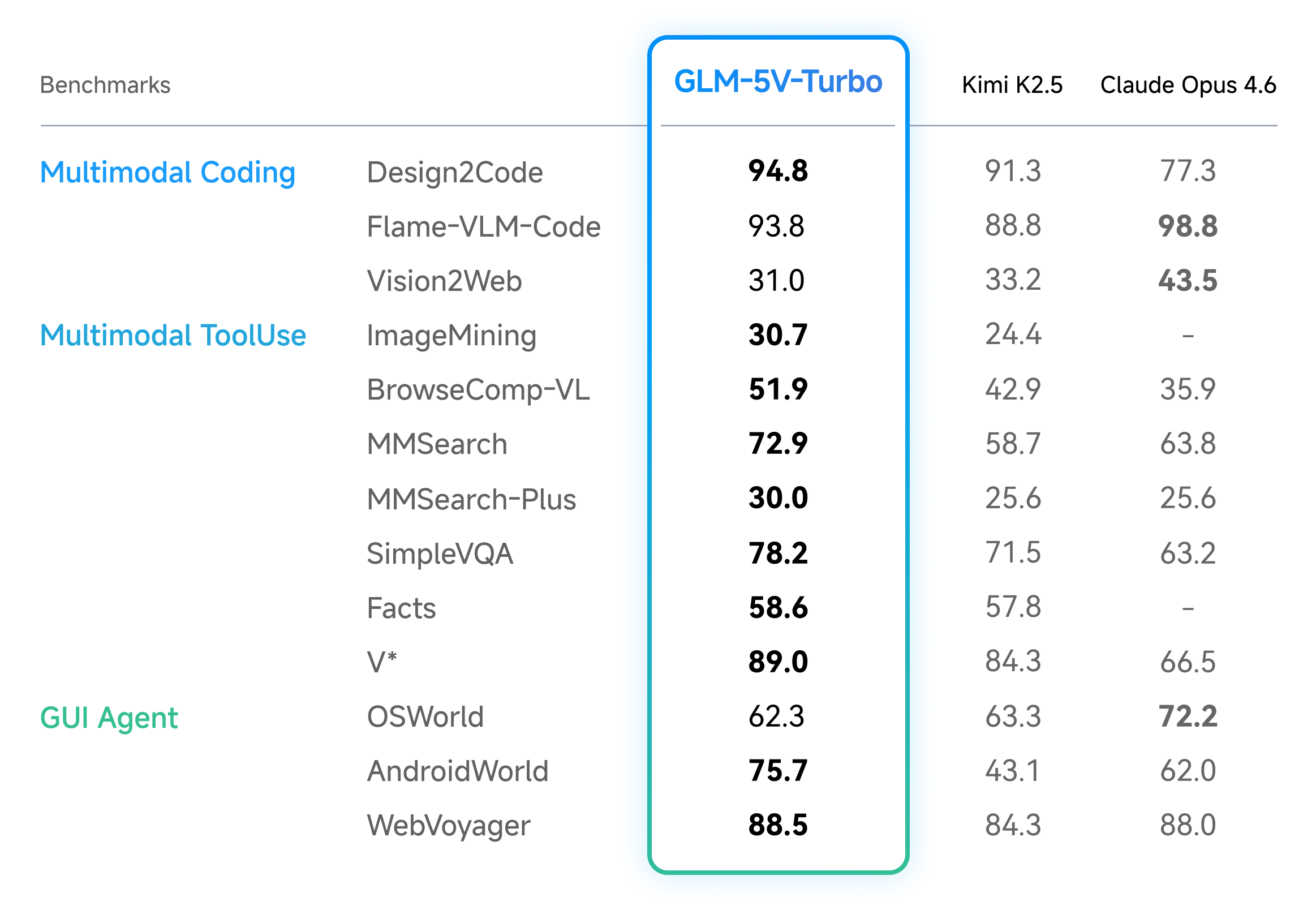
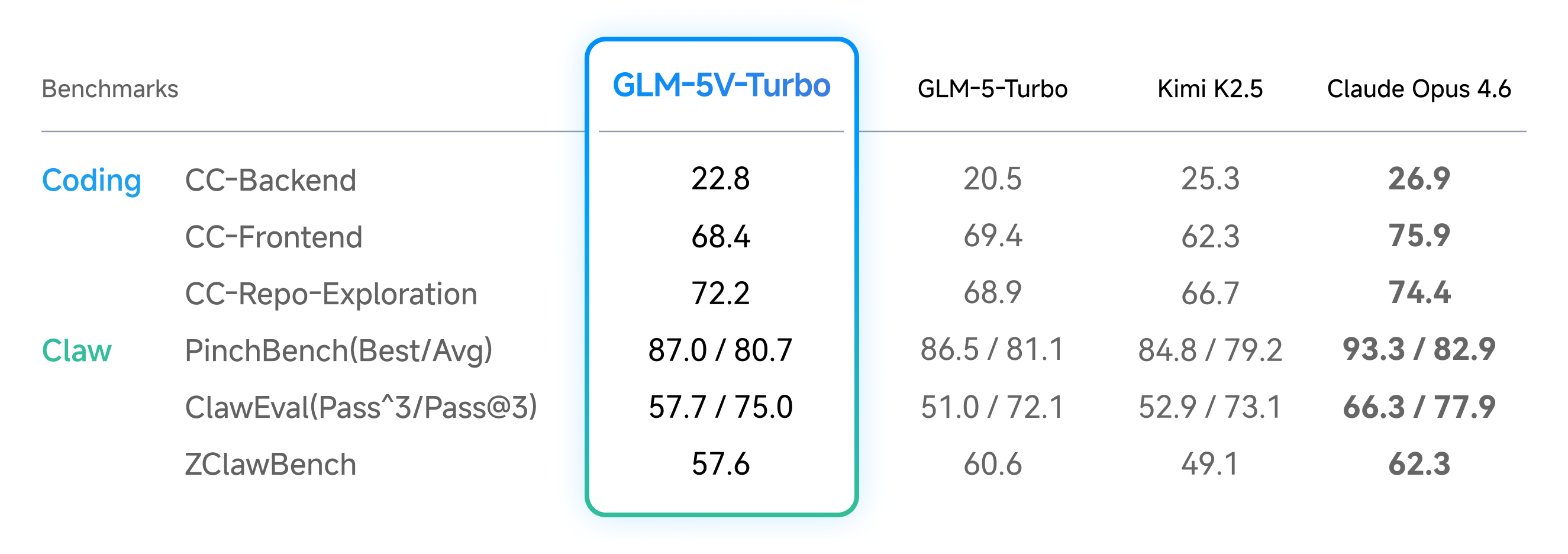
Across benchmarks for multimodal coding and agentic tasks, as well as pure-text coding, GLM-5V-Turbo delivers strong performance with a smaller model size.
In multimodal coding and agentic tasks, GLM-5V-Turbo achieved leading results across benchmarks for design-to-code generation, visual code generation, multimodal retrieval and question answering, and visual exploration. It also delivered strong performance on benchmarks such as AndroidWorld and WebVoyager, which evaluate an agent’s ability to operate in real GUI environments.
In pure-text coding, GLM-5V-Turbo maintained solid performance across the three core benchmarks in CC-Bench-V2—Backend, Frontend, and Repo Exploration—showing that the addition of visual capabilities did not come at the expense of its text-only strengths. At the same time, the model also delivered strong results on PinchBench, ClawEval, and ZClawBench, which evaluate Lobster-style Agent task execution quality, further validating its overall capability in complex task execution scenarios.
GLM-5V-Turbo combines strong vision and coding capabilities while achieving leading performance with a smaller parameter size, powered by systematic upgrades across **model architecture, training methods, data construction, and tooling**:
* **Native Multimodal Fusion**: From pretraining through post-training, the model continuously strengthens visual-text alignment. Combined with the new CogViT vision encoder and an inference-friendly MTP architecture, it improves multimodal understanding and reasoning efficiency.
* **30+ Task Joint Reinforcement Learning**: During RL, the model is jointly optimized across 30+ task types, spanning STEM, grounding, video, GUI agents, and coding agents, resulting in more robust gains in perception, reasoning, and agentic execution.
* **Agentic Data and Task Construction**: To address the scarcity of agent data and the difficulty of verification, we built a multi-level, controllable, and verifiable data system, and injected agentic meta-capabilities during pretraining to strengthen action prediction and execution.
* **Expanded Multimodal Toolchain**: Adds multimodal tools such as box drawing, screenshots, and webpage reading (including image understanding), extending agent capabilities from pure text to visual interaction and supporting a more complete perception–planning–execution loop.
## Official Skills
Beyond vision-based coding and Claw-style tasks, GLM-5V-Turbo also shows major gains in a broader range of agentic scenarios, including multimodal search, deep research, GUI agents, and perceptual grounding. To support these use cases, we provide a set of official Skills.
The ability to automatically analyze image content and generate natural-language descriptions; it can not only identify objects in an image, but also understand relationships between objects, scene atmosphere, and actions, turning them into accurate and fluent textual descriptions
The ability to precisely locate the corresponding object or region in an image based on a natural-language description; it establishes alignment between text and visual pixels, typically marking the target location with a bounding box, enabling more grounded interactions and assisting with fine-grained image analysis
The ability to understand and extract key information from user-provided documents (such as PDFs and Word files) and then generate text in a specified format; this ensures the output remains tightly grounded in the document content, making it useful for document interpretation, report generation, news writing, or proposal drafting
The ability to read candidate resumes and intelligently compare them against job requirements; it can quickly extract key information such as education, work experience, and skill tags, assess candidate-job fit, and provide rankings or recommendations, significantly improving recruiting efficiency
The ability to automatically generate high-quality, structured prompts based on reference images/videos and the user's intended goal; by understanding the content and characteristics of the image/video, refining wording, and adding relevant detail, it produces instructions that are easier for AI models to follow, leading to more accurate and higher-quality image/video generation results
Additionally, based on the previously released specialized models GLM-OCR and GLM-Image, we have created five Skills to support a wider range of scenarios and tasks.
The above Skills are now available on ClawHub, [Install Now](https://clawhub.ai/jaredforreal/glm-master-skill)!
## Examples
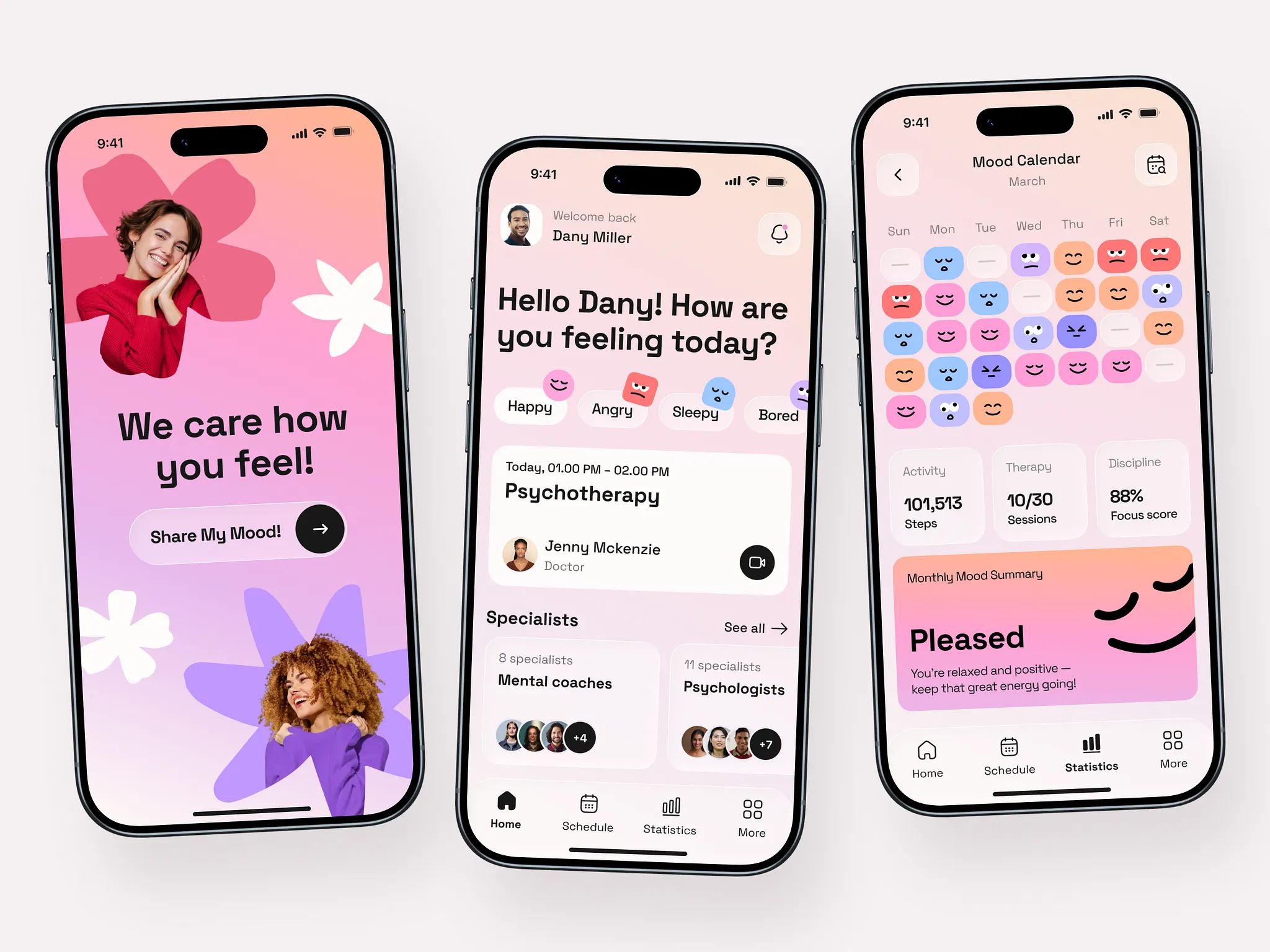
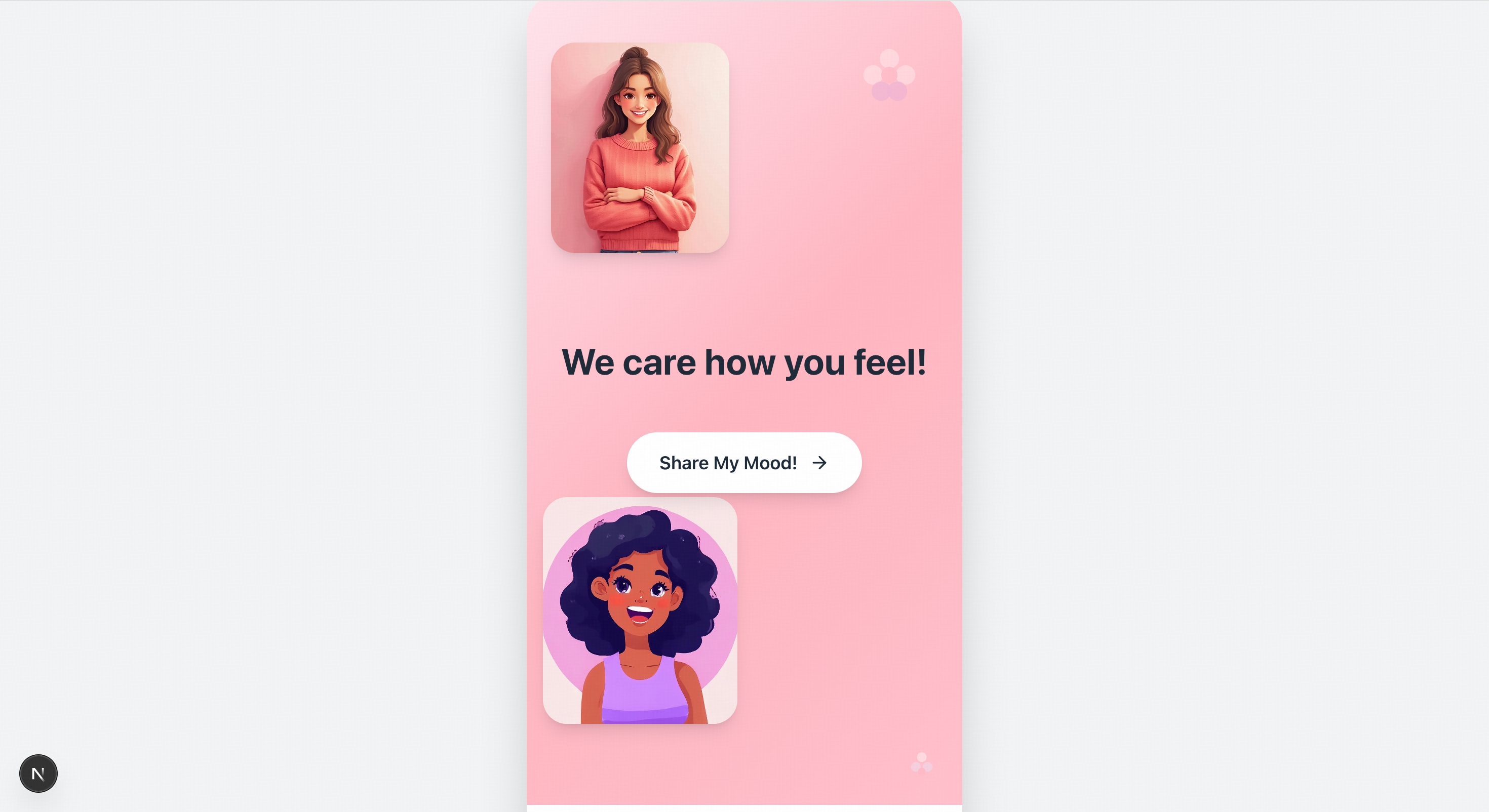
> Please recreate the mobile pages based on the design mockups in the images. The left side shows the welcome page, and the center shows the homepage image. You will also need to create mockups for the remaining two pages.
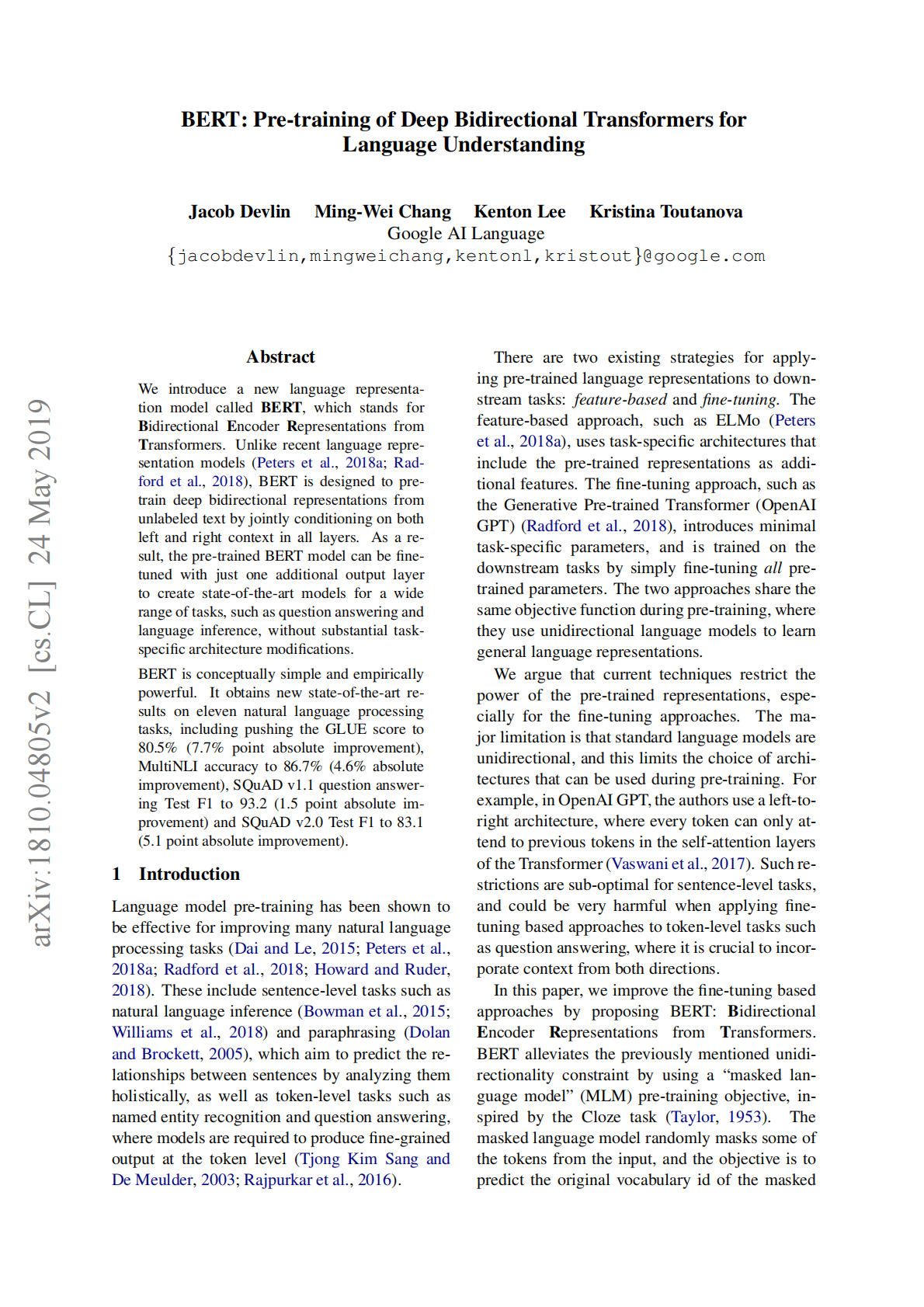
> Create an academic website based on the content of this article.

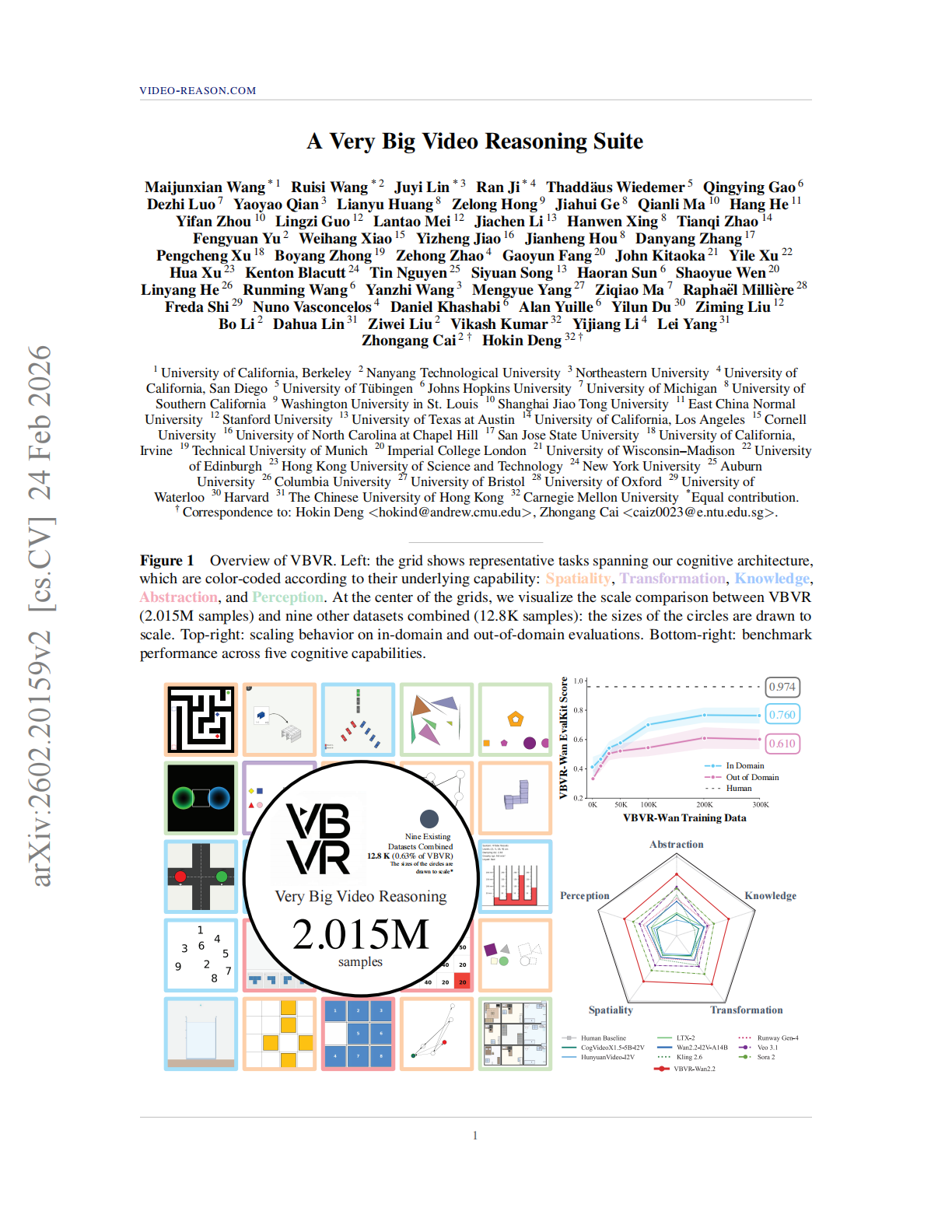
> Summarize the main content and key arguments of the paper.
```
Paper Summary: A Very Big Video Reasoning Suite (VBVR)
1. Overview
As video generation models (such as Sora and Veo) continue to improve rapidly in visual quality, their limitations in reasoning are becoming increasingly apparent. Existing video reasoning benchmarks are often relatively small in scale and lack systematic theoretical grounding. To address this gap, this paper introduces the VBVR (Very Big Video Reasoning) suite, which includes a large-scale dataset, VBVR-Dataset, and a verifiable evaluation framework, VBVR-Bench.
VBVR is designed to advance video reasoning models beyond pure “visual generation” toward capabilities grounded in “physical-world commonsense and logical reasoning” through a systematic task design based on cognitive architecture.
Figure 1: Overview of VBVR. The left panel shows a representative task grid covering five cognitive faculties; the center panel compares the scale of VBVR with other datasets (2.015M samples); the radar chart in the lower-right corner shows model performance across different cognitive faculties.
2. VBVR-Dataset: A Large-Scale and Systematic Dataset
2.1 Cognitive Architecture and Task Design
The core innovation of VBVR-Dataset lies in its task taxonomy, which is built on theories from human cognitive science (such as Kant and Anderson). The dataset decomposes video reasoning into five core cognitive faculties:
Perception: extracting structured representations from sensory input.
Transformation: operating on and composing mental representations.
Spatiality: intuitive understanding of position and navigation.
Abstraction: distilling general patterns from concrete experience.
Knowledge: applying prior knowledge and logical rules.
The dataset contains 200 tasks and approximately 2.015 million samples in total (1 million training samples and 1 million test samples).
2.2 Scale Comparison
Compared with existing video reasoning benchmarks (such as Video-Zero-Shot and Ruler-Bench), VBVR-Dataset improves by an order of magnitude in both number of tasks and dataset size, providing sufficient “fuel” for model training.
Table 1: Comparison between VBVR-Dataset and existing video reasoning benchmarks. VBVR far exceeds previous datasets in both task count (200) and sample size (2M+).
2.3 Task Examples
VBVR features highly diverse task designs, ranging from simple geometric shape recognition to complex physical simulation and logical planning. The figure below shows sample tasks, including polygon recognition, pipe connection, grid navigation, maze solving, and sliding puzzle tasks.
Figure 2: Sample tasks generated by the VBVR parametric task suite. Each sequence illustrates the reasoning process required to arrive at a valid solution, covering perception, spatial reasoning, and logical operations.
2.4 Data Generation Pipeline
To ensure both data quality and scale, VBVR adopts a distributed parametric generation pipeline. Tasks are first rigorously designed and reviewed, then implemented through standardized generator templates, and finally generated and stored at scale in parallel using cloud services (AWS Lambda).
Figure 3: System pipeline for VBVR data generation. Starting from cognitive architecture, tasks proceed through task design and generator implementation, and are ultimately written to S3 storage through distributed Lambda workers.
3. VBVR-Bench: A Verifiable Evaluation Framework
3.1 Evaluation Results
VBVR-Bench provides a rule-based, reproducible, and interpretable evaluation framework. The research team conducted a comprehensive evaluation of current state-of-the-art video generation models, including open-source models such as CogVideoX and closed-source models such as Sora 2 and Veo 3.1.
The results show that even the best-performing model (such as Sora 2) achieves an overall score of only around 0.546, far below human performance (0.974). This indicates that current models still face major challenges on video tasks requiring strict logical reasoning and physical consistency.
Table 3: Benchmark results on VBVR-Bench. Shows model performance on in-domain and out-of-domain tasks. Bold indicates the best result, and underlining indicates the second best.
3.2 Human Alignment Analysis
To validate the effectiveness of VBVR-Bench, the study conducted a large-scale human preference alignment analysis. The results show that VBVR’s automatic evaluation scores are highly correlated with human preference scores (correlation coefficient ρ>0.93), demonstrating that the benchmark accurately reflects models’ actual reasoning capabilities.
Figure 4: Alignment analysis between VBVR-Bench evaluation results and human preferences. The left panel shows in-domain tasks, and the right panel shows out-of-domain tasks; both exhibit strong linear correlation.
4. Scaling Laws and Emergent Capabilities
4.1 The Effect of Data Scale
The study further explores how data scale affects model reasoning ability. By fine-tuning the Wan2.2 model on VBVR-Dataset, the team found that as training data increased from 0 to 500K, model performance showed a steady upward trend across all metrics. This demonstrates the critical role of high-quality, large-scale reasoning data in improving model performance.
Table 4: Model performance at different data scales (VBVR-Wan2.2). As the amount of training data increases, the model’s scores on both in-domain and out-of-domain tasks improve significantly.
4.2 Qualitative Analysis and Emergent Behaviors
In qualitative analysis, the model fine-tuned on VBVR data (VBVR-Wan2.2) demonstrated more controllable execution than Sora 2. For example, on tasks such as “delete a specific symbol” or “precisely rotate an object,” VBVR-Wan2.2 was able to follow instructions strictly, whereas Sora 2 was more prone to object deformation or execution failure.
In addition, the study observed several emergent behaviors, such as the model spontaneously choosing a completion strategy (Self-chosen completion policy) or providing “rationalized” interpretations of a scene (Rationalizing), suggesting that large-scale reasoning training may unlock deeper cognitive capabilities.
Figure 6: Qualitative comparison between VBVR-Wan2.2 and Sora 2. Panel A shows VBVR-Wan2.2’s advantages on controlled execution tasks; Panel B shows an emergent self-chosen completion policy; Panel C shows the model’s limitations when handling complex constraints.
5. Conclusion
By providing the largest and most systematic video reasoning dataset and evaluation benchmark to date, the VBVR suite reveals the shortcomings of current video generation models in logical reasoning and validates the feasibility of improving model capabilities through more high-quality reasoning data. This lays the foundation for future development of general-purpose video agents with genuine physical-world commonsense and logical reasoning abilities.
```
> Output the object tracking results for the pony in the video in JSON format.
```
{
"0": [
{
"label": "horse-0",
"bbox_2d": [574, 512, 641, 602]
}
],
"1": [
{
"label": "horse-0",
"bbox_2d": [556, 469, 605, 585]
}
],
"2": [
{
"label": "horse-0",
"bbox_2d": [532, 458, 579, 562]
}
],
"3": [
{
"label": "horse-0",
"bbox_2d": [518, 497, 592, 637]
}
],
"4": [
{
"label": "horse-0",
"bbox_2d": [534, 597, 614, 758]
}
],
"5": [
{
"label": "horse-0",
"bbox_2d": [529, 627, 602, 779]
}
],
"6": [
{
"label": "horse-0",
"bbox_2d": [509, 609, 582, 787]
}
],
"7": [
{
"label": "horse-0",
"bbox_2d": [472, 593, 579, 809]
}
],
"8": [
{
"label": "horse-0",
"bbox_2d": [450, 605, 592, 825]
}
],
"9": [
{
"label": "horse-0",
"bbox_2d": [455, 600, 614, 838]
}
],
"10": [
{
"label": "horse-0",
"bbox_2d": [448, 569, 659, 852]
}
],
"11": [
{
"label": "horse-0",
"bbox_2d": [436, 562, 686, 862]
}
],
"12": [
{
"label": "horse-0",
"bbox_2d": [419, 553, 709, 889]
}
],
"13": [
{
"label": "horse-0",
"bbox_2d": [409, 554, 721, 924]
}
],
"14": [
{
"label": "horse-0",
"bbox_2d": [398, 555, 705, 930]
}
],
"15": [
{
"label": "horse-0",
"bbox_2d": [435, 531, 763, 920]
}
],
"16": [
{
"label": "horse-0",
"bbox_2d": [480, 533, 779, 909]
}
],
"17": [
{
"label": "horse-0",
"bbox_2d": [528, 574, 769, 900]
}
]
}
```
## Quick Start
**Basic Call**
```bash theme={null}
curl -X POST \
https://api.z.ai/api/paas/v4/chat/completions \
-H "Authorization: Bearer your-api-key" \
-H "Content-Type: application/json" \
-d '{
"model": "glm-5v-turbo",
"messages": [
{
"role": "user",
"content": [
{
"type": "image_url",
"image_url": {
"url": "https://cloudcovert-1305175928.cos.ap-guangzhou.myqcloud.com/%E5%9B%BE%E7%89%87grounding.PNG"
}
},
{
"type": "text",
"text": "Where is the second bottle of beer from the right on the table? Provide coordinates in [[xmin,ymin,xmax,ymax]] format"
}
]
}
],
"thinking": {
"type":"enabled"
}
}'
```
**Streaming Call**
```bash theme={null}
curl -X POST \
https://api.z.ai/api/paas/v4/chat/completions \
-H "Authorization: Bearer your-api-key" \
-H "Content-Type: application/json" \
-d '{
"model": "glm-5v-turbo",
"messages": [
{
"role": "user",
"content": [
{
"type": "image_url",
"image_url": {
"url": "https://cloudcovert-1305175928.cos.ap-guangzhou.myqcloud.com/%E5%9B%BE%E7%89%87grounding.PNG"
}
},
{
"type": "text",
"text": "Where is the second bottle of beer from the right on the table? Provide coordinates in [[xmin,ymin,xmax,ymax]] format"
}
]
}
],
"thinking": {
"type":"enabled"
},
"stream": true
}'
```
**Install SDK**
```bash theme={null}
# Install the latest version
pip install zai-sdk
# Or specify a version
pip install zai-sdk==0.2.3
```
**Verify installation**
```
import zai
print(zai.__version__)
```
**Basic Call**
```python theme={null}
from zai import ZaiClient
client = ZaiClient(api_key="") # Enter your own APIKey
response = client.chat.completions.create(
model="glm-5v-turbo", # Enter the name of the model you want to call
messages=[
{
"content": [
{
"type": "image_url",
"image_url": {
"url": "https://cloudcovert-1305175928.cos.ap-guangzhou.myqcloud.com/%E5%9B%BE%E7%89%87grounding.PNG"
}
},
{
"type": "text",
"text": "Where is the second bottle of beer from the right on the table? Provide coordinates in [[xmin,ymin,xmax,ymax]] format"
}
],
"role": "user"
}
],
thinking={
"type":"enabled"
}
)
print(response.choices[0].message)
```
**Streaming Call**
```python theme={null}
from zai import ZaiClient
client = ZaiClient(api_key="") # Enter your own APIKey
response = client.chat.completions.create(
model="glm-5v-turbo", # Enter the name of the model you want to call
messages=[
{
"content": [
{
"type": "image_url",
"image_url": {
"url": "https://cloudcovert-1305175928.cos.ap-guangzhou.myqcloud.com/%E5%9B%BE%E7%89%87grounding.PNG"
}
},
{
"type": "text",
"text": "Where is the second bottle of beer from the right on the table? Provide coordinates in [[xmin,ymin,xmax,ymax]] format"
}
],
"role": "user"
}
],
thinking={
"type":"enabled"
},
stream=True
)
for chunk in response:
if chunk.choices[0].delta.reasoning_content:
print(chunk.choices[0].delta.reasoning_content, end='', flush=True)
if chunk.choices[0].delta.content:
print(chunk.choices[0].delta.content, end='', flush=True)
```
**Install SDK**
**Maven**
```xml theme={null}
ai.z.openapi
zai-sdk
0.3.5
```
**Gradle (Groovy)**
```groovy theme={null}
implementation 'ai.z.openapi:zai-sdk:0.3.5'
```
**Basic Call**
```java theme={null}
import ai.z.openapi.ZaiClient;
import ai.z.openapi.service.model.*;
import ai.z.openapi.core.Constants;
import java.util.Arrays;
public class GLM45VExample {
public static void main(String[] args) {
String apiKey = ""; // Enter your own APIKey
ZaiClient client = ZaiClient.builder().ofZAI()
.apiKey(apiKey)
.build();
ChatCompletionCreateParams request = ChatCompletionCreateParams.builder()
.model("glm-5v-turbo")
.messages(Arrays.asList(
ChatMessage.builder()
.role(ChatMessageRole.USER.value())
.content(Arrays.asList(
MessageContent.builder()
.type("text")
.text("Describe this image.")
.build(),
MessageContent.builder()
.type("image_url")
.imageUrl(ImageUrl.builder()
.url("https://aigc-files.bigmodel.cn/api/cogview/20250723213827da171a419b9b4906_0.png")
.build())
.build()))
.build()))
.build();
ChatCompletionResponse response = client.chat().createChatCompletion(request);
if (response.isSuccess()) {
Object reply = response.getData().getChoices().get(0).getMessage();
System.out.println(reply);
} else {
System.err.println("Error: " + response.getMsg());
}
}
}
```
**Streaming Call**
```java theme={null}
import ai.z.openapi.ZaiClient;
import ai.z.openapi.service.model.*;
import ai.z.openapi.core.Constants;
import java.util.Arrays;
public class GLM45VStreamExample {
public static void main(String[] args) {
String apiKey = ""; // Enter your own APIKey
ZaiClient client = ZaiClient.builder().ofZAI()
.apiKey(apiKey)
.build();
ChatCompletionCreateParams request = ChatCompletionCreateParams.builder()
.model("glm-5v-turbo")
.messages(Arrays.asList(
ChatMessage.builder()
.role(ChatMessageRole.USER.value())
.content(Arrays.asList(
MessageContent.builder()
.type("text")
.text("Where is the second bottle of beer from the right on the table? Provide coordinates in [[xmin,ymin,xmax,ymax]] format")
.build(),
MessageContent.builder()
.type("image_url")
.imageUrl(ImageUrl.builder()
.url("https://cloudcovert-1305175928.cos.ap-guangzhou.myqcloud.com/%E5%9B%BE%E7%89%87grounding.PNG")
.build())
.build()))
.build()))
.stream(true)
.build();
ChatCompletionResponse response = client.chat().createChatCompletion(request);
if (response.isSuccess()) {
response.getFlowable().subscribe(
// Process streaming message data
data -> {
if (data.getChoices() != null && !data.getChoices().isEmpty()) {
Delta delta = data.getChoices().get(0).getDelta();
System.out.print(delta + "\n");
}},
// Process streaming response error
error -> System.err.println("\nStream error: " + error.getMessage()),
// Process streaming response completion event
() -> System.out.println("\nStreaming response completed")
);
} else {
System.err.println("Error: " + response.getMsg());
}
}
}
```