Best Practices for Coding Agents: Managing Prompts, Plans, Skills, and Workflows
As foundation models continue to improve, AI coding tools are evolving from simple code-completion assistants into coding agents that can participate in the full software development lifecycle. Unlike traditional copilot-style tools, coding agents do more than generate code from prompts. They can read and navigate codebases, modify files, run commands, invoke external tools, and complete complex tasks through multi-step interaction.As this shift continues, developers need more than prompt-writing techniques. They need a reliable way to work with coding agents in practice. Across leading tools, a shared usage pattern is starting to emerge: provide clear task context, plan execution steps, capture project-level guidance, connect external tools and systems, and automate repetitive workflows so agents can collaborate effectively in real development environments over time.Drawing on official guidance from these tools, this article outlines a more general best practices framework for coding agents.
1. Treat Coding Agents as a Collaborator, Not One-Off Assistants
A common mistake when using a coding agent is to treat it like a one-off question-and-answer tool:
Ask a question, get a piece of code, and end the interaction.
In practice, that approach does not make full use of what a coding agent can do.A coding agent is better understood as a configurable collaborator that can be refined over time. Through project-level guidance files, tool integrations, and reusable skills, developers can continuously shape the agent’s behavior so it becomes better aligned with the team’s development workflow.
In other words, the value of a coding agent does not come from model capability alone. It comes from the combination of model capability and the development workflow around it.
2. Structure Task Inputs: Context Matters More Than Prompting Tricks
When working with a coding agent, many developers focus too much on prompt-writing techniques and not enough on what matters more: task context.In a complex codebase, an effective task description typically includes four elements:
Goal
Clearly describe what needs to be built or changed, such as fixing a bug, implementing an endpoint, or refactoring a module.
Context
Provide the relevant files, error messages, documentation, or examples. For example, specify which files, functions, or modules are involved.
Constraints
List the engineering requirements the agent should follow, such as coding standards, architectural rules, security requirements, or dependency limitations.
Done when
Define how completion should be evaluated, such as tests passing, behavior changing as expected, or the bug no longer reproducing.
This kind of structured task input reduces unnecessary guesswork and makes the agent’s changes more consistent and easier to review.In most coding agents, you can provide this context by referencing files, supplying code snippets, or stating the relevant details explicitly in the prompt. Once that context is in place, the next step for complex work is to plan before making changes.
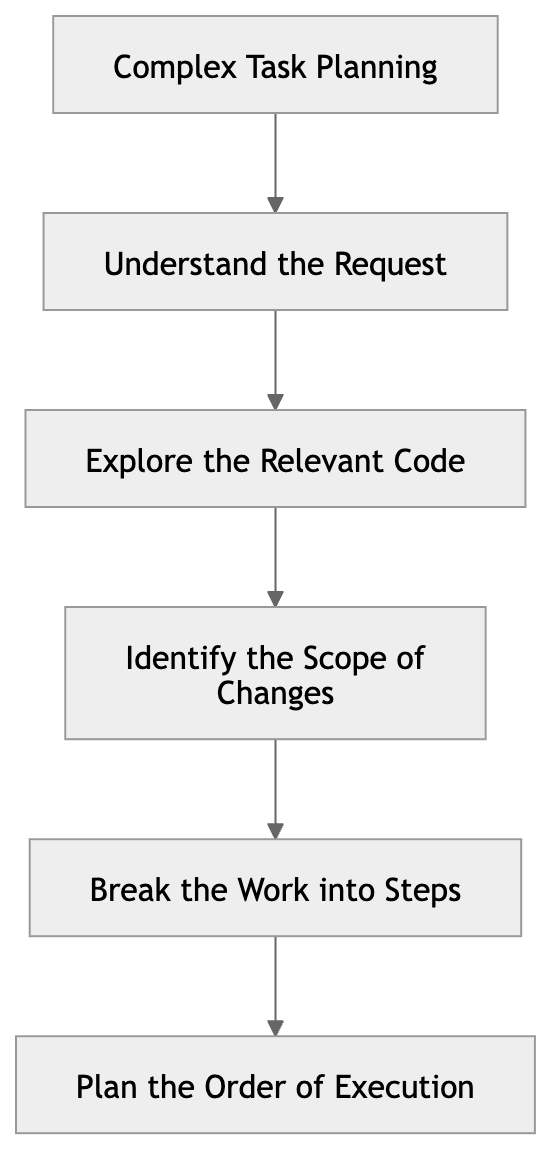
Once a task has clear context, the next challenge is execution. For complex requests, coding agents are most effective when they plan before they act.For more complex requests, asking the agent to start writing code immediately often leads to logic errors, unnecessary rework, or repeated revisions. A more effective approach is to have the agent produce a plan first, then move into implementation.This planning phase typically includes:
Claude Code, for example, encourages an analysis-and-planning step for complex tasks, such as exploring the codebase, identifying the scope of changes, and confirming the implementation approach before making edits. Some coding agents also provide a dedicated Plan mode that generates a complete execution plan before implementation begins.This shifts the agent from simply generating code on demand to completing work step by step against an explicit plan.
4. Capture Repeated Rules in Project-Level Configuration Files
In practice, many prompts end up repeating the same project rules, such as:
- Project directory structure- Build commands- Test workflow- Coding standards- PR submission process
If these rules are restated in every prompt, the workflow becomes inefficient and the instructions can easily drift over time.For this reason, most coding agents provide a way to store long-lived project guidance in project-level configuration files, so the agent can automatically load the relevant context when carrying out tasks.In some tools, these configuration files take the form of agent-facing guidance documents that describe the repository structure, how to run the project, and the development conventions to follow.Other systems capture the same information through configuration files, scripts, or related project settings, allowing the agent to apply consistent project constraints across sessions.Regardless of the implementation, the goal is the same: move information that would otherwise need to be repeated in conversation into stable project context.
From a practical standpoint, this can be reduced to one simple rule: put temporary instructions in the prompt, and put long-lived rules in project-level configuration files.
5. The Execution Environment Defines What the Agent Can Do
When working with coding agents, developers often attribute inconsistent results to model capability. In practice, many of these issues are caused by an incomplete or poorly configured execution environment.Unlike traditional code-completion tools, coding agents are typically expected to operate in a real development environment and carry out tasks such as:
- Reading and modifying source files- Running build or test commands- Calling external tools or APIs- Interacting with version control systems
As a result, agent behavior depends not only on model capability, but also on whether its execution environment is complete, stable, and accessible. When the environment is not configured properly, the agent can easily run into problems such as:
Being unable to locate the correct project directory
Lacking permission to read or modify critical files
Failing to run build or test commands
Being unable to access external tools or services
These issues often appear as model misunderstanding or poor code quality, but the underlying problem is usually that the agent does not have enough execution capability or access to the right context.Most leading coding agents now provide some form of environment configuration to define the boundaries of agent behavior within a project. For example:
- Setting the default model or reasoning level- Controlling file permissions and sandbox policies- Defining which commands the agent is allowed to run- Configuring connections to external tools or services
While the implementation differs across tools, the objective is largely the same: to provide the agent with a stable, controlled, and repeatable execution environment.In practice, a reliable execution environment usually depends on a few categories of configuration:
- The project working directory and code access permissions- The allowed command surface, such as build, test, and lint- Connections to external tools or data sources- Shared team defaults for agent behavior
Once the execution environment is configured correctly, a coding agent is much more likely to behave consistently across sessions and complete multi-step tasks reliably.
At a higher level, a coding agent depends on three types of context:
Task Context: the prompt and input for the current task
Project Context: the repository structure and engineering rules
Environment Context: the tools, permissions, and execution environment
Of these, Environment Context determines what the agent can do, and how far it can go.
6. Involve Coding Agents in the Full Development Loop
Once a coding agent has the right execution environment, the next step is to involve it in the full development loop rather than using it for code generation alone. In real software development, a code change is rarely judged on generation alone. It also needs to pass tests, comply with engineering standards, and go through appropriate review.A more effective approach is to have the coding agent participate in the full development loop, rather than treating it as a tool for code generation only.A typical agent-driven development loop includes the following steps:
Implement code changes
Modify existing code or add new code based on the task requirements.
Write or update tests
Add test coverage for new functionality or for the bug being fixed.
Run the test suite
Execute unit or integration tests to verify that the changes behave as expected.
Run code checks
Run linting, formatting, or type-checking tools to ensure the changes meet engineering standards.
Review the code changes
Inspect the diff to identify potential issues, regression risks, or unintended modifications.
In this workflow, the coding agent is no longer just a code generator. It becomes an active participant in implementation, validation, and review.Most leading coding agents now support this way of working. Some can automatically run tests or build commands after making changes. Others can execute validation scripts or trigger review steps once code has been modified. Through these mechanisms, agents can participate continuously in code quality workflows, whether in a local development environment or in CI pipelines.
From a workflow perspective, this shifts the coding agent from a traditional code generator to an execution node within the development loop.
Once an agent is able to participate in the full loop, its role extends beyond writing code. It can also reduce repetitive manual work in testing, validation, and review, improving overall development efficiency.
In real development workflows, the information a coding agent needs does not always live inside the code repository. Much of the context that shapes implementation decisions is often spread across external systems, such as:
- Issue tracking and requirements systems- CI/CD status and execution results- Database schemas or production data- API documentation and external service references
If this information has to be copied and pasted manually each time, the workflow becomes inefficient and the context passed to the agent is often fragmented and unreliable. For coding agents that are expected to carry out multi-step tasks over time, this approach does not scale well to more complex workflows.For this reason, many coding agent tools support the Model Context Protocol (MCP), which provides a standard way to connect external tools and systems so the agent can access the real-time information it needs beyond the repository itself.Through MCP, a coding agent can typically access resources such as:
- Code hosting and collaboration platforms- Databases and query interfaces- API services and technical documentation- Internal tools and automation systems
This changes how coding agents obtain information. Instead of relying entirely on what a developer describes in the prompt, the agent can retrieve the relevant context directly from connected tools.
From a workflow perspective, this is a meaningful shift. When an agent can only use the information provided in the prompt, it is usually limited to localized tasks. Once it can connect to external systems, it becomes capable of participating in more complete development workflows, such as reading issue context, investigating failed CI runs, checking API definitions, or analyzing problems against database schemas.
The value of external tool integration is therefore not just that it gives the agent more tools. It expands the agent’s context boundary, allowing it to evolve from a repository-level executor into a collaborative node that operates within a real engineering environment.
If these tasks are described manually in the prompt each time, the result is unnecessary repetition and less consistent outcomes.For this reason, many coding agent systems provide a Skill mechanism for packaging common workflows into reusable workflow templates.At a high level, a Skill can be understood as a structured workflow template. It abstracts execution logic that would otherwise be scattered across prompts, allowing the agent to apply the same workflow consistently when handling similar tasks.
Different coding agent tools manage Skills in different ways. Some define them through dedicated skill files, while others register reusable workflows through configuration or scripting mechanisms.Although the implementations vary, the goal is the same: turn ad hoc prompting into reusable workflows.In practice, one simple rule works well:
If a prompt pattern or task flow is used repeatedly, it should probably be captured as a Skill.
This shifts the use of coding agents from one-off, conversation-driven interaction toward more workflow-oriented task execution. As the skill library grows, agent behavior also becomes more consistent and predictable.
Once a Skill can be executed reliably, the next step is often to automate it.In long-running development workflows, many tasks are inherently repetitive or time-based. For example:
- Generate commit summaries on a regular basis- Automatically investigate failed CI runs- Scan for potential bugs or abnormal logs- Produce daily or weekly engineering reports
Even when these tasks have already been encapsulated as Skills, they still create unnecessary manual work if developers need to trigger them every time.For this reason, many coding agent systems provide an Automation layer that allows workflows to run automatically based on a schedule or a defined trigger condition.
Automation can be understood as the next layer above Skills. A Skill defines how a workflow is executed, while Automation determines when that workflow runs and how it continues to operate over time.
For example, a Skill for generating release notes might be configured to run:
- whenever a new release is published- once a week to produce a release summary- automatically after CI completes
This allows the coding agent to keep performing tasks in the background without requiring developers to start each run manually. The significance of this model is that it shifts the coding agent from an interactive tool to a continuous development assistant.Once a workflow has been abstracted into a stable Skill, adding automation can significantly reduce manual effort and allow the agent to provide ongoing support within the development environment.
When working with coding agents, a session is more than just a chat history. In practice, it functions as a working context that accumulates context, intermediate reasoning, and execution results over time.As a task progresses, the agent gradually builds up information within the same session, including:
- the task objective- relevant code context- changes that have already been made- intermediate reasoning and decisions
Together, these form the agent’s active working context for the task.If sessions are not managed carefully, unrelated tasks can accumulate in the same session and make the context unnecessarily complex. This often reduces the quality of the agent’s reasoning and execution. For that reason, deliberate session management is an important part of working effectively with coding agents. Common practices include:
Use a separate session for each task
Avoid mixing unrelated tasks in the same session so the working context stays clear.
Avoid overly long sessions
When a session accumulates too much history, use summaries or compression to reduce context overhead.
Start a new session for branch explorations
If the task opens up a new line of investigation, continue it in a separate session instead of piling more changes into the original one.
Periodically compress historical context
Summarize older parts of the conversation to reduce pressure on the context window.
In more complex development scenarios, teams may also adopt a multi-agent collaboration model. For example, subtasks such as exploring the codebase, running tests, or investigating failures can be delegated to separate agents, while a primary agent coordinates the overall task. This helps preserve clarity in the main session while improving execution efficiency for more complex work.At a higher level, session management is a form of context management. A well-structured session strategy helps coding agents maintain a clear reasoning path across multi-step tasks, which in turn improves consistency and execution quality.
The effectiveness of a coding agent does not come from the model alone. It also depends on how developers structure the workflow around it.In practice, a mature coding agent workflow typically includes the following stages:Through this workflow, a coding agent can gradually evolve from a simple code generation tool into a collaborative system that participates across the full software development lifecycle.



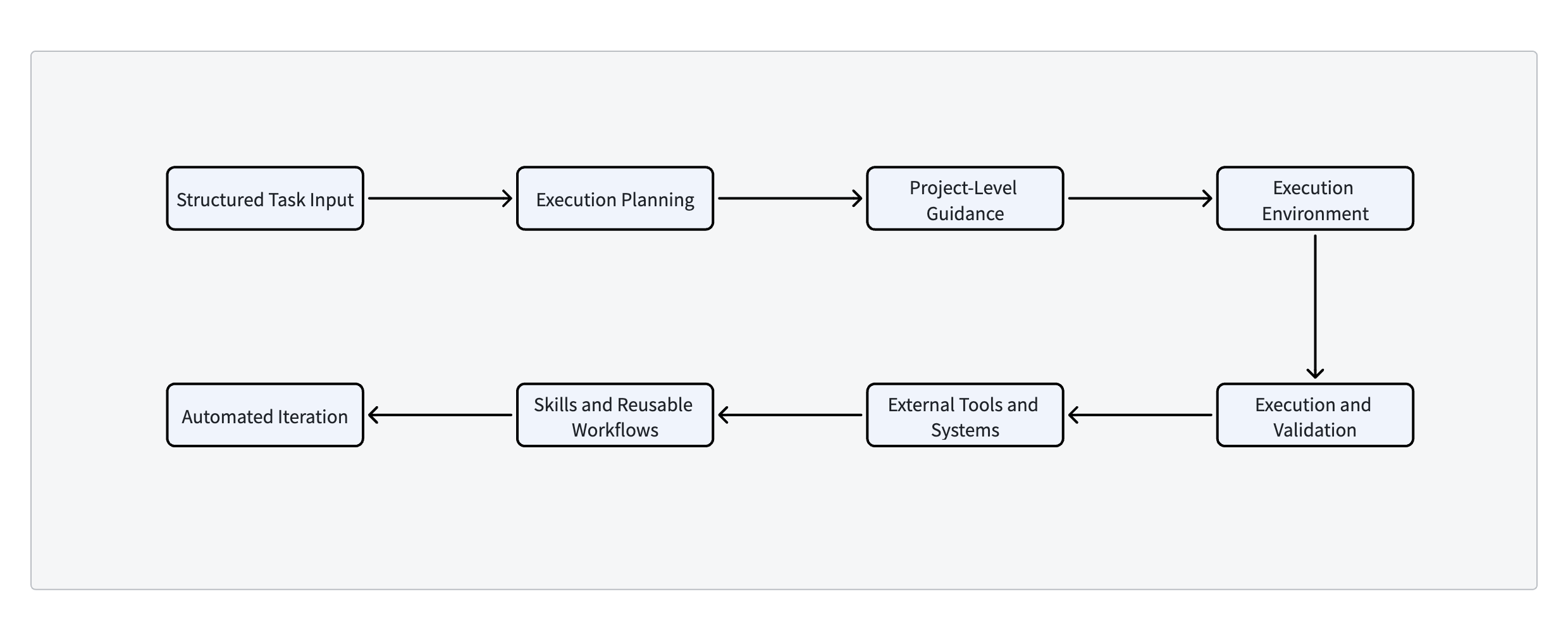 Through this workflow, a coding agent can gradually evolve from a simple code generation tool into a collaborative system that participates across the full software development lifecycle.