The GLM Coding Plan now supports the latest GLM-5.1 model for all users (Max, Pro, and Lite), and you can switch between models within your preferred Coding Agent.
Switching Models in Claude Code
Step 0 Claude Code default configuration
By default, Claude Code maps its internal model environment variables to GLM models as follows:
ANTHROPIC_DEFAULT_OPUS_MODEL:GLM-4.7ANTHROPIC_DEFAULT_SONNET_MODEL:GLM-4.7ANTHROPIC_DEFAULT_HAIKU_MODEL:GLM-4.5-Air
Step 1 Update the default configuration
For Windows Users
Locate the configuration file at ~/.claude/settings.json, as shown below:
For macOS Users
Method 1: In the terminal, run vim ~/.claude/settings.json to open and edit the file. When you’re done, press Esc, type :wq, and save your changes.
Method 2: In Finder, choose Go → Go to Folder, then enter ~/.claude/settings.json to locate and edit the configuration file.
You can also ask directly in Claude Code:
To use GLM-5.1, add or replace the following environment variables in settings.json:
  {
    "env": {
      "ANTHROPIC_DEFAULT_HAIKU_MODEL": "glm-4.5-air",
      "ANTHROPIC_DEFAULT_SONNET_MODEL": "glm-5.1",
      "ANTHROPIC_DEFAULT_OPUS_MODEL": "glm-5.1"
    }
  }
Step 2 Confirm that the model has been switched
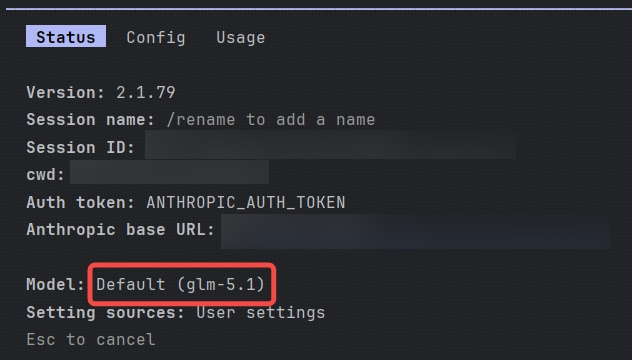
Open a new terminal window and run claude to launch Claude Code. Then type /status in Claude Code to verify the current model:
Switching Models in OpenClaw
For users who are already using OpenClaw and cannot switch to glm-5.1 by selecting a provider model directly you can update the configuration manually after completing the provider setup in the previous step.
Step 1 Update the default configuration
Locate the configuration file at ~/.openclaw/openclaw.json, as shown below:
In ~/.openclaw/openclaw.json, add the glm-5.1 model to the models.providers.zai.models array.Append the following object after the last model in the array. Be sure to include a comma if required by JSON syntax:
{
  "id": "glm-5.1",
  "name": "GLM-5.1",
  "reasoning": true,
  "input": [
    "text"
  ],
  "cost": {
    "input": 0,
    "output": 0,
    "cacheRead": 0,
    "cacheWrite": 0
  },
  "contextWindow": 204800,
  "maxTokens": 131072
}
agents.defaults.model.primary:
Change it to:
"primary": "zai/glm-5.1",
Step 2 Updated configuration reference
Below are reference snippets showing what the updated configuration should look like:
models.providers.zai.models section:
"models": [
  {
    "id": "glm-5",
    "name": "GLM-5",
    "reasoning": true,
    "input": ["text"],
    "cost": {"input": 0, "output": 0, "cacheRead": 0, "cacheWrite": 0},
    "contextWindow": 204800,
    "maxTokens": 131072
  },
  {
    "id": "glm-4.7",
    "name": "GLM-4.7",
    "reasoning": true,
    "input": ["text"],
    "cost": {"input": 0, "output": 0, "cacheRead": 0, "cacheWrite": 0},
    "contextWindow": 204800,
    "maxTokens": 131072
  },
  {
    "id": "glm-5.1",
    "name": "GLM-5.1",
    "reasoning": true,
    "input": ["text"],
    "cost": {"input": 0, "output": 0, "cacheRead": 0, "cacheWrite": 0},
    "contextWindow": 204800,
    "maxTokens": 131072
  }
]
agents.defaults.model.primary section:
"model": {
  "primary": "zai/glm-5.1",
  "fallbacks": ["zai/glm-4.7"]
}
- agents.defaults.models section:
"models": {
  "zai/glm-5": {"alias": "GLM"},
  "zai/glm-4.7": {},
  "zai/glm-5.1": {}
}
openclaw gateway restart
Once restarted, you should be able to use the glm-5.1 model directly. You can run openclaw tui in the terminal to enter the chat interface, where you should see that glm-5.1 is now in use.
This currently only works with coding agents that support custom model configuration. If your agent tool does not allow custom model settings, you will need to wait for official support in a future release.
Using Cline as an example:
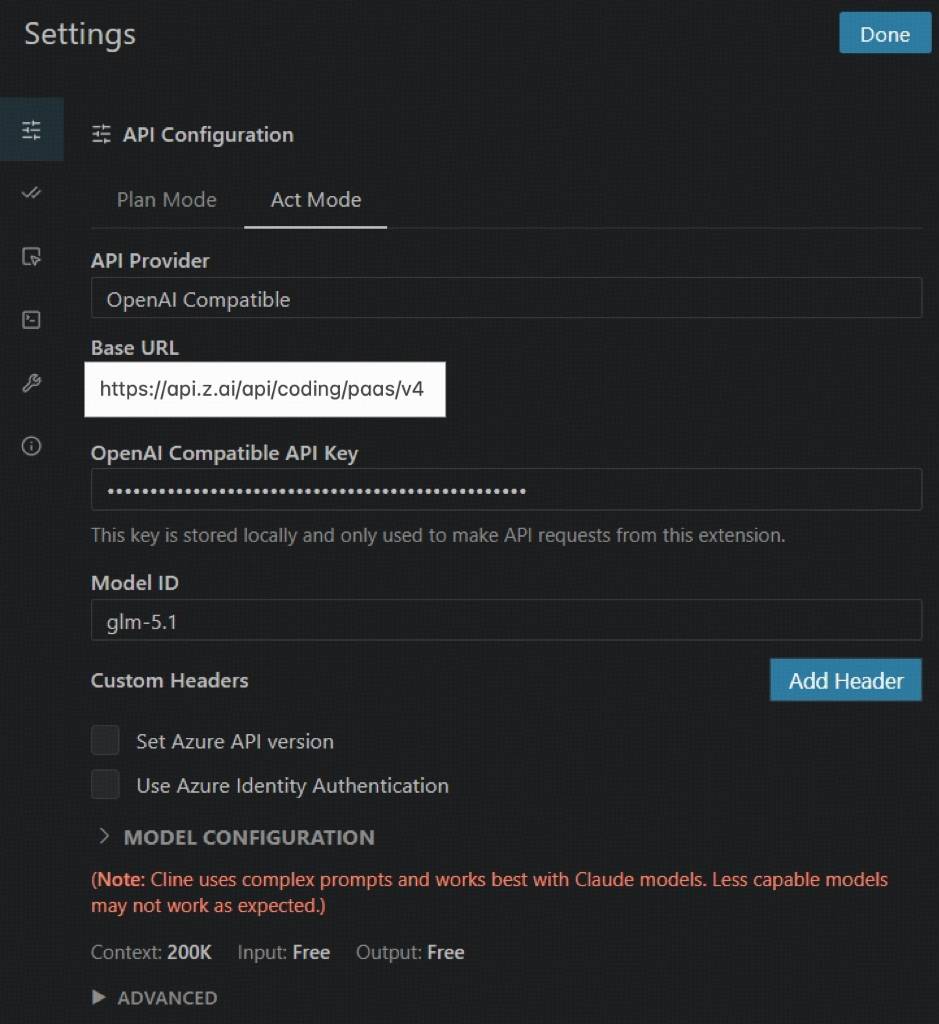 Please use the following settings:
- API Provider:Select OpenAI Compatible
- Base URL:Enter https://api.z.ai/api/coding/paas/v4
- API Key:Enter your Z.AI API key
- Model:Choose Custom Model and enter the model name, such as glm-5.1 or glm-5
- Other settings:
- Uncheck Support Images
- Set Context Window Size to 200000
- Adjust temperature and any other parameters based on your task requirements

